XML technologies / XSL-FO / Reference / Elements in XSL-FO / fo:table-and-caption
(Excerpt from “XSL-FO ― The Reference” by Manuel Montero Pineda & Steffen Herkert, 2016, dpunkt.verlag)
A | B | C | D | E | F | G | H | I | J | K | L | M | N | O | P | Q | R | S | T | U | V | W | X | Y | Z
Recommendation section: 6.7.2
Category: 6.7 Formatting Objects for Tables
Description
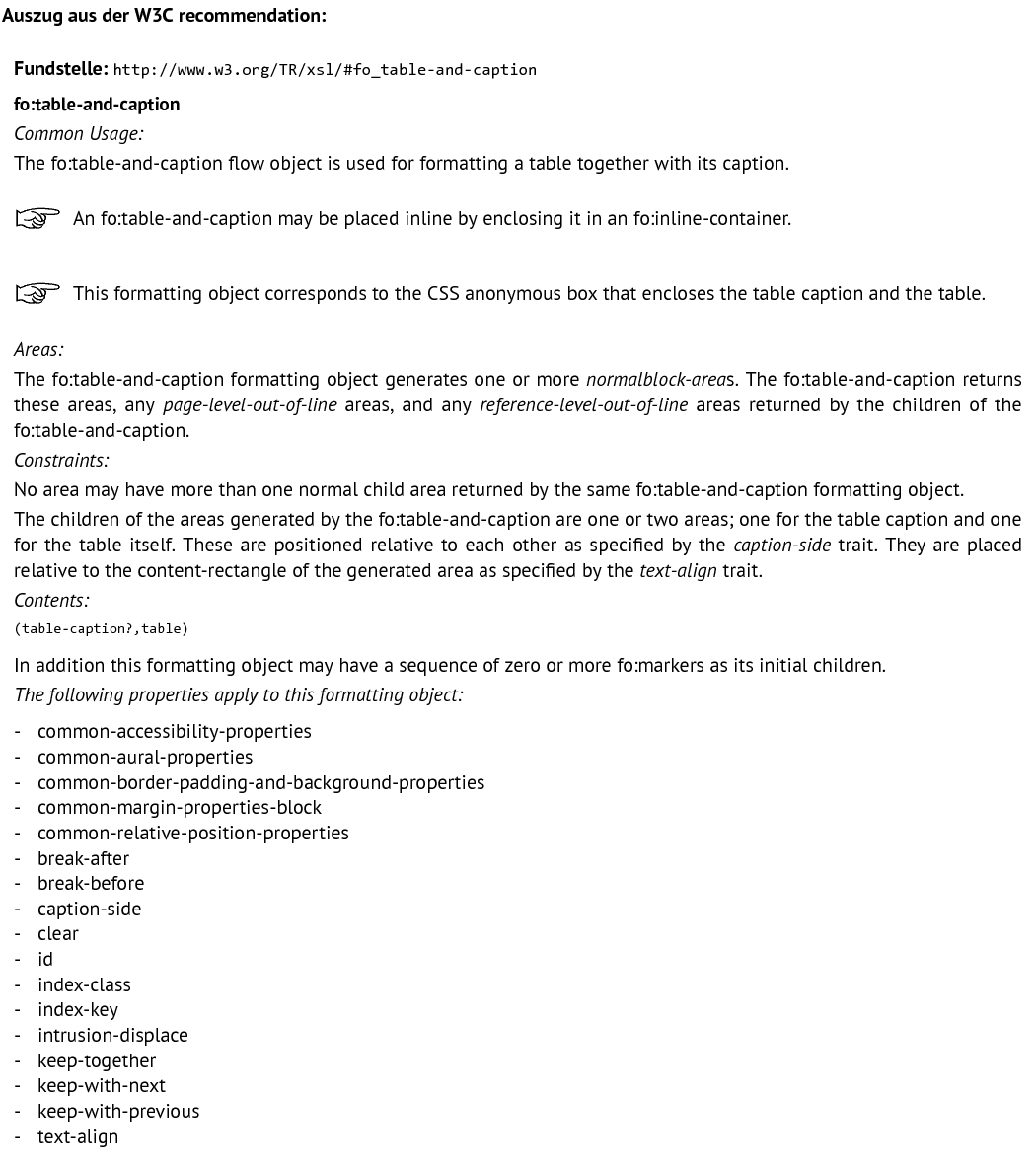
This element creates a table with a caption above or below it.
XSL-FO version: 1.0
Parent elements
<fo:basic-link> , <fo:bidi-override> , <fo:block> , <fo:block-container> , <fo:float> , <fo:flow> , <fo:footnote-body> , <fo:inline> , <fo:inline-container> , <fo:list-item-body> , <fo:list-item-label> , <fo:marker> , <fo:multi-case> , <fo:multi-toggle> , <fo:static-content> , <fo:table-caption> , <fo:table-cell> and <fo:wrapper>
Child elements
This element creates a table. | |
This element specifies a table caption above or below the table. |
Attributes
This attribute sets several background properties at once: color (background-color), a background graphic (background-image), its repetition (background-repeat) when the image does not fill the entire reserved area (tiling), scrolling behavior (background-attachment), and positioning (background-position). Any number and combination of these properties may be specified, separated by spaces. Unspecified properties use their respective individual defaults. | |
This attribute determines whether the background moves when the foreground is scrolled. | |
This attribute specifies a background color. | |
This attribute creates a background image in the element using a path given by uri-specification. | |
This property sets both the horizontal and vertical position of a background image specified by background-image. By default, the image aligns with the top-left corner of the element where it is invoked. Positioning can use percentages percentage, absolute measurements length, or constants. One or two values, separated by spaces, may be specified. With two values, the first always sets horizontal positioning and the second vertical positioning. A single value sets horizontal positioning; vertical positioning then defaults to 50%.<fo:block-container background-image="hintergrund.eps" background-position="75%>One value may even be an absolute measurement while the other is a percentage percentage. <fo:block-container background-image="hintergrund.eps" background-position="75mm 10%> One or two values may also be specified when using constants.<fo:block-container background-image="hintergrund.eps" background-position="top right"> A single value applies to the axis for which it is defined. The other axis is set to center. <fo:block-container background-image="hintergrund.eps" background-position="top"> | |
This property sets the horizontal position of the marked area using a percentage value (percentage), an absolute measurement (length), or a predefined value (left, center, right). | |
This property sets the vertical position of the marked area using a percentage value (percentage) or an absolute measurement (length). | |
This property specifies how a background image (background-image) is repeated, or tiled, within an area. By default, the background image is repeated. | |
This attribute simultaneously sets values for all four borders (top, left, bottom and right): width (border-width), color (border-color) and style (border-style). Values may be given for one, two or all three properties. Separate two or three values with spaces. | |
This attribute sets the color of the bottom border. The after side depends on the prevailing writing direction. In Western writing (top to bottom, left to right), it is at the bottom. With another writing direction, it could also be at the top. | |
This attribute sets the style of the bottom border. The after side depends on the prevailing writing direction. In Western writing (top to bottom, left to right), this is the bottom. With another writing direction, it could be the top. | |
This attribute sets the bottom border’s width. The after region follows the writing direction: it is at the bottom for Western writing (top to bottom, left to right), but may be at the top for another direction. | |
This attribute sets the color of the top border. The before side depends on the prevailing writing direction. In Western writing (top to bottom, left to right), it is at the top. With another writing direction, it could also be at the bottom. | |
This attribute sets the style of the top border. The before side depends on the prevailing writing direction. In Western writing (top to bottom, left to right), this is the top. With another writing direction, it could be the bottom. | |
This attribute sets the top border’s width. The before region follows the writing direction: it is at the top for Western writing (top to bottom, left to right), but may be at the bottom for another direction. | |
This attribute sets the bottom border’s width (border-bottom-width), color (border-bottom-color) and style (border-bottom-style). Values may be given for one, two or all three properties. Separate two or three values with spaces. | |
This attribute sets the bottom border’s color. | |
This attribute sets the style of the bottom border. | |
This attribute sets the width of the bottom border. | |
This attribute sets a uniform color for all four borders of an area (top, left, bottom, and right). | |
This attribute sets the color of the right border. The end side depends on the prevailing writing direction. In Western writing (top to bottom, left to right), it is on the right. With another writing direction, such as Arabic, it can also be on the left. | |
This attribute sets the style of the right border. The end side depends on the prevailing writing direction. In Western writing (top to bottom, left to right), this is the right. With another writing direction, it could be the left. | |
This attribute sets the right border’s width. The end region follows the writing direction: it is on the right for Western writing (top to bottom, left to right), but may be on the left for another direction. | |
This attribute sets the left border’s width (border-left-width), color (border-left-color) and style (border-left-style). Values may be given for one, two or all three properties. Separate two or three values with spaces. | |
This attribute sets the left border’s color. | |
This attribute sets the style of the left border. | |
This attribute sets the width of the left border. | |
This attribute sets the right border’s width (border-right-width), color (border-right-color) and style (border-right-style). Values may be given for one, two or all three properties. Separate two or three values with spaces. | |
This attribute sets the right border’s color. | |
This attribute sets the style of the right border. | |
This attribute sets the width of the right border. | |
This attribute sets the spacing between adjacent cells in a table (fo:table). Property border-collapse must also be set to separate. The value applies to both width and height. Using the corresponding components for height (block-progression-direction) and width (inline-progression-direction) allows them to be specified separately. | |
This attribute sets the color of the left border. The start side depends on the prevailing writing direction. In Western writing (top to bottom, left to right), it is on the left. With another writing direction, such as Arabic, it can also be on the right. | |
This attribute sets the style of the left border. The start side depends on the prevailing writing direction. In Western writing (top to bottom, left to right), this is the left. With another writing direction, it could be the right. | |
This attribute sets the left border’s width. The start region follows the writing direction: it is on the left for Western writing (top to bottom, left to right), but can be on the right for another direction. | |
This attribute sets a uniform style for all four borders of an area (top, left, bottom, and right). | |
This attribute sets the top border’s width (border-top-width), color (border-top-color) and style (border-top-style). Values may be given for one, two or all three properties. Separate two or three values with spaces. | |
This attribute sets the top border’s color. | |
This attribute sets the style of the top border. | |
This attribute sets the width of the top border. | |
This attribute sets a uniform width for all four borders of an area (top, left, bottom, and right). | |
This attribute specifies the distance of a positioned object (fo:block-container) measured from the bottom edge of its immediate parent block area. | |
This attribute determines whether a new column or page should begin after the area on which it is set. | |
This attribute determines whether the block, on which it is set, must always begin in a new column or on a new left or right page. | |
For a fo:table-and-caption table, this sets the position of its title, optionally specified in child element fo:table-caption. | |
For an object that allows text to flow around it (fo:float), typically an image, this specifies whether another such object may appear to its left, right or both sides, or whether it must wait in the text flow until an existing floating object has ended. | |
This attribute sets a right-side indent for an area. The end side depends on the prevailing writing direction. In Western writing (top to bottom, left to right), it is on the right. With another writing direction, such as Arabic, it can also be on the left. | |
This attribute uniquely identifies an object so that other objects can reference it. | |
This attribute defines an index class for individual index entries (index-key) or an entire area. All index entries in that area belong to the class. When referencing index entries (fo:index-key-reference) belonging to different classes, their page numbers are listed separately even if they are consecutive. For example, "1-8" becomes "1-4,5-8" if entries on pages 1-4 belong to one class and pages 5-8 to another. This is useful when pages are grouped into sections with different numbering systems. A range such as "I-14" can thus be avoided and replaced with "I-V,1-14". | |
This attribute defines an index entry. The supplied value is used as the entry’s identifier. An index entry reference (fo:index-key-reference) can reference all entries with this identifier and add their page numbers to a page citation list (fo:index-page-citation-list). | |
This attribute determines how an area is filled with content when element fo:float embeds an object inside it. Content may fill all space not occupied by the object, or leave whitespace above and below it, forming a column. This can create marginal-note columns. | |
This attribute prevents line, column or page breaks within the marked area. It can be refined using the component attributes keep-together.within-line (for line breaks), keep-together.within-column (for column breaks) and keep-together.within-page (for page breaks). Specifying keep-together alone is equivalent to setting all three components to the same value. If keep-together is combined with one component, it applies to the other two. A priority can also be assigned to resolve a conflicting instruction, such as a page-break-after instruction within the area. | |
This attribute prevents column breaks within the marked area and overrides the general keep-together setting. A priority can resolve conflicting instructions, such as page-break-after within the area. | |
This attribute prevents line breaks within the marked area and overrides the general keep-together setting. A priority can resolve conflicting instructions, such as page-break-after within the area. | |
This attribute prevents page breaks within the marked area and overrides the general keep-together setting. A priority can resolve conflicting instructions, such as page-break-after within the area. | |
This attribute prevents line, column or page breaks between the marked area and the following area. It can be refined with component attributes keep-with-next.within-line (for line breaks), keep-with-next.within-column (for column breaks) and keep-with-next.within-page (for page breaks). Specifying keep-with-next alone is equivalent to setting all three components to the same value. Combined with one component, keep-with-next applies to the other two. A priority may also resolve conflicting specifications, for example a page-break-after instruction within the area. | |
This attribute prevents column breaks between the marked area and the following area, overriding the general keep-with-next setting. A priority may resolve conflicting specifications, such as page-break-after within the area. It takes effect only when the following area is defined on the Following-Sibling axis in the FO document. | |
This attribute prevents line breaks between the marked area and the following area, overriding the general keep-with-next setting. A priority may resolve conflicting specifications, such as page-break-after within the area. It takes effect only when the following area is defined on the Following-Sibling axis in the FO document. | |
This attribute prevents page breaks between the marked area and the following area, overriding the general keep-with-next setting. A priority may resolve conflicting specifications, such as page-break-after within the area. It takes effect only when the following area is defined on the Following-Sibling axis in the FO document. | |
This attribute prevents line, column or page breaks between the marked area and the preceding area. It takes effect only when the preceding area is defined on the Preceding-Sibling axis in the FO document. It can be refined with component attributes keep-with-previous.within-line (for line breaks), keep-with-previous.within-column (for column breaks) and keep-with-previous.within-page (for page breaks). Specifying keep-with-previous alone is equivalent to setting all three components to the same value. Combined with one component, keep-with-previous applies to the other two. A priority may also resolve conflicting specifications, for example a page-break-after instruction within the area. | |
This attribute prevents column breaks between the marked area and the preceding area, overriding the general keep-with-previous setting. A priority may resolve conflicting specifications, such as page-break-after within the area. It takes effect only when the preceding area is defined on the Preceding-Sibling axis in the FO document. | |
This attribute prevents page breaks between the marked area and the preceding area, overriding the general keep-with-previous setting. A priority may resolve conflicting specifications, such as page-break-after within the area. It takes effect only when the preceding area is defined on the Preceding-Sibling axis in the FO document. | |
This attribute prevents page breaks between the marked area and the preceding area, overriding the general keep-with-previous setting. A priority may resolve conflicting specifications, such as page-break-after within the area. It takes effect only when the preceding area is defined on the Preceding-Sibling axis in the FO document. | |
This attribute shrinks or expands an area at its left edge relative to the parent area. It applies only when position is not static. The other values of position determine the reference area for left. Without a value (0mm), the edge coincides with the parent edge. A positive value shrinks the area at that edge; a negative value expands it. | |
This attribute sets the top, right, bottom and left margins of an area relative to its immediate parent block area. With one value it applies to the left (margin-left), right (margin-right), top (margin-top) and bottom (margin-bottom). With two values, the first sets top and bottom (margin-top and margin-bottom), the second left and right (margin-left and margin-right). With three, the first sets top (margin-top), the second left and right (margin-left and margin-right), the third bottom (margin-bottom). Four values follow the usual order: top (margin-top), right (margin-right), bottom (margin-bottom), left (margin-left). | |
This attribute sets the bottom margin of an area relative to its immediate parent area. The other margins are specified by margin-top (top), margin-right (right), margin-left (left). A value set here overrides any corresponding value specified by margin. | |
This attribute sets the left margin of an area relative to its immediate parent area. The other margins are specified by margin-top (top), margin-right (right), margin-bottom (bottom). A value set here overrides any corresponding value specified by margin. | |
This attribute sets the right margin of an area relative to its immediate parent area. The other margins are specified by margin-top (top), margin-left (left), margin-bottom (bottom). A value set here overrides any corresponding value specified by margin. | |
This attribute sets the top margin of an area relative to its immediate parent area. The other margins are specified by margin-right (right), margin-left (left), margin-bottom (bottom). A value set here overrides any corresponding value specified by margin. | |
Padding is the inner spacing of an area, between content and border, which need not be visible. An element can use the padding attribute to set top (padding-top), right (padding-right), bottom (padding-bottom) and left (padding-left) spacing together. One value sets all sides equally. Multiple values are separated by spaces. With two values, the first sets top and bottom, the second right and left. With three, the first is top, the second right and left, and the third bottom. Four values follow top, right, bottom, left. All assignments are independent of writing direction. | |
Padding is the inner spacing of an area, between content and border, which need not be visible. An element can use the padding-after attribute to set spacing to the bottom edge, depending on the writing direction selected by attribute writing-mode. With lr-tb (within lines: left to right; lines: top to bottom) and rl-tb (within lines: right to left; lines: top to bottom), padding-after remains spacing to the bottom edge. With tb-rl (within columns: top to bottom; columns: right to left), it concerns the left edge. It always concerns the edge parallel to the line or column that closes the area. | |
Padding is the inner spacing of an area, between content and border, which need not be visible. An element can use the padding-before attribute to set spacing to the top edge depending on the writing-mode attribute. With lr-tb (within lines: left to right; lines: top to bottom) and rl-tb (within lines: right to left; lines: top to bottom), padding-before remains spacing to the top edge. With tb-rl (within columns: top to bottom; columns: right to left), it concerns the left edge. It always concerns the edge parallel to the line or column that opens the area. | |
Padding is the inner spacing between content and border, which need not be visible. Attribute adding-bottom sets spacing to the bottom edge independently of writing-mode. It overrides padding, padding-after and padding-after.length (with lr-tb and rl-tb). | |
Padding is the inner spacing of an area, between content and border, which need not be visible. An element can use the padding-end attribute to set spacing to the right edge depending on writing-mode. With rl-tb (within lines: right to left; lines: top to bottom), padding-end concerns the left edge; with tb-rl (within columns: top to bottom; columns: right to left), the bottom edge; only with lr-tb (within lines: left to right; lines: top to bottom), the right edge. It always concerns the edge at the end of a line or column, creating a line or column break. | |
Padding is the inner spacing between content and border, which need not be visible. Attribute padding-left sets spacing to the left edge independently of writing-mode. It overrides padding, padding-start and padding-start.length (with lr-tb and rl-tb). | |
Padding is the inner spacing between content and border, which need not be visible. Attribute padding-right sets spacing to the right edge independently of writing-mode. It overrides padding, padding-end and padding-end.length (with lr-tb and rl-tb). | |
Padding is the space inside an area: the distance from the content to the border. (The border need not be visible.) An element can use padding-start to specify the space to the left border, depending on the writing direction selected by writing-mode. With rl-tb (within lines: right to left; lines: top to bottom), padding-start refers to the right border. With tb-rl (within columns: top to bottom; columns: right to left), it refers to the top border. Only with lr-tb (within lines: left to right; lines: top to bottom) is it the left border. It always concerns the border at the start of the line or column. | |
Padding is the inner spacing between content and border, which need not be visible. Attribute padding-top sets spacing to the top edge independently of writing-mode. It overrides padding, padding-before and padding-before.length (with lr-tb and rl-tb). | |
This attribute controls a possible page break after the marked area. It may forbid the break, for example by moving the last lines of the paragraph to the next page. It can also force a break to the next page, or to the next right-hand (odd-numbered) or left-hand page. This is commonly used for book chapters that must always begin on a particular side. | |
This attribute controls a possible page break before the marked area. It may forbid the break, for example by moving the last lines of the preceding paragraph to the next page. It can also force a break to the next page, or to the next right-hand (odd-numbered) or left-hand page. This is commonly used for book chapters that must always begin on a particular side. | |
This attribute controls a potential page break within the marked area. It can prohibit page breaks there. To avoid a prohibited break, the entire area is moved to the next page. | |
This attribute specifies the positioning mode or reference for the marked area on the page. Together with top, right, bottom, and left, it positions the area relative to its text-flow position, the enclosing area, or the page determined by the text flow. | |
This attribute specifies how the marked area is positioned on the page. Unlike position, it only allows static placement or positioning relative to the text flow. In combination with top, right, bottom, and left, it specifies an offset from the position determined by the text flow. | |
This attribute shrinks or expands an area at its right edge relative to the parent area. It applies only when position is not static. The other values of position determine the reference area for right. Without a value (0mm), the edge coincides with the parent edge. A positive value shrinks the area at that edge; a negative value expands it. | |
This attribute creates content-related identifiers that provide alternative output devices, such as audio output, with information about the XML element’s content. | |
This attribute identifies an XML document as the source document. If the renderer cannot interpret the FO document, for example for a hypothetical speech output, the source document can also be consulted. It has no practical significance. | |
This attribute sets the space before the immediately following area. This space is applied only if an area is defined on the Following-Sibling axis in the FO document. If a page break occurs after this area, the space is ignored on the following page. This attribute can combine several spacing values. | |
This attribute determines how spacing to the following area, specified in space-after, applies when an area is split by a break. Treating it as one area ignores the breaks and shows only spacing to the following area. Alternatively, treating the parts independently inserts that spacing before each break too. | |
This attribute sets the maximum permitted space before the immediately following area. It allows a limit to be set when the processor automatically distributes areas on a page or in a column. This space is applied only if an area is defined on the Following-Sibling axis in the FO document. In this respect, the attribute differs from the margin attributes. | |
This attribute sets the minimum permitted space before the immediately following area. It allows a limit to be set when the processor automatically distributes areas on a page or in a column. This space is applied only if an area is defined on the Following-Sibling axis in the FO document. In this respect, the attribute differs from the margin attributes. | |
This attribute sets the optimum space before the immediately following area. When the processor automatically distributes areas on a page or in a column, it attempts to maintain this space whenever possible. This space is applied only if an area is defined on the Following-Sibling axis in the FO document. In this respect, the attribute differs from the margin attributes. | |
If an area specifies space-after and the following area specifies space-before, only one value sets their separation. Priority is calculated from the corresponding space-after.precedence and space-before.precedence attributes. When equal, space-after takes precedence. | |
This attribute sets the space after the immediately preceding area. This space is applied only if an area is defined on the Following-Sibling axis in the FO document. If a page break occurs after this area, the space is ignored on the following page. This attribute can combine several spacing values. | |
This attribute specifies how the space after the immediately preceding area, defined by space-before, is applied when a break divides an area into two parts. The split area can still be treated as a single area, ignoring the breaks and applying the space only after the preceding area. Alternatively, each part can be treated as independent, so the space is also inserted after each break. | |
This attribute limits the maximum separation from the preceding area when the processor distributes areas on a page or column automatically. Unlike the margin attributes, the spacing is applied only if an area is defined on the Preceding-Sibling axis in the FO document. | |
This attribute sets the minimum permitted space after the immediately preceding area. It allows a limit to be set when the processor automatically distributes areas on a page or in a column. This space is applied only if an area is defined on the Preceding-Sibling axis in the FO document. In this respect, the attribute differs from the margin attributes. | |
This attribute sets the optimum space after the immediately preceding area. When the processor automatically distributes areas on a page or in a column, it attempts to maintain this space whenever possible. This space is applied only if an area is defined on the Preceding-Sibling axis in the FO document. In this respect, the attribute differs from the margin attributes. | |
If an area has space-before and the preceding area has space-after, only one value determines their separation. The corresponding space-after.precedence and space-before.precedence attributes determine priority. If the values are equal, space-after takes precedence. | |
This attribute sets an indent at the beginning of every line in an area. | |
This attribute sets line alignment within an area, such as justified or left-aligned. | |
This attribute specifies the distance of a positioned object (fo:block-container) measured from the top edge of its immediate parent block area. |
Support:
Conformance level | Antenna House | FOP | RenderX XEP | Altsoft XML2PDF | Compart DocBridge |
Basic | J | N | J | J | N |
XSL-FO example:
<fo:root font-size="10pt" font-family="Arial" xmlns:fo="http://www.w3.org/1999/XSL/Format" xmlns:cpfo="http://www.compart.net/xmlns/cpfo" xmlns:svg="http://www.w3.org/2000/svg" xmlns:axf="http://www.antennahouse.com/names/XSL/Extensions">
<fo:layout-master-set>
<fo:simple-page-master master-name="Inhalt-Seiten" margin="0mm 0mm 0mm
                      0mm" page-height="210mm" page-width="210mm">
<fo:region-body margin="10mm 15mm 10mm
                        15mm"/>
</fo:simple-page-master>
</fo:layout-master-set>
<fo:page-sequence master-reference="Inhalt-Seiten">
<fo:flow flow-name="xsl-region-body">
<fo:table-and-caption>
<fo:table-caption>
<fo:block>
XSL-FO:
                Formatierer-Vergleich
</fo:block>
</fo:table-caption>
<fo:table>
<fo:table-header background-color="#F38222" border-width="1pt" border-style="solid">
<fo:table-row>
<fo:table-cell number-rows-spanned="2">
<fo:block>
Formatting
                Object
</fo:block>
</fo:table-cell>
<fo:table-cell number-rows-spanned="2" text-align="center">
<fo:block>
Conformance Level
</fo:block>
</fo:table-cell>
<fo:table-cell text-align="center">
<fo:block>
Antenna House
</fo:block>
</fo:table-cell>
<fo:table-cell text-align="center">
<fo:block>
FOP
</fo:block>
</fo:table-cell>
<fo:table-cell text-align="center">
<fo:block>
RenderX XEP
</fo:block>
</fo:table-cell>
<fo:table-cell text-align="center">
<fo:block>
Altsoft XML2PDF
</fo:block>
</fo:table-cell>
<fo:table-cell text-align="center">
<fo:block>
Compart
                DocBridge
</fo:block>
</fo:table-cell>
</fo:table-row>
<fo:table-row>
<fo:table-cell text-align="center">
<fo:block>
Supported
</fo:block>
</fo:table-cell>
<fo:table-cell text-align="center">
<fo:block>
Supported
</fo:block>
</fo:table-cell>
<fo:table-cell text-align="center">
<fo:block>
Supported
</fo:block>
</fo:table-cell>
<fo:table-cell text-align="center">
<fo:block>
Supported
</fo:block>
</fo:table-cell>
<fo:table-cell text-align="center">
<fo:block>
Supported
</fo:block>
</fo:table-cell>
</fo:table-row>
</fo:table-header>
<fo:table-footer>
<fo:table-row>
<fo:table-cell number-columns-spanned="7" background-color="#F38222" border-width="1pt" border-style="solid">
<fo:block>
http://www.data2type.de/xml-xslt-xslfo/xsl-fo/formatierer-vergleich/
</fo:block>
</fo:table-cell>
</fo:table-row>
</fo:table-footer>
<fo:table-body background-color="#4F491D" border-width="1pt" border-style="solid">
<fo:table-row>
<fo:table-cell>
<fo:block>
6.4.2 fo:root
</fo:block>
</fo:table-cell>
<fo:table-cell text-align="center">
<fo:block>
Basic
</fo:block>
</fo:table-cell>
<fo:table-cell text-align="center">
<fo:block>
J
</fo:block>
</fo:table-cell>
<fo:table-cell text-align="center">
<fo:block>
J
</fo:block>
</fo:table-cell>
<fo:table-cell text-align="center">
<fo:block>
J
</fo:block>
</fo:table-cell>
<fo:table-cell text-align="center">
<fo:block>
J
</fo:block>
</fo:table-cell>
<fo:table-cell text-align="center">
<fo:block>
J
</fo:block>
</fo:table-cell>
</fo:table-row>
<fo:table-row>
<fo:table-cell>
<fo:block>
6.4.3
                fo:declarations
</fo:block>
</fo:table-cell>
<fo:table-cell text-align="center">
<fo:block>
Basic
</fo:block>
</fo:table-cell>
<fo:table-cell text-align="center">
<fo:block>
J
</fo:block>
</fo:table-cell>
<fo:table-cell text-align="center">
<fo:block>
J
</fo:block>
</fo:table-cell>
<fo:table-cell text-align="center">
<fo:block>
N
</fo:block>
</fo:table-cell>
<fo:table-cell text-align="center">
<fo:block>
J
</fo:block>
</fo:table-cell>
<fo:table-cell text-align="center">
<fo:block>
J
</fo:block>
</fo:table-cell>
</fo:table-row>
<fo:table-row>
<fo:table-cell>
<fo:block>
6.4.4 fo:color-profile
</fo:block>
</fo:table-cell>
<fo:table-cell text-align="center">
<fo:block>
Extended
</fo:block>
</fo:table-cell>
<fo:table-cell text-align="center">
<fo:block>
J
</fo:block>
</fo:table-cell>
<fo:table-cell text-align="center">
<fo:block>
J
</fo:block>
</fo:table-cell>
<fo:table-cell text-align="center">
<fo:block>
N
</fo:block>
</fo:table-cell>
<fo:table-cell text-align="center">
<fo:block>
J
</fo:block>
</fo:table-cell>
<fo:table-cell text-align="center">
<fo:block>
J
</fo:block>
</fo:table-cell>
</fo:table-row>
</fo:table-body>
</fo:table>
</fo:table-and-caption>
</fo:flow>
</fo:page-sequence>
</fo:root>More information online about
Practical example: "Table concepts">
Practical example: "Simple tables">
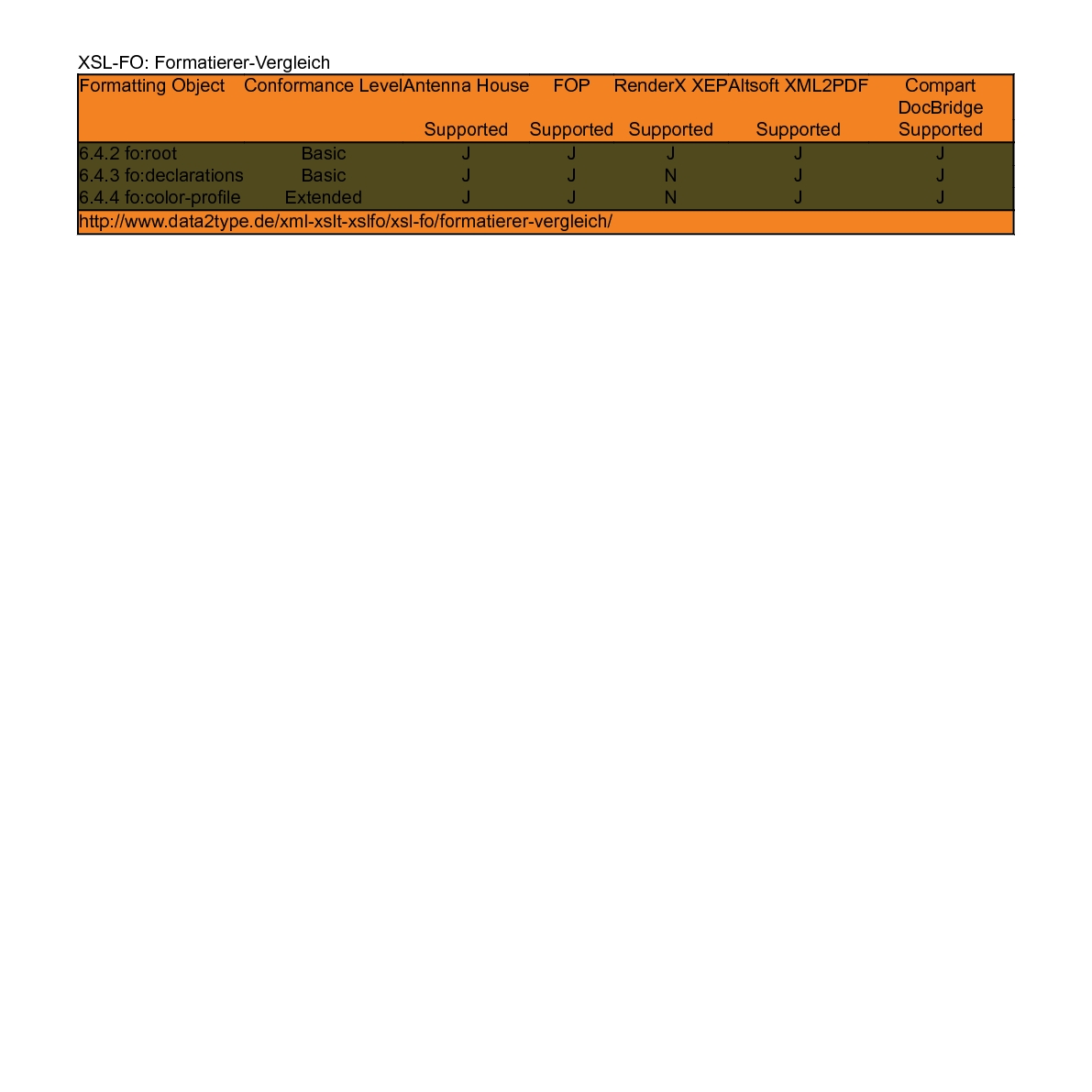
In the output:
Excerpt from the W3C Recommendation: