XML technologies / XSL-FO / Reference / Elements in XSL-FO / fo:simple-page-master
(Excerpt from “XSL-FO ― The Reference” by Manuel Montero Pineda & Steffen Herkert, 2016, dpunkt.verlag)
A | B | C | D | E | F | G | H | I | J | K | L | M | N | O | P | Q | R | S | T | U | V | W | X | Y | Z
Recommendation section: 6.4.13
Category: 6.4 Declarations and Pagination and Layout Formatting Objects
Description
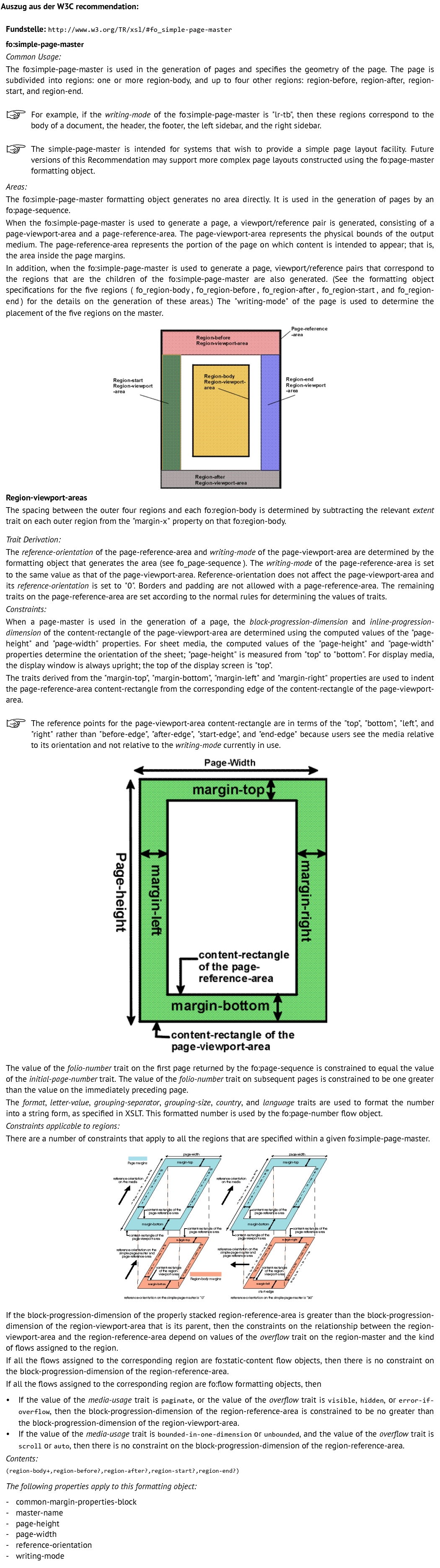
This element defines individual pages. Desired values can be assigned to each of a page’s five regions.
XSL-FO version: 1.0
Parent elements
This element defines all the masters for the pages or page sequences to be used. |
Child elements
This element configures the area below the fo:region-body region, that is, the page footer area. | |
This element configures the area above the fo:region-body region, that is, the page header area. | |
This element names the central region, the main area of the page. The document’s main content is displayed here. | |
The region to the right of <fo:region-body> for left-to-right writing. | |
The region to the left of <fo:region-body> for left-to-right writing. |
Attributes
This attribute sets a right-side indent for an area. The end side depends on the prevailing writing direction. In Western writing (top to bottom, left to right), it is on the right. With another writing direction, such as Arabic, it can also be on the left. | |
This attribute sets the top, right, bottom and left margins of an area relative to its immediate parent block area. With one value it applies to the left (margin-left), right (margin-right), top (margin-top) and bottom (margin-bottom) margins. With two values, the first controls top and bottom (margin-top and margin-bottom), the second left and right (margin-left and margin-right). With three values, the first is top (margin-top), the second left and right (margin-left and margin-right), and the third bottom (margin-bottom). Four values follow the usual order: top (margin-top), right (margin-right), bottom (margin-bottom), left (margin-left). | |
This attribute sets the bottom margin of an area relative to its immediate parent area. The other margins are specified by margin-top (top), margin-right (right), margin-left (left). A value set here overrides any corresponding value specified by margin. | |
This attribute sets the left margin of an area relative to its immediate parent area. The other margins are specified by margin-top (top), margin-right (right), margin-bottom (bottom). A value set here overrides any corresponding value specified by margin. | |
This attribute sets the right margin of an area relative to its immediate parent area. The other margins are specified by margin-top (top), margin-left (left), margin-bottom (bottom). A value set here overrides any corresponding value specified by margin. | |
This attribute sets the top margin of an area relative to its immediate parent area. The other margins are specified by margin-right (right), margin-left (left), margin-bottom (bottom). A value set here overrides any corresponding value specified by margin. | |
This attribute uniquely identifies page masters (fo:simple-page-master) and page-sequence masters (fo:page-sequence-master). Those masters are referenced by attribute master-reference in selected page sequences (fo:page-sequence). If a page master has the same master-name attribute as a page sequence master, master-reference always references the page sequence master. | |
A page master’s format is specified on fo:simple-page-master with attributes page-width and page-height. The page-width attribute controls page width, while the page-height attribute controls height. | |
A page master’s format is specified on fo:simple-page-master with page-width and page-height. The page-width attribute controls width and the page-height attribute controls height. | |
This attribute rotates an object in 90° increments only (0°, 90°, 180°, 270°). | |
Specifies a page’s orientation and size. Besides the three predefined values, it can contain the page width and height. | |
This attribute sets the space before the immediately following area. This space is applied only if an area is defined on the Following-Sibling axis in the FO document. If a page break occurs after this area, the space is ignored on the following page. This attribute can combine several spacing values. | |
This attribute determines how spacing to the following area, specified in space-after, applies when an area is split by a break. Treating it as one area ignores the breaks and shows only spacing to the following area. Alternatively, treating the parts independently inserts that spacing before each break too. | |
This attribute sets the maximum permitted space before the immediately following area. It allows a limit to be set when the processor automatically distributes areas on a page or in a column. This space is applied only if an area is defined on the Following-Sibling axis in the FO document. In this respect, the attribute differs from the margin attributes. | |
This attribute sets the minimum permitted space before the immediately following area. It allows a limit to be set when the processor automatically distributes areas on a page or in a column. This space is applied only if an area is defined on the Following-Sibling axis in the FO document. In this respect, the attribute differs from the margin attributes. | |
This attribute sets the optimum space before the immediately following area. When the processor automatically distributes areas on a page or in a column, it attempts to maintain this space whenever possible. This space is applied only if an area is defined on the Following-Sibling axis in the FO document. In this respect, the attribute differs from the margin attributes. | |
If an area specifies space-after and the following area specifies space-before, only one value sets their separation. Priority is calculated from the corresponding space-after.precedence and space-before.precedence attributes. When equal, space-after takes precedence. | |
This attribute sets the space after the immediately preceding area. This space is applied only if an area is defined on the Following-Sibling axis in the FO document. If a page break occurs after this area, the space is ignored on the following page. This attribute can combine several spacing values. | |
This attribute specifies how the space after the immediately preceding area, defined by space-before, is applied when a break divides an area into two parts. The split area can still be treated as a single area, ignoring the breaks and applying the space only after the preceding area. Alternatively, each part can be treated as independent, so the space is also inserted after each break. | |
This attribute limits the maximum separation from the preceding area when the processor distributes areas on a page or column automatically. Unlike the margin attributes, the spacing is applied only if an area is defined on the Preceding-Sibling axis in the FO document. | |
This attribute sets the minimum permitted space after the immediately preceding area. It allows a limit to be set when the processor automatically distributes areas on a page or in a column. This space is applied only if an area is defined on the Preceding-Sibling axis in the FO document. In this respect, the attribute differs from the margin attributes. | |
This attribute sets the optimum space after the immediately preceding area. When the processor automatically distributes areas on a page or in a column, it attempts to maintain this space whenever possible. This space is applied only if an area is defined on the Preceding-Sibling axis in the FO document. In this respect, the attribute differs from the margin attributes. | |
If an area has space-before and the preceding area has space-after, only one value determines their separation. The corresponding space-after.precedence and space-before.precedence attributes determine priority. If the values are equal, space-after takes precedence. | |
This attribute sets an indent at the beginning of every line in an area. | |
This attribute sets writing direction. Applied to page masters (fo:simple-page-master), writing-mode affects placement of fo-region-body, fo-region-before, fo-region-after, fo-region-start and fo-region-end. On tables, writing-mode controls horizontal column/cell alignment or vertical row alignment, allowing landscape tables. |
Support:
Conformance level | Antenna House | FOP | RenderX XEP | Altsoft XML2PDF | Compart DocBridge |
Basic | J | P | J | J | J |
XSL-FO example:
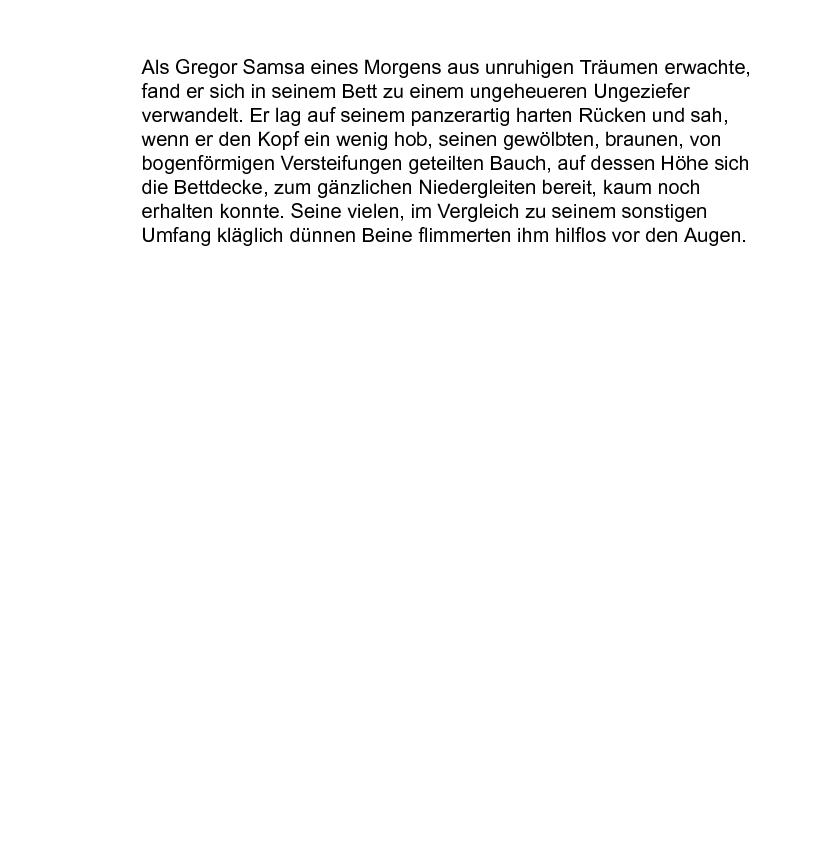
<fo:root font-family="Arial" font-size="10pt" line-height="1.2em" xmlns:fo="http://www.w3.org/1999/XSL/Format" xmlns:cpfo="http://www.compart.net/xmlns/cpfo" xmlns:svg="http://www.w3.org/2000/svg" xmlns:axf="http://www.antennahouse.com/names/XSL/Extensions">
<fo:layout-master-set>
<fo:simple-page-master master-name="Inhalt-Seiten" margin="0mm 0mm 0mm
                      0mm" page-height="150mm" page-width="148mm">
<fo:region-body margin="10mm 15mm 10mm
                        25mm"/>
</fo:simple-page-master>
</fo:layout-master-set>
<fo:page-sequence master-reference="Inhalt-Seiten" font-size="10pt">
<fo:flow flow-name="xsl-region-body">
<fo:block>
Als Gregor Samsa
                eines Morgens aus unruhigen Träumen erwachte, fand er sich in seinem Bett zu einem
                ungeheueren Ungeziefer verwandelt. Er lag auf seinem panzerartig harten Rücken und
                sah, wenn er den Kopf ein wenig hob, seinen gewölbten, braunen, von bogenförmigen
                Versteifungen geteilten Bauch, auf dessen Höhe sich die Bettdecke, zum gänzlichen
                Niedergleiten bereit, kaum noch erhalten konnte. Seine vielen, im Vergleich zu
                seinem sonstigen Umfang kläglich dünnen Beine flimmerten ihm hilflos vor den
                Augen.
</fo:block>
</fo:flow>
</fo:page-sequence>
</fo:root>More information online about
Practical example: "Page masters and simple page sequence masters">
Practical example: "Complex page sequence masters">
In the output:
Excerpt from the W3C Recommendation: