

Publications / Practical guides
(As of March 2025; authors: Nico Kutscherauer and Manuel Montero Pineda)
Schematron is often understood purely as a checking language: a rule reports a problem and users must know how to solve it themselves. Combined with Schematron QuickFix (SQF), however, it becomes an interactive tool. Rules describe findings and directly offer suitable actions.
Style guides, modeling rules and editorial requirements can thus be implemented in Oxygen XML Editor to guide users without requiring them to memorize technical details. This applies to content documents and XML-based code such as XSD or XSLT.
Style guides, Schematron and XML-based code
A standard specifies whether a document or code is syntactically and structurally permitted. In XML, this is usually handled by the XML parser (syntax checking) and an XML Schema (structure checking). A style guide describes conventions beyond validity: whether document or code follows agreed construction, such as ID and naming requirements or consistent use of semantically similar structures. Such rules often sit in a document no one opens while working—and may never be checked!
Schematron is designed precisely for these rules. Rather than describing a content model, it states conditions at specific document locations: XPath selects context, a test describes the expectation and natural language conveys the message. Distinguishing errors, warnings and information also permits recommendations that should not halt validation.
The checked document need not be content. XML Schema, XSLT, XProc and Schematron itself are XML and therefore ordinary test objects. Schematron can check code: documented XSLT templates, declared modes or XSD design-pattern compliance. What other languages require a dedicated linting tool for is available through standard XML tools. The first example, “XSD Guide as an interactive style guide”, uses exactly this.
The task: rules should guide as well as check
Schematron’s strength in checking very specific style rules raises another practical question: What should users do with a violation notice?
Style guides work only if recommended solutions are easily accessible during work. Having to open documentation, set a correctly namespaced attribute or manually build complex XML for every warning eventually encourages users to bypass rules. Schematron QuickFix addresses this by offering specific correction or generation actions with a message.
The style guide becomes an active part of authoring, rather than an external document or final checklist. Domain rule, technical check and recommended correction meet at the affected XML location.
This is especially useful for non-obvious project conventions rather than standard-defined right or wrong choices, such as:
Which XSD architecture should be used?
Which DITA structures does the editorial team want?
Which layout helpers are allowed, and in what form?
Schematron and SQF bring precisely these conventions into everyday work.
Two examples show different forms of this principle:
XSD Guide helps developers build an XML Schema using a chosen pattern.
A DITA editorial menu offers configurable insertion of layout and content components.
Example 1: XSD Guide as an interactive style guide
XML Schema offers many ways to express the same structure. A team can agree on a pattern such as Venetian Blind or Salami Slice. Other common styles include Russian Doll. The challenge is consistent daily implementation even where not everyone is an XSD specialist.
These styles differ in ways crucial to maintainability. Venetian Blind is type-oriented: root elements are global; the structure uses named global constructs ( xs:complexType- and xs:simpleType-Definitionen). This suits reuse, extension and references in larger schemas. Salami Slice is element-oriented: elements are declared globally and used elsewhere through @ref. This suits a focus on names and reusable element declarations. Russian Doll takes the opposite approach, nesting locally within a global root. Clear for small compact schemas, this offers less reuse.
Uncontrolled mixing is problematic: global types, global elements, inline types and references coexist without a clear modeling rationale. Maintenance, review, extension and documentation suffer because each schema needs reinterpretation. The XSD Guide makes the chosen style explicit and guides appropriate next steps.
XSD Guide first checks pattern compliance using Schematron, then generates matching structures with SQF. Users decide, for example, which root to create; QuickFix builds its technical XML structure.
The aim is not to replace all XSD knowledge, but to standardize entry, guide recurring decisions, avoid slips and turn conventions into executable editor actions. Teams with varied experience obtain more consistent schemas and easier reviews.
Activation through XSD configuration
The starting point is an empty schema:
<?xml version="1.0" encoding="UTF-8"?>
<xs:schema xmlns:xs="http://www.w3.org/2001/XMLSchema"
           elementFormDefault="qualified">

</xs:schema>
The guide first reports inactivity. The proposed QuickFix adds configuration inside xs:annotation/xs:appinfo:
<xs:schema xmlns:xs="http://www.w3.org/2001/XMLSchema"
           elementFormDefault="qualified">
  <xs:annotation>
    <xs:appinfo>
      <d2t:xsdguide xmlns:d2t="http://www.data2type.de"
                    status="active"/>
    </xs:appinfo>
  </xs:annotation>
</xs:schema>
Editing state is thus stored directly in XSD, allowing Schematron to react:
<sch:let name="config"
         value="/xs:schema/xs:annotation/xs:appinfo/d2t:xsdguide"/>
<sch:let name="status" value="($config/@status, 'inactive')[1]"/>

<sch:pattern id="mode">
  <sch:rule context="node()[$status = 'inactive']"/>
  ...
</sch:pattern>
The empty <sch:rule> element controls behavior: when inactive, the pattern’s remaining rules do not apply. SQF changes the document so subsequent Schematron behavior changes.
The guide is state-based. All metadata, including activation and chosen pattern, are stored in the document through the XSD annotation model —keeping the schema valid and its editing state persistent and traceable when shared or reopened. Neither separate editor settings nor memorized state are needed.
Choosing a design pattern
After activation, users choose a basic pattern. Schematron offers two QuickFixes to avoid manually entering configuration:
<sch:let name="design-pattern" value="$config/@mode"/>

<sch:assert
    test="$design-pattern = ('venetian-blind', 'salami-slice')"
    sqf:fix="mode.venetian.blind mode.element.based setGuideInActive">
  Please select the basic XSD design pattern.
  Possible patterns are: "Venetian Blind" or "Salami Slice".
</sch:assert>

<sqf:fix id="mode.venetian.blind">
  <sqf:description>
    <sqf:title>Choose the Venetian Blind pattern.</sqf:title>
  </sqf:description>
  <sqf:add match="$config"
           target="mode"
           node-type="attribute"
           select="'venetian-blind'"/>
</sqf:fix>

<sqf:fix id="mode.element.based">
  <sqf:description>
    <sqf:title>Choose the Salami Slice pattern.</sqf:title>
  </sqf:description>
  <sqf:add match="$config"
           target="mode"
           node-type="attribute"
           select="'salami-slice'"/>
</sqf:fix>
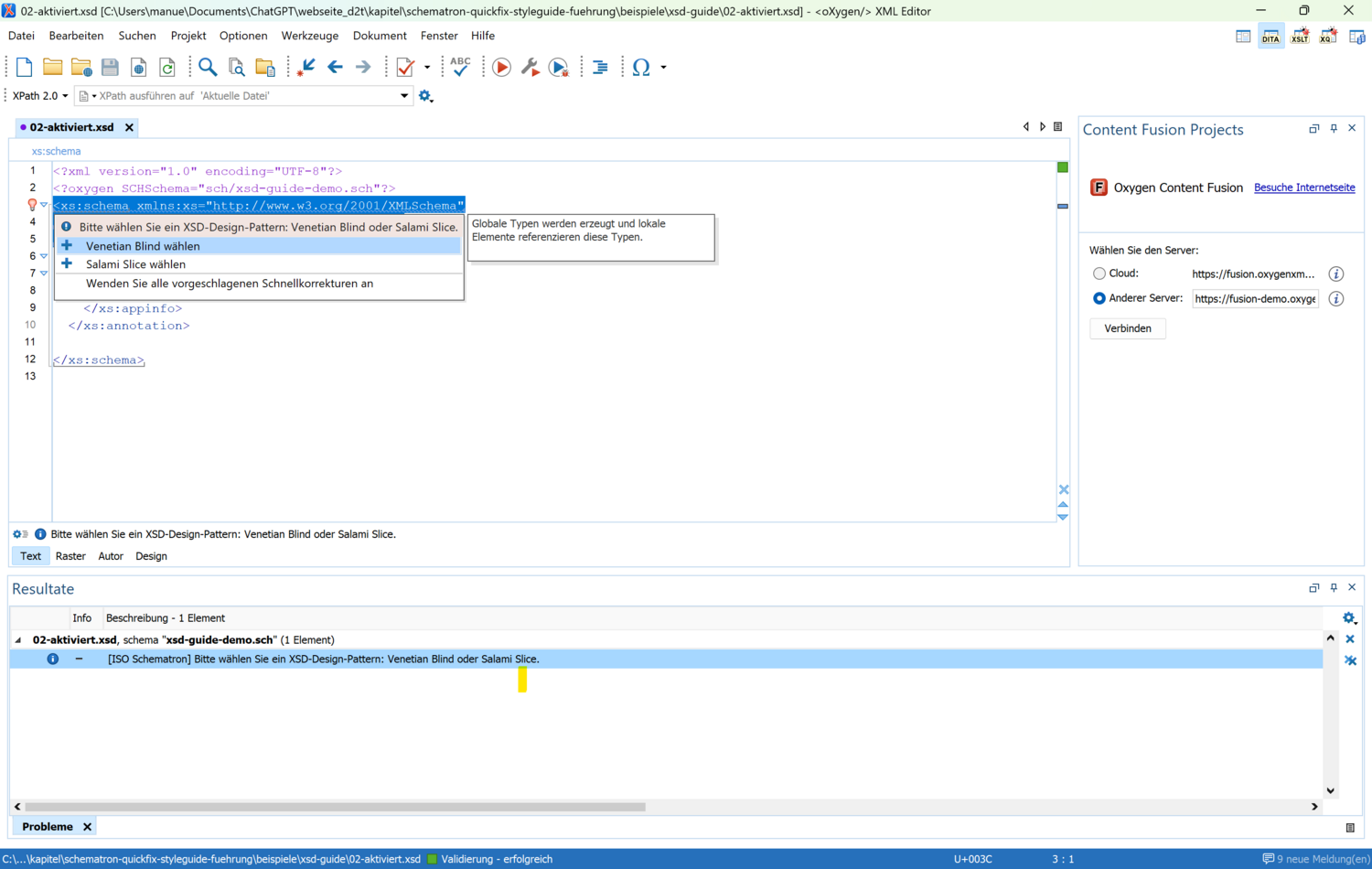
Figure: XSD pattern selection in Oxygen XML Editor
The guide offers pattern selection directly as a QuickFix. “Choose Venetian Blind” is selected in the figure. Help explains that global types are created and local elements reference them.
Selection is stored as @mode:
<xs:schema xmlns:xs="http://www.w3.org/2001/XMLSchema"
           elementFormDefault="qualified">
  <xs:annotation>
    <xs:appinfo>
      <d2t:xsdguide xmlns:d2t="http://www.data2type.de"
                    status="active" mode="venetian-blind"/>
    </xs:appinfo>
  </xs:annotation>
</xs:schema>
Pattern-specific rules can then be shown or hidden:
<sch:let name="design-pattern" value="string($config/@mode)"/>
<sch:let name="isSalamiSlice" value="$design-pattern = 'salami-slice'"/>
<sch:let name="isVenetianBlind" value="$design-pattern = 'venetian-blind'"/>

<sch:pattern id="vb.content">
  <sch:rule context="node()[$status = 'inactive']"/>
  <sch:rule context="node()[not($isVenetianBlind)]"/>
  ...
</sch:pattern>
Users simply choose a pattern from the QuickFix menu. Schematron can then evaluate that choice, with rules and QuickFixes reacting differently depending on @mode. The same domain action, such as defining a root, may internally generate different XML structures for different architectures.
Free-text input and generated XSD structures
Not every decision selects fixed values. A root element name uses sqf:user-entry: users enter a name and SQF generates the appropriate structure.
<sch:rule context="xs:schema" role="info">
  <sch:assert test="xs:element" sqf:fix="vb.root.define sl.root.define">
    You should start with a root element
  </sch:assert>

  <sqf:fix id="vb.root.define" use-when="$isVenetianBlind">
    <sqf:description>
      <sqf:title>Define a root element name</sqf:title>
    </sqf:description>
    <sqf:user-entry name="vb.root.element.name">
      <sqf:description>
        <sqf:title>Please specify the local name of your root element.</sqf:title>
      </sqf:description>
    </sqf:user-entry>
    <sqf:add position="last-child">
      <xs:element name="{$vb.root.element.name}"
                  type="{$vb.root.element.name}Type"/>
    </sqf:add>
  </sqf:fix>
</sch:rule>
A style rule thus becomes a guided dialog: users decide and QuickFix generates consistent XSD code.
For Venetian Blind, a QuickFix might create a global element with @type and an additional global xs:complexType. For Salami Slice, the same step may instead create a global element with an inline content model. To users both define a root; to the style guide they are different but compliant templates.
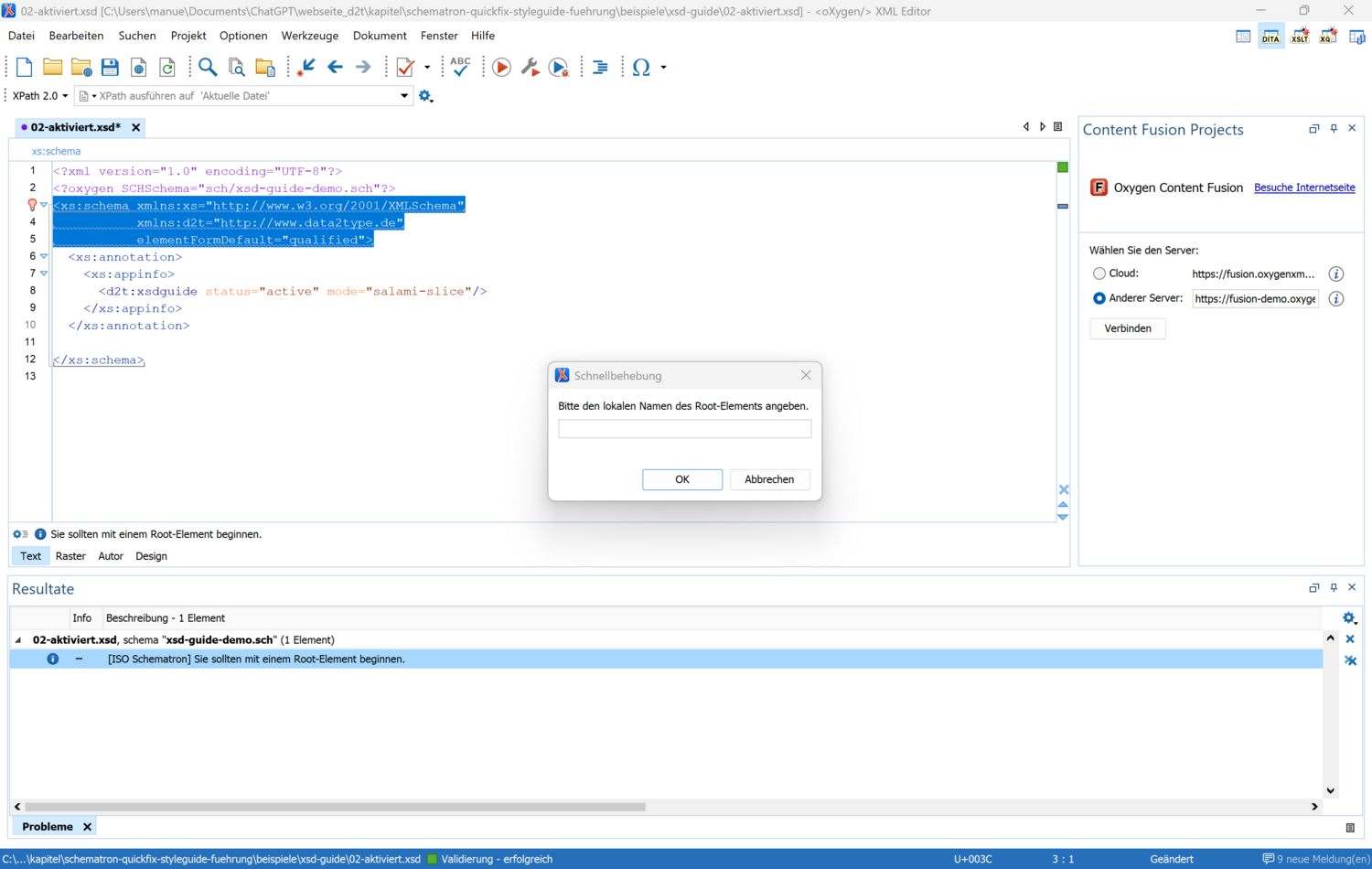
Figure: root dialog in Oxygen XML Editor
Once a pattern is selected, Schematron reports the next step: a root is missing. The dialog demonstrates sqf:user-entry: users decide the name and SQF builds the matching structure.
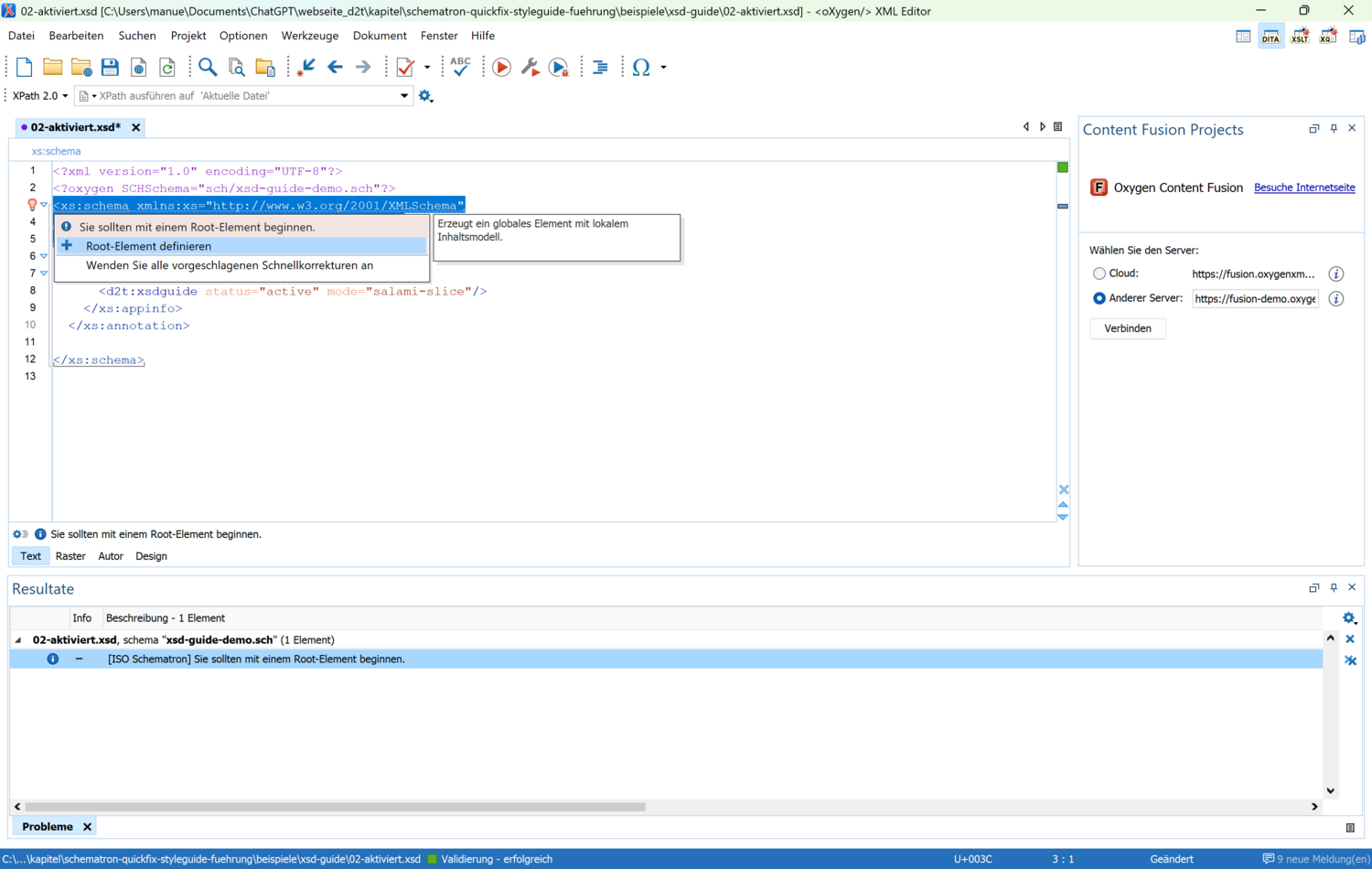
Figure: root definition in Oxygen XML Editor
For Salami Slice, the interface looks similar but help and generated code differ: the QuickFix produces a global element with a local content model instead of a referenced type.
Why XSD Guide helps
XSD Guide makes modeling conventions explicit and executable, with practical benefits:
New team members work productively without first mastering every XSD convention.
Reviews are easier because simple structural decisions are checked during editing.
Generated structures are uniform because they share QuickFix templates.
Modeling strategy remains visible and available for later evaluation.
Style checking accompanies schema creation step by step rather than only at the end.
Checking and generation combine: Schematron detects a missing step, SQF offers an action, execution changes document state, and Schematron presents the next useful message. This creates simple but effective guidance.
Demo files for Oxygen
For a short demonstration, downloadable sample files show the path from empty XSD through activation to generated roots in two patterns:
beispiele/xsd-guide/01-start.xsd is the starting point for the SQF demo in Oxygen.
beispiele/xsd-guide/sch/xsd-guide-demo.sch contains a small demo implementation of QuickFix guidance.
beispiele/xsd-guide/03-venetian-blind-mit-root.xsd shows the expected result for Venetian Blind.
beispiele/xsd-guide/04-salami-slice-mit-root.xsd shows the expected result for Salami Slice.
The demo files show only a highly simplified extract.
A more advanced XSD Guide implementation is available as an open-source project: github.com/nkutsche/xsdguide. It provides a usable Schematron, SQF and XSLT implementation, installable through Oxygen’s add-on feature or the Escali-Oxygen-Plugin.
Example 2: configurable DITA menu for editors
The second example applies the principle to DITA editing. Editors need not handwrite every construct. They type a shortcut such as ### and Oxygen offers suitable insertion actions through Schematron QuickFix:
image with text wrapping,
boxes,
multicolumn areas or
tables.
Motivation differs from XSD Guide, but the problem is similar. DITA editing often requires complex recurring structures:
tables with a specific structure,
boxes with defined titles,
figure containers,
processing instructions for layout or
project-specific layout components.
Without guidance, editors would repeatedly select and nest elements and assign attributes manually, risking errors and distraction from content work.
Oxygen itself could be customized with framework extensions, Author Actions or plugins. This approach is deliberately lighter: functionality resides in SQF and configuration. Complex structures receive meaningful names and menu entries without editor-specific extension programming.
The example links Schematron directly using an Oxygen processing instruction:
<?oxygen SCHSchema="sqf_dita_template_generator/sch/shortcut.sch"?>
The screenshot shows a QuickFix menu opened by ###, with options such as left image positioning, boxes or inserting a task box.
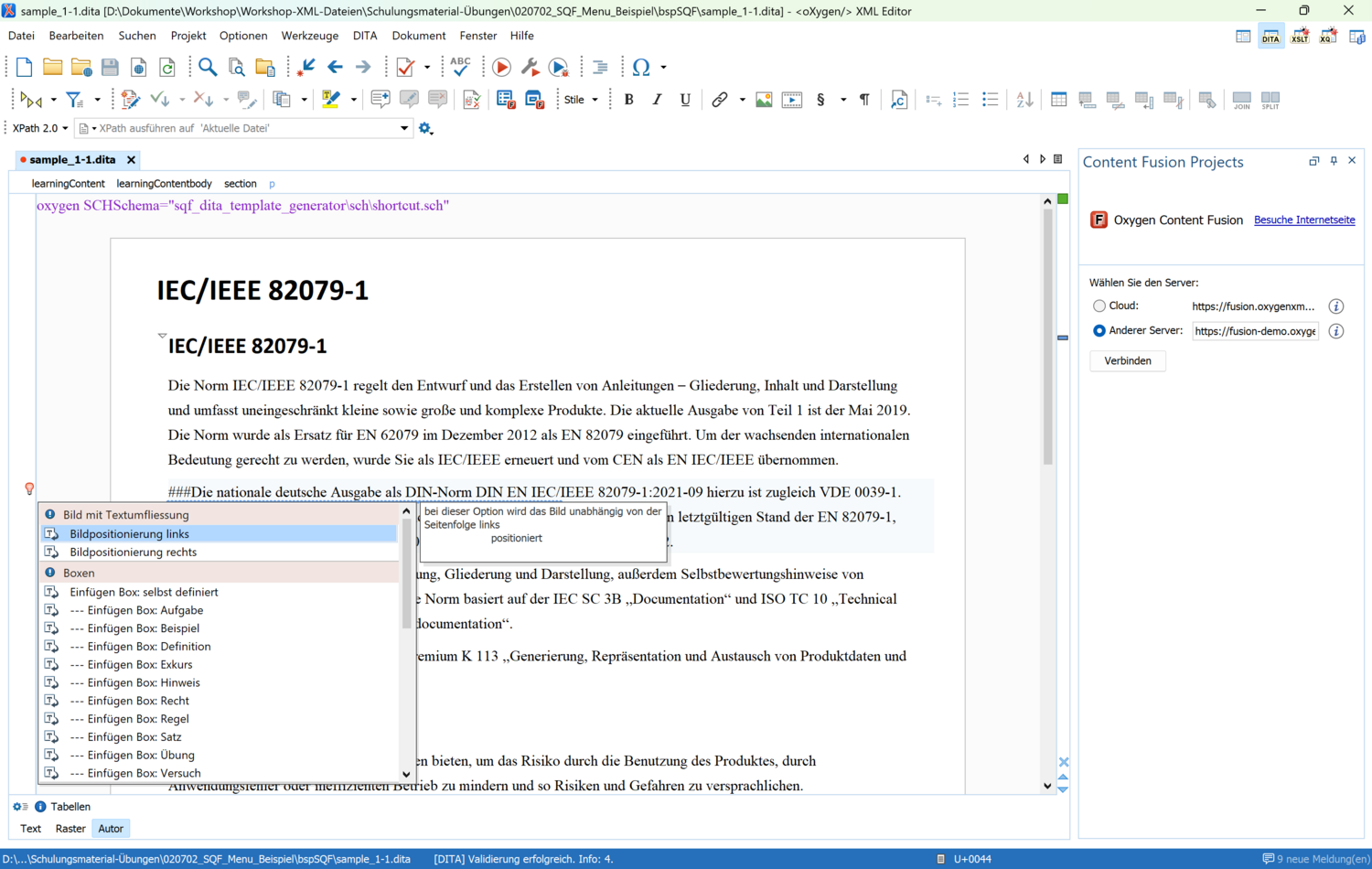
Figure: DITA QuickFix editorial menu in Oxygen XML Editor
The DITA example shows everyday guidance: a shortcut becomes a menu of meaningful actions. Editors choose an image position or box, and SQF inserts the underlying DITA fragment.
The editorial advantage is clear: editors need not know the DITA structure behind each layout or content component. They choose a meaningful action while XML remains structured, controllable and reusable.
Reduced version dependence is another advantage. The solution uses Oxygen’s supported QuickFix standard rather than a specific version or proprietary plugin interface. It can in principle transfer to other editors supporting SQF or similar mechanisms.
Technical solution: Schematron reads external configuration
Menu entries are not hard-coded in rules. Schematron loads an external configuration file:
<sch:let name="config" value="doc('../cfg/config.xml')"/>
<sch:let name="shortcuts" value="$config/shortcuts/shortcut"/>
A rule checks text nodes for configured shortcuts. For each matching option, @use-for-each generates a separate QuickFix:
<sch:rule context="text()">
<sch:let name="text" value="."/>
<sch:let name="available-shortcuts"
value="$shortcuts[matches($text, @key)][@id = 'box']"/>
<sch:report test="$available-shortcuts"
role="info"
sqf:fix="shortcut-exec">
<sch:value-of select="$available-shortcuts/description"/>
</sch:report>
<sqf:fix id="shortcut-exec"
use-for-each="$available-shortcuts//option">
<sch:let name="level"
value="$sqf:current/ancestor::option/'---' => string-join()"/>
<sqf:description>
<sqf:title>
<sch:value-of select="$level, $sqf:current/description"/>
</sqf:title>
<sqf:p>
<sch:value-of select="$sqf:current/about/p => string-join('
')"/>
</sqf:p>
</sqf:description>
<sqf:stringReplace
regex="{$sqf:current/ancestor::shortcut/@key}"
select="$sqf:current/insert-fragment/node()"/>
</sqf:fix>
</sch:rule>Logic is generic: the shortcut is replaced by XML content from <insert-fragment>. Menu text comes from <description>, help text from <about>. Nested options display their computed level using ---.
Schematron thus acts as a runtime for configured editorial actions. No separate rule is needed for every box, table or instruction. The generic mechanism detects shortcuts, finds options, shows descriptions and inserts fragments.
Configuration instead of programming effort
An image-positioning entry is described as a configuration data structure:
<shortcut key="###" id="float">
  <description>Bild mit Textumfliessung</description>
  <option>
    <description>Bildpositionierung links</description>
    <about>
      <p>bei dieser Option wird das Bild unabhängig von der Seitenfolge links positioniert</p>
    </about>
    <insert-fragment>
      <div props="float_container">
        <div props="float_object right">
          <fig>
            <title>TEXT Abbildungstitel</title>
            <image width="" height=""
                   href="media/imageXXXXX.jpeg"
                   placement="inline">
              <alt>Grafik</alt>
            </image>
          </fig>
        </div>
        <div props="float_content"/>
      </div>
    </insert-fragment>
  </option>
</shortcut>
Another example is boxes. Editors can receive a whole component group without new Schematron programming for task, example, definition or exercise boxes:
<shortcut key="###" id="box">
  <description>Boxen</description>
  <option>
    <description>Einfügen Box: selbst definiert</description>
    <about>
      <p>bei dieser Option wird eine Box selbst erstellt. Hierfür muß der Benutzerführung
      per Quickfix gefolgt werden, bis alle Quickfixes entsprechend aufgelöst worden sind.</p>
    </about>
    <insert-fragment>
      <table frame="none" colsep="no" rowsep="no">
        <tgroup cols="1">
          <colspec colnum="1" colname="col1" colwidth="100.00%"/>
          <tbody>
            <row>
              <entry namest="col1" nameend="col1">
                <div props="ElementTitel">##Box-Titel##</div>
                <div props="BoxPfad">##Box-Pfad##</div>
                <p/>
              </entry>
            </row>
          </tbody>
        </tgroup>
      </table>
    </insert-fragment>
  </option>
</shortcut>
The placeholders ##Box-Titel## and ##Box-Pfad## then trigger further messages and QuickFixes. Guidance becomes multistage: insert the box first, then clarify its title or image path.
<sch:report sqf:fix="predefined-fix"
            test=".[matches(., '##Box-Titel##')]">
  Wie lautet der Titel
</sch:report>

<sqf:fix id="predefined-fix">
  <sqf:description>
    <sqf:title>Bitte Titel selbst definieren</sqf:title>
  </sqf:description>
  <sqf:stringReplace regex="##Box-Titel##" select="''"/>
</sqf:fix>
Generically extensible
The key advantage is extensibility. A new component often requires only an additional <option> configuration entry. The rule stays unchanged, processing all matching options generically.
An additional entry might look like this:
<option>
  <description>Einfügen Box: Praxistipp</description>
  <about>
    <p>Fügt eine standardisierte Hinweisbox für redaktionelle Praxistipps ein.</p>
  </about>
  <insert-fragment>
    <table frame="none" colsep="no" rowsep="no">
      <tgroup cols="1">
        <tbody>
          <row>
            <entry>
              <div props="ElementTitel">Praxistipp:</div>
              <p>TEXT PRAXISTIPP</p>
            </entry>
          </row>
        </tbody>
      </tgroup>
    </table>
  </insert-fragment>
</option>
A Schematron schema thus becomes a configurable editorial tool. Requirements can vary by project without reprogramming QuickFix behavior.
This is valuable where requirements change. New box types, project-specific layout components or permitted instructions are added through configuration. Users see new menu entries without changing how they work.
Configuration becomes the domain interface: a component gets a clear name, description and XML fragment. Structure remains controlled, while maintenance follows requirements rather than editor programming. This benefits projects regularly adapting editorial patterns.
Dynamic tables from patterns
Besides static fragments, dynamic generation is possible. Entering a pattern such as ##3x4## can automatically create a three-row, four-column table:
<sch:report test="matches(., '##\d+x\d+##')"
            role="info"
            sqf:fix="shortcut-exec1">
  Tabellenaufbau-Template ist vorhanden!
</sch:report>

<sqf:fix id="shortcut-exec1">
  <sqf:description>
    <sqf:title>Erstellt Tabellen anhand dem Muster {Zahl} x {Zahl}</sqf:title>
  </sqf:description>
  <sqf:stringReplace regex="(##)(\d+)(x)(\d+)(##)">
    ...
  </sqf:stringReplace>
</sqf:fix>
SQF combines with XSLT logic to turn compact editorial input into a complete DITA table structure.
What both examples demonstrate
Both approaches use Schematron as an editor interaction layer: it recognizes state, SQF offers an action, that action changes the document and Schematron reevaluates the new state.
Lightweight guidance close to the document results:
Style rules appear at the relevant context.
Users need not memorize namespaces, attributes or fragments.
Decisions are stored in document or configuration.
Recurring structures are consistent, traceable and need much less editorial effort.
Configuration extends the menu without changing generic Schematron logic.
Organizationally, rules become tools. Relevant actions appear while editing, reducing training. Repeated XML need not be handbuilt, reducing errors. Centralized requirement changes simplify maintenance.
Technically, no custom plugin is needed if Schematron and SQF can express the interaction. Existing Oxygen mechanisms suffice:
Schematron validation,
QuickFix menus,
user entries and
XPath/XSLT expressions.
The solution remains transparent and maintainable.
For teams needing XML competence without daily Schematron, SQF or XSD programming, this is pragmatic: style rules remain formally checkable while actively assisting writing and modeling.