

XML technologies / ePUB / ePub für (In)Designer / Cross-references and links / Cross-references
(Excerpt from “ePub für (In)Designer — Mit InDesign Schritt für Schritt zum E-Book” by Sascha Heck & Yves Apel)
InDesign creates cross-references in the Hyperlinks panel, divided into hyperlinks above and cross-references below. The latter point to other passages and update automatically. For example, InDesign generates a referenced chapter’s name and updates it after title corrections. In e-books, this is their main difference from ordinary hyperlinks.
Creating a cross-reference is straightforward. Place the cursor where it should appear and, in the Hyperlinks panel, click the lower-right icon Create New Cross-Reference or select Insert Cross-Reference.
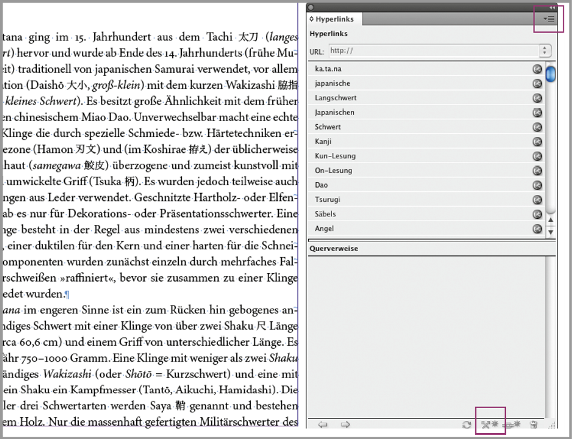
Figure: The Hyperlinks panel is divided into Hyperlinks and Cross-References.
A window opens for further options. First select the target document. If you split chapters using the Book panel, as explained under Creating chapters with a book file, you may first need to choose the correct document. In the screenshot we want a particular paragraph among all h1 paragraphs, the sample book’s chapter headings. All paragraphs styled h1 appear on the right. Here we reference chapter 6, Schwertfechtkunst.
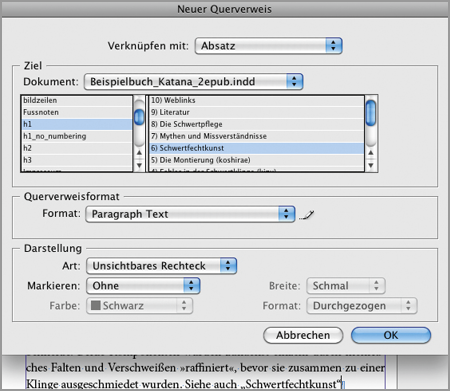
Figure: Cross-reference options.
Cross-Reference Format selects its text. If no preset suits, click the pencil to create your own. Under Appearance you can choose its appearance. A character style provides finer typographic control. Select this style under Character Style for Cross-Reference.
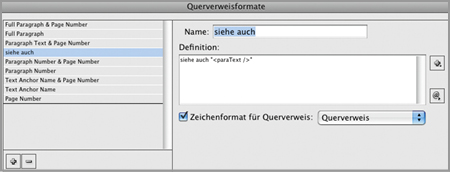
Figure: Adjusting cross-reference formats and appearance.
In ePub, cross-references become blue, underlined hyperlinks. Character styles can set font and color, but removing or changing underlining requires editing CSS; see Changing hyperlink appearance. Interactive PDF export differs: character styles determine link appearance there.
Bug in InDesign CS5
Cross-references have a problem in CS5 if you split the document with the Book panel or TOC styles to separate ePub chapters; see Creating chapters using paragraph styles. Each chapter becomes a separate HTML document and links stop working. Adobe has released no fixing update. Code inspection shows incorrect links: InDesign behaves as though only one document exists.
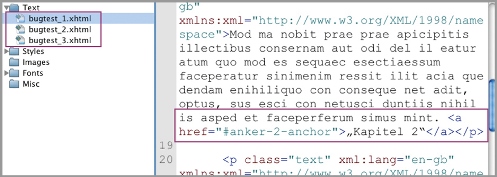
Figure: The annoying link bug in InDesign CS5.
InDesign writes this ePub hyperlink:
<a href="#anker-2-anchor">„Kapitel 2“</a>Since it points to chapter 2 in the next HTML file, the path should instead be:
<a href="../Text/bugtest_2.xhtml#anker-2-anchor">„Kapitel 2“</a>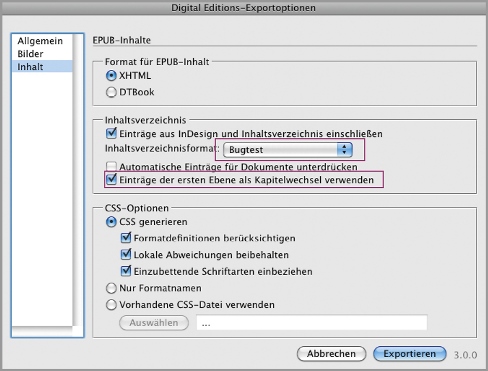
Figure: Using First-Level Entries as Chapter Breaks with
a custom TOC style breaks exported ePub cross-references
in InDesign CS5.
Forums and blogs widely discussed this annoying CS5 bug. It was fixed only in CS5.5. With CS5, check every link in exported HTML and correct where needed. Alternatively avoid the Book panel or TOC styles for chapter splitting. You can also use Dutch developer Teus de Jong’s tool, InDesign Utilities, whose script fixes the error.
Copyright © dpunkt.verlag GmbH 2012
You may print the online version for your private use.
Otherwise, this chapter from “ePub für (In)Designer” is subject to the same terms as the printed edition: the work and all its parts are protected by copyright. All rights reserved, including reproduction, translation, microfilming, and storage and processing in electronic systems.
dpunkt.verlag GmbH, Wieblinger Weg 17, 69123 Heidelberg, fon 06221-14830, fax 06221-148399, hallo(at)dpunkt.de