

XML technologies / ePUB / ePub für (In)Designer / Book features / Creating a book file and chapters / Creating chapters with paragraph styles
(Excerpt from “ePub für (In)Designer — Mit InDesign Schritt für Schritt zum E-Book” by Sascha Heck & Yves Apel)
In InDesign CS5 and CS5.5, ePub export offers page breaks based on paragraph or contents styles, but only one paragraph style can be chosen. Our example uses h1, which starts every chapter.
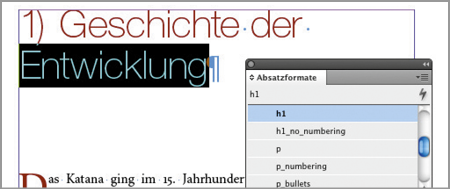
Figure: h1 starts every chapter in our example.
In the ePub export dialog’s section Content check Split Document at Paragraph Style in CS5.5 and choose the style before which to split. InDesign automatically creates separate HTML files.
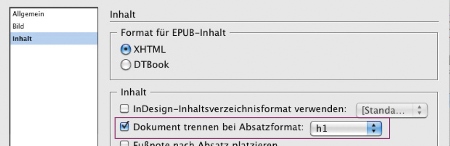
Figure: In CS5.5, choose the paragraph style
before which InDesign splits the file.
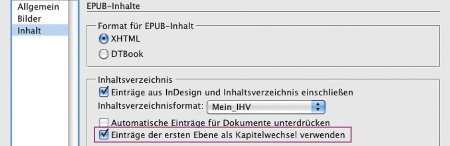
Figure: CS5 uses a different procedure.
Use First Level Entries as Chapter Breaks splits the document
into HTML files based on your contents style;
see also Setting up e-book navigation.
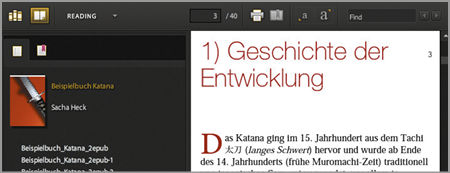
Figure: Each chapter starts at the page top after a break.
After export, Digital Editions shows each chapter starting on a new page. The left navigation reveals separate documents. Appearance still needs work: for improvement and a correct navigation map, see Setting up e-book navigation.
Pro tip: A trick permits a break anywhere: create a paragraph style called Seitenumbruch, without special settings. Wherever a break is needed, insert a blank line with that style. At export, select it under Split Document at Paragraph Style. Check for unwanted blank lines afterward.
Copyright © dpunkt.verlag GmbH 2012
You may print the online version for your private use.
Otherwise, this chapter from “ePub für (In)Designer” is subject to the same terms as the printed edition: the work and all its parts are protected by copyright. All rights reserved, including reproduction, translation, microfilming, and storage and processing in electronic systems.
dpunkt.verlag GmbH, Wieblinger Weg 17, 69123 Heidelberg, fon 06221-14830, fax 06221-148399, hallo(at)dpunkt.de
back to top