

XML technologies / ePUB / ePub für (In)Designer / Images / Converting graphics and objects to images / InDesign CS5
(Excerpt from “ePub für (In)Designer — Mit InDesign Schritt für Schritt zum E-Book” by Sascha Heck & Yves Apel)
To convert graphics and objects into images in InDesign CS5, proceed as follows:
Select all objects you want to retain in the same form in your digital book. Select only one set of objects at a time; the objects need not be grouped.
Open the menu File → Export and select JPEG as the format. In the next window, under Export choose Selection. Set the remaining options according to your own quality requirements.
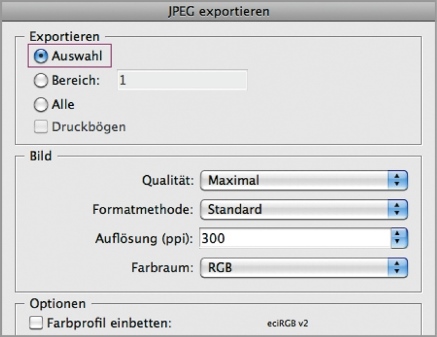
Figure: JPEG export options. Click Selection to export only selected elements as JPEGs.
Then move the set of objects to the InDesign document’s slug area and replace it with the image just created. Alternatively, use layers: retain the original vector objects at their correct position for later editing, and switch as needed between a dedicated layer containing those objects and another containing their image files.
Copyright © dpunkt.verlag GmbH 2012
You may print the online version for your private use.
Otherwise, this chapter from “ePub für (In)Designer” is subject to the same terms as the printed edition: the work and all its parts are protected by copyright. All rights reserved, including reproduction, translation, microfilming, and storage and processing in electronic systems.
dpunkt.verlag GmbH, Wieblinger Weg 17, 69123 Heidelberg, fon 06221-14830, fax 06221-148399, hallo(at)dpunkt.de
back to top