

XML technologies / ePUB / ePub für (In)Designer / Cross-references and links / Hyperlinks
(Excerpt from “ePub für (In)Designer — Mit InDesign Schritt für Schritt zum E-Book” by Sascha Heck & Yves Apel)
Hyperlinks are a major digital advantage: websites, document positions, contents and more become conveniently accessible. Conceptually they are cross-references.
Creating hyperlinks
InDesign has a dedicated panel under Window → Interactive → Hyperlinks. Click the target word and choose from the panel menu New Hyperlink or click its lower-right icon.
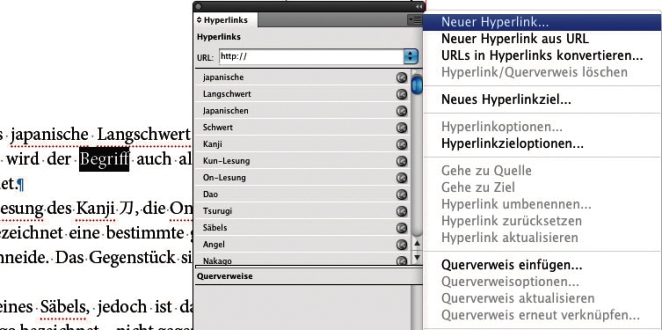
Figure: Creating hyperlinks through the panel.
The dialog defines destination and link type. For a website, choose URL. Always include the complete URL and protocol, such as http://. Important options include Character Style and Appearance, but you may ignore the Appearance section: final appearance is controlled during ePub editing.
Enable Shared Hyperlink Destination to reuse the destination. Changing it once then updates every referring instance.
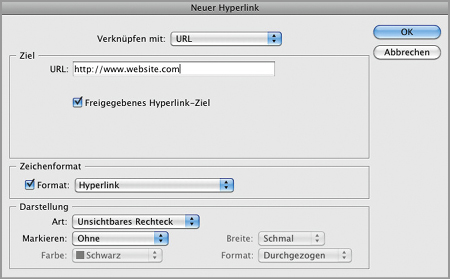
Figure: Shared destinations can be reused throughout the document.
Links may have different states: inactive, hovered—irrelevant on tablets—or clicked, with different colors or styling. Prepare this later in the CSS file, not InDesign; see Changing hyperlink appearance.
Warning!
The & character may cause URL problems. Shorten affected URLs through tinyurl, goo.gl or bit.ly, though generated links are not guaranteed forever.
Hyperlink destinations
Unlike PDF, e-books have no fixed pages. Use destinations instead: select the target passage and choose from the Hyperlinks panel menu New Hyperlink Destination. In the dialog choose Text Anchor, not Page, and name it.
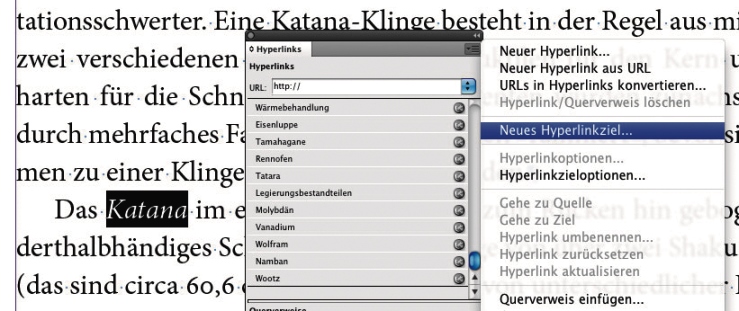
Figure: Creating a hyperlink destination.
Select the text that receives the link and click Create New Hyperlink in the Hyperlinks panel. Choose your existing text anchor from the list.
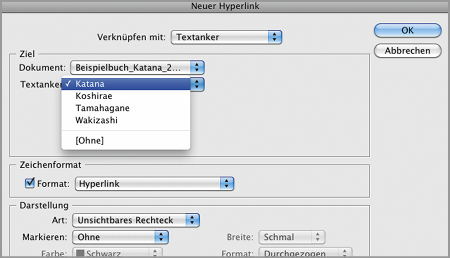
Figure: Choose the previously defined anchor.
Copyright © dpunkt.verlag GmbH 2012
You may print the online version for your private use.
Otherwise, this chapter from “ePub für (In)Designer” is subject to the same terms as the printed edition: the work and all its parts are protected by copyright. All rights reserved, including reproduction, translation, microfilming, and storage and processing in electronic systems.
dpunkt.verlag GmbH, Wieblinger Weg 17, 69123 Heidelberg, fon 06221-14830, fax 06221-148399, hallo(at)dpunkt.de