

XML technologies / ePUB / ePub für (In)Designer / Text / Paragraph and character styles / Character styles
(Excerpt from “ePub für (In)Designer — Mit InDesign Schritt für Schritt zum E-Book” by Sascha Heck & Yves Apel)
Character styles mark deviations within paragraphs, such as italic words, bold phrases, or different fonts and colors. InDesign records only properties differing from the current paragraph style. HTML represents them with the <span> element. To create a character style, follow paragraph-style creation: format the text, then Alt-click the new-style icon in the Character Styles panel or choose New Character Style in the flyout menu. All properties are copied into the style.
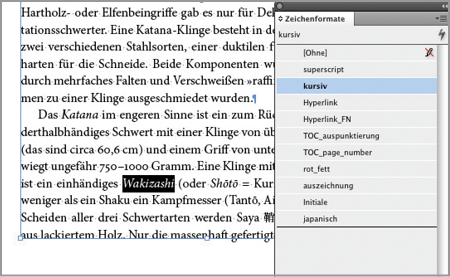
Figure: Character styles in InDesign.
Copyright © dpunkt.verlag GmbH 2012
You may print the online version for your private use.
Otherwise, this chapter from “ePub für (In)Designer” is subject to the same terms as the printed edition: the work and all its parts are protected by copyright. All rights reserved, including reproduction, translation, microfilming, and storage and processing in electronic systems.
dpunkt.verlag GmbH, Wieblinger Weg 17, 69123 Heidelberg, fon 06221-14830, fax 06221-148399, hallo(at)dpunkt.de
back to top