

XML technologies / ePUB / ePub für (In)Designer / Cross-references and links / Footnotes/endnotes
(Excerpt from “ePub für (In)Designer — Mit InDesign Schritt für Schritt zum E-Book” by Sascha Heck & Yves Apel)
InDesign automates footnotes but has no built-in dynamic endnotes. In ePub they are effectively the same: continuous text has no page foot. During ePub export, footnotes become endnotes at the flow’s end. Numbers link automatically to notes, whose clickable numbers return to the text.
Insert a footnote through the menu Type → Insert Footnote. InDesign adds the number and moves to the frame’s foot for note text. Word footnotes convert automatically on import.
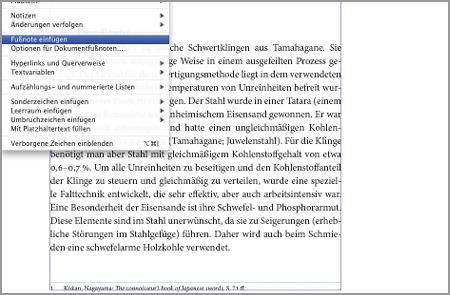
Figure: Insert through Type or import footnotes.
Correct tags and CSS classes require styles here too. Open Type → Document Footnote Options and define a character style for the reference number and a paragraph style for the note text.
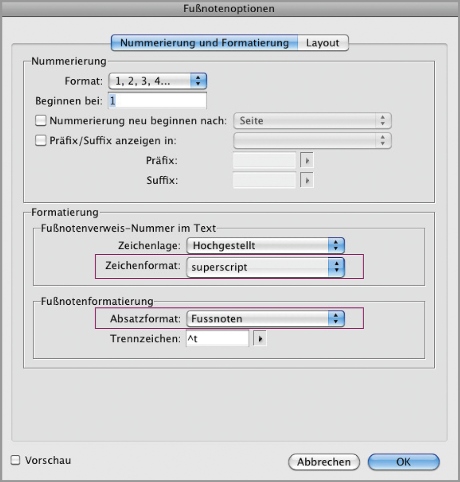
Figure: Footnote options accept paragraph and character styles.
Export then converts footnotes to endnotes and adds links automatically.
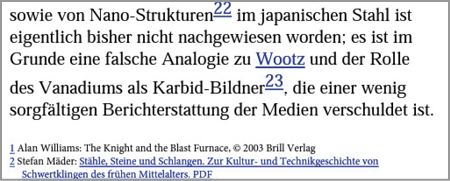
Figure: Footnotes in Adobe Digital Editions.
Exported HTML places notes inside a div element and retains defined styles, such as our fussnoten paragraph style.
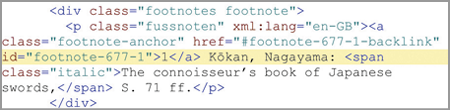
Figure: Footnote in exported HTML.
Endnote links default to blue underlining, as the Adobe Digital Editions screenshot shows. Improve this by editing CSS; see Changing hyperlink appearance.
Outlook
Experiments seek creative notes, such as popups or expandable explanations on clicking a number. This requires extensive code editing plus HTML5, CSS3 and JavaScript. Most e-readers do not yet support this. These standards are still new to ePub and immature; future developments remain promising.
Copyright © dpunkt.verlag GmbH 2012
You may print the online version for your private use.
Otherwise, this chapter from “ePub für (In)Designer” is subject to the same terms as the printed edition: the work and all its parts are protected by copyright. All rights reserved, including reproduction, translation, microfilming, and storage and processing in electronic systems.
dpunkt.verlag GmbH, Wieblinger Weg 17, 69123 Heidelberg, fon 06221-14830, fax 06221-148399, hallo(at)dpunkt.de