

XML technologies / CSS / CSS Cookbook / Links and navigation / Graphical rollover effects
(Excerpt from “CSS Kochbuch” by Christopher Schmitt)
Problem
Use graphical rollovers instead of text links.
Solution
First wrap anchor text in an element span:
<a href="/" id="linkhome"><span>Homepage</span></a>Instead of JavaScript, use the property background-image with selectors for the pseudo-classes :hover and :active to change images on hover (see the figure):
a span {
 display: none;
}
a:link {
 display: block;
 width: 125px;
 height: 30px;
 background-image: url(btn.gif);
 background-repeat: no-repeat;
 background-position: top left;
}
a:link:hover {
 display: block;
 width: 125px;
 height: 30px;
 background-image: url(btn_roll.gif);
 background-repeat: no-repeat;
 background-position: top left;
}
a:link:active {
 display: block;
 width: 125px;
 height: 30px;
 background-image: url(btn_on.gif);
 background-repeat: no-repeat;
 background-position: top left;
}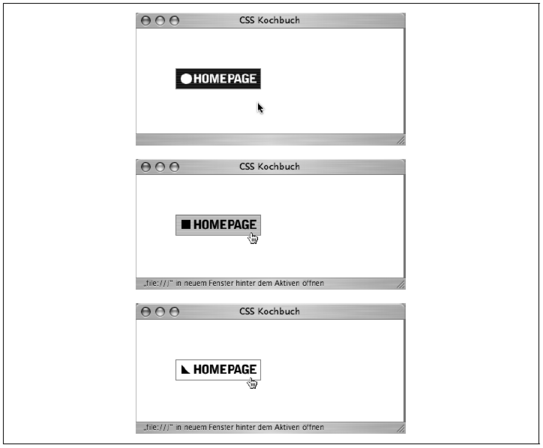
Figure: Graphical link in default, hover and active states.
Discussion
Image replacement has five advantages:
Text stays separate from presentation: typographic images belong to CSS, while markup retains plain text.
One stylesheet change updates a graphical heading throughout the site.
It works with alternative sheets and stylesheet switching, letting users choose designs. A tag
spanhides HTML text while displaying the graphic as background.Browsers without CSS show plain HTML text and avoid unnecessary image downloads.
It is cleaner and simpler than JavaScript.
This also works without rollovers. For a heading font users lack, use an image, starting with the markup below.
<h2 id="headworld"><span>Hallo Welt!</span></h2>
Figure: Default heading.
These rules hide text and insert the background (see the figure):
h2#headworld span {
 display: none;
}
h2#headworld {
 width: 395px;
 height: 95px;
 background-image: url(heading.gif);
 background-repeat: no-repeat;
 background-position: top left;
}
Figure: HTML heading replaced by image.
This is also called Fahrner Image Replacement (FIR), after Todd Fahrner.
Screen readers serving blind and visually impaired people expose a drawback: some do not read elements with display: none.
An alternative is Leahy-Langridge Image Replacement (LIR), independently developed by Seamus Leahy and Stuart Langridge. It moves text off-screen and needs no extra element span to hide it. The heading HTML is simply:
<h2 id="headworld">Hallo Welt!</h2>The image shows because in the CSS rule, padding matches its exact height. Set the property height to 0:
h2#headworld {
 /* Bildbreite */
 width: 395px;
 /* Die Bildhöhe ist der erste Wert für die Innenabstände */
 padding: 95px 0 0 0;
 overflow: hidden;
 background-image: url(heading.gif);
 background-repeat: no-repeat;
 height: 95px;
 voice-family: "\"}\"";
 voice-family: inherit;
 height: 0px !important;
}
The last four lines work around Internet Explorer’s poor support for the box model, giving IE a 95-pixel height while other browsers get zero.
Another approach uses the property background-position and is known as the Pixy method. All three states share one image, moved with background-position according to state (see the figure):
a span {
 display: none;
}
a:link, a:visited {
 display: block;
 width: 125px;
 height: 30px;
 background-image: url(btn_omni.gif);
 background-repeat: no-repeat;
 background-position: 0 0;
}
a:link:hover, a:visited:hover {
 display: block;
 width: 125px;
 height: 30px;
 background-image: url(btn_omni.gif);
 background-repeat: no-repeat;
 /* Bild um 30 Pixel nach oben verschieben */
 background-position: 0 -30px;
}
a:link:active, a:visited:active {
 display: block;
 width: 125px;
 height: 30px;
 background-image: url(btn_omni.gif);
 background-repeat: no-repeat;
 /* Bild um 60 Pixel nach oben verschieben */
 background-position: 0 -60px;
}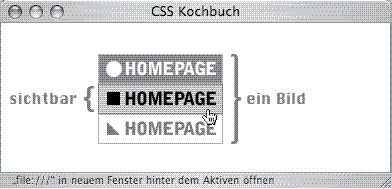
Figure: Parts of the rollover image.
Warning:
Most replacement methods show nothing when CSS works but images are disabled, broken or not loaded. Choose carefully before building documents, and avoid replacement in important headings.
See also
The recipe Replacing HTML text with an image,
another demonstration of the LIR method by Seamus P. H. Leahy, and
instructions for creating faster CSS rollovers without preloading images.
Copyright of the German edition © 2007 by O’Reilly Verlag GmbH & Co. KG
You may print the online version for your private use.
Otherwise, this chapter from “CSS Kochbuch” is subject to the same conditions as the bound edition: the work, including all its parts, is protected by copyright. All rights reserved, including reproduction, translation, microfilming, and storage and processing in electronic systems.
O’Reilly Verlag GmbH & Co. KG, Balthasarstr. 81, 50670 Köln