

XML technologies / CSS / CSS Cookbook / Links and navigation / Removing standard link underlines and adding other decorations
(Excerpt from “CSS Kochbuch” by Christopher Schmitt)
Problem
Links are underlined by default. You want to remove these underlines, as shown in the following figure.
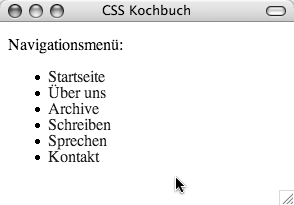
Figure: Links without underlines.
Solution
Use the property text-decoration together with the pseudo-class based selector for visited and unvisited links:
a:link, a:visited {
 text-decoration: none;
}
Discussion
The pseudo-classes :link and :visited let you style links in a document. The pseudo-class :link selects unvisited links, while :visited represents visited links. The property text-decoration accepts five values (see the following table).
Table: Available values for text-decoration.
Values for text-decoration | Result |
|---|---|
| Draws a line below the text (underline). |
| Draws a line above the text (overline). |
| Makes text blink. |
| Strikes through text. |
| Applies no additional text decoration. |
The property text-decoration is often used to improve page presentation. Rather than underlining every link, designers often set text-decoration to the value none and also change the link’s background or text color, or both:
a:link, a:visited {
 text-decoration: none;
 background-color: red;
 color: white;
}
To accommodate visitors who may be colorblind and unable to identify links by color alone, some designers also make link text bold:
a:link, a:visited {
 font-weight: bold;
 text-decoration: none;
 color: red;
}
The value line-through can also indicate a visited link, displayed like a checked-off agenda item (see the following figure):
a:link {
 font-weight: bold;
 text-decoration: none;
 color: red;
}
a:visited {
 font-weight: bold;
 text-decoration: line-through;
 color: black;
}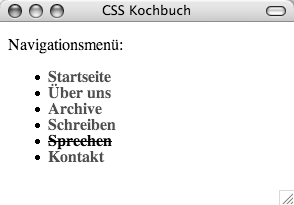
Figure: Links displayed with strikethrough.
See also
The CSS 2.1 specification on the property text-decoration and Jakob Neilsen’s “Design Guidelines for Visualizing Links”.
Copyright of the German edition © 2007 by O’Reilly Verlag GmbH & Co. KG
You may print the online version for your private use.
Otherwise, this chapter from “CSS Kochbuch” is subject to the same conditions as the bound edition: the work, including all its parts, is protected by copyright. All rights reserved, including reproduction, translation, microfilming, and storage and processing in electronic systems.
O’Reilly Verlag GmbH & Co. KG, Balthasarstr. 81, 50670 Köln