

XML technologies / CSS / CSS Cookbook / Links and navigation / Expandable navigation menus
(Excerpt from “CSS Kochbuch” by Christopher Schmitt)
Problem
Some links should be hidden and displayed only when needed. Instead of showing two link lists, hide the second (see the next figure) and show it only when the user clicks a plus sign (+), as in the figure after that.
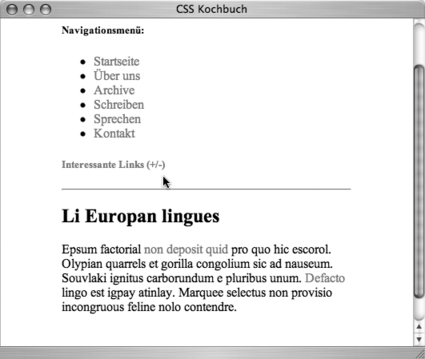
Figure: The second link list is hidden.
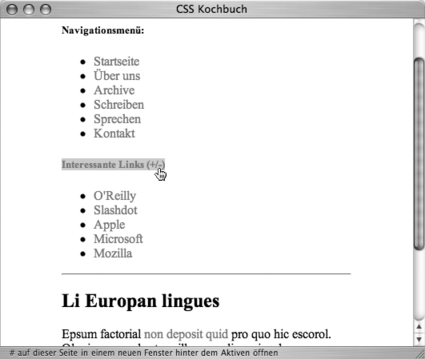
Figure: Clicking the heading link displays the second list.
Solution
First give the HTML links to be hidden an attribute id in the element ul:
<h5>Interessante Links (+/-)</h5>
<ul id="menulink">
  <li><a href="http://www.ora.com/">O'Reilly</a></li>
  <li><a href="http://www.slashdot.org/">Slashdot</a></li>
  <li><a href="http://www.apple.com/">Apple</a></li>
  <li><a href="http://www.microsoft.com/">Microsoft</a></li>
  <li><a href="http://www.mozilla.org/">Mozilla</a></li>
</ul>
Then create a CSS rule that prevents the list from appearing when the page loads:
#menulink {
 display: none;
}
The following JavaScript function switches the property display between the values block and none:
function kadabra(zap) {
 if (document.getElementById) {
  var abra = document.getElementById(zap).style;
  if (abra.display == "block") {
   abra.display = "none";
   } else {
   abra.display = "block";
  }
  return false;
  } else {
  return true;
 }
}
Enclose the heading in an element a containing the JavaScript event onclick. Clicking this link executes the corresponding JavaScript function:
<h5><a href="#" onclick="return kadabra('menulink');">Interessante Links (+/-)</a></h5>Discussion
The JavaScript code uses the function getElementbyId to change the link list’s display behavior. Without additional JavaScript, this technique can be adapted to show or hide multiple menus or other parts of the web document:
<p>Wollen Sie wirklich die Wahrheit erfahren? Wenn ja, dann klicken Sie <a href="#" onclick="return kadabra('spoiler'); ">diesen Link</a> an.</p>
<p id="spoiler">Darth Vader war der Vater von Luke!</p>
This technique works in Netscape Navigator 6+, Opera 7.5+, Internet Explorer for Windows 5+ and Safari.
See also
MDN Mozilla Developer Network for more information on the function getElementbyId.
Copyright of the German edition © 2007 by O’Reilly Verlag GmbH & Co. KG
You may print the online version for your private use.
Otherwise, this chapter from “CSS Kochbuch” is subject to the same conditions as the bound edition: the work, including all its parts, is protected by copyright. All rights reserved, including reproduction, translation, microfilming, and storage and processing in electronic systems.
O’Reilly Verlag GmbH & Co. KG, Balthasarstr. 81, 50670 Köln