

XML technologies / CSS / Advanced websites with CSS / CSS property reference / display
(Excerpt from “CSS − Advanced websites with Cascading Stylesheets” by Rachel Andrew & Dan Shafer)
The property display changes an element’s display mode. An inline element such as a can appear as a block, while a block such as div can appear inline.
The most common use of display toggles whole document areas. Setting display to none not only hides the element, as visibility does, but removes it from layout. Dynamic HTML can change this with JavaScript, creating hierarchical menus with expanding and collapsing submenus.
Inherited: no
See also: visibility
Values
block
CSS version: 1
Browser support: All CSS-capable browsers, including Netscape 4.
The default mode for p, div, ul, blockquote and many other elements. They occupy rectangular areas and stack vertically with surrounding elements.
inline
CSS version: 1
Browser support: All CSS-capable browsers, including Netscape 4.
The default mode for strong, u, a, code and many other elements. Inline content appears as a character string within its parent.
list-item
CSS version: 1
Browser support: Netscape 4+, Internet Explorer 6 for Windows and Internet Explorer 5 for Mac.
The default mode for elements li. Each becomes a list item. List properties (see list-style) define marker type, position and appearance.
marker
CSS version: 2
Browser support: Not supported by current browsers.
Used only with pseudo-elements :before and :after. Text generated by the property content appears in its own small box beside the content. Formatting resembles lists but is more flexible. The property marker-offset is specifically intended for this generated-content mode.
none
CSS version: 1
Browser support: All CSS-capable browsers, including Netscape 4.
Hides the element and, unlike visibility, removes it from layout.
compact
CSS version: 2
Browser support: Not supported by current browsers.
Places an element at an adjacent block’s left edge, or right for right-to-left languages, if both fit on one line. Otherwise both become blocks. The figure shows the effect.
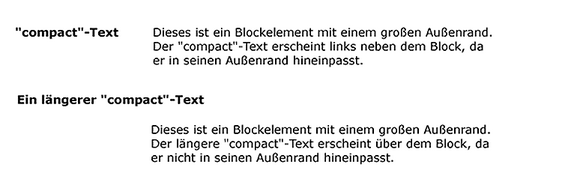
Figure: The compact display mode.
run-in
CSS version: 2
Browser support: Not supported by current browsers.
Places the element at the start of the immediately following block. Without one, it becomes an ordinary block. The figure shows the effect.

Figure: The run-in display mode.
table, inline-table, table-row, table-column, table-row-group, table-column-group, table-header-group, table-footer-group, table-cell, table-caption
CSS version: 2
Browser support: Fully supported only by Internet Explorer 5 for Macintosh. IE 5 for Windows supports only table-header-group, with 5.5 adding table-footer-group. IE 6 for Windows adds no more modes. Netscape 6 and Mozilla support all except inline-table, table-caption, table-column and table-column-group.
These modes display elements as tables or table parts. Their practical value is debatable, partly explaining incomplete support. Full details appear in the CSS2 specification.
inline-block
CSS version: 3 (early specification drafts)
Browser support: Only Internet Explorer for Windows 5.5+ so far.
Displays a block as an inline element within its parent.
Default value: inline (Note: like all defaults, those of the property display come from the browser’s stylesheet, not CSS2 itself. A newly programmed tag, possible in XHTML, automatically receives the default inline.)
Compatibility
CSS version: 1 (many modes added in CSS2; more to follow in CSS3)
All CSS browsers support the property, none every mode. See each mode’s description for exact compatibility.
Example
This rule hides unordered lists (ul) nested within unordered lists of class menue. JavaScript can show submenus by switching the property display to block when a main menu item is clicked.
ul.menue ul {
 display: none;
}
Copyright © 2006 of the German translation, dpunkt.verlag GmbH
You may print the online version for your private use.
Otherwise, this chapter from “CSS − Anspruchsvolle Websites mit Cascading Stylesheets” is subject to the same conditions as the bound edition: the work, including all its parts, is protected by copyright. All rights reserved, including reproduction, translation, microfilming, and storage and processing in electronic systems.
dpunkt.verlag GmbH, Ringstraße 19, 69115 Heidelberg