

XML technologies / CSS / CSS Cookbook / Links and navigation / Hierarchical navigation
(Excerpt from “CSS Kochbuch” by Christopher Schmitt)
Problem
You want to create a nested list (see the next figure) to build a hierarchical link path (“breadcrumb trail”) leading back to the home page (see the figure after that).
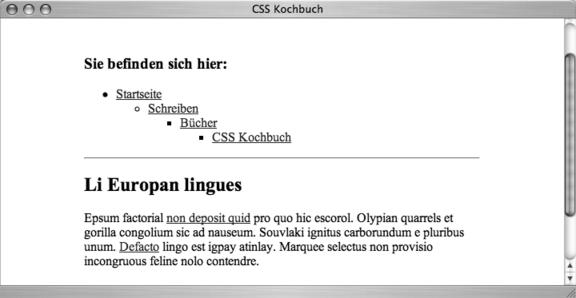
Figure: Default nested list appearance.
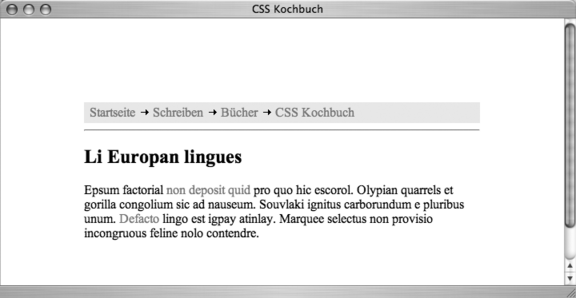
Figure: The breadcrumb trail: the hierarchical path.
Solution
First create a correctly structured list of nested links reflecting the document’s position within the website:
<div id="crumbs">
  <h3>Sie befinden sich hier:</h3>
  <ul>
    <li><a href="/">Startseite</a>
      <ul>
        <li><a href="/writing/">Schreiben</a>
          <ul>
            <li><a href="/writing/books/">Bücher</a>
              <ul>
                <li><a href="/writing/books/">CSS Kochbuch</a></li>
              </ul>
            </li>
          </ul>
        </li>
      </ul>
    </li>
  </ul>
</div>
Next, for the elements ul and li, set the values of the property display:
#crumbs {
 background-color: #eee;
 padding: 4px;
}
#crumbs h3 {
 display: none;
}
#crumbs ul {
 display: inline;
 padding-left: 0;
 margin-left: 0;
}
#crumbs ul li {
 display: inline;
}
#crumbs ul li a:link {
 padding: .2em;
}
Give each nested list item a small background image of an arrow, displayed to the left of the actual link:
crumbs ul ul li{
 background-image: url(arrow.gif);
 background-repeat: no-repeat;
 background-position: left;
 padding-left: 12px;
}
Discussion
The term breadcrumb trail comes from the fairy tale “Hansel and Gretel”. Such a trail helps people find their way home. On the Web, a breadcrumb trail or hierarchical path shows the user the route to the page currently being viewed (see the following figure).

Figure: Example of a breadcrumb trail.
If more browsers supported the pseudo-element :before, the property background-image would not be needed here. Instead, use the following CSS rule (also see the recipe Highlighting active table rows):
#crumbs ul ul li:before {
 content: url(arrow.gif);
}
At the time this book was written, the pseudo-element :before was supported only by Firefox, Safari, Netscape Navigator 6+ and Opera 5+.
See also
Research findings on the effectiveness of hierarchical paths.
Copyright of the German edition © 2007 by O’Reilly Verlag GmbH & Co. KG
You may print the online version for your private use.
Otherwise, this chapter from “CSS Kochbuch” is subject to the same conditions as the bound edition: the work, including all its parts, is protected by copyright. All rights reserved, including reproduction, translation, microfilming, and storage and processing in electronic systems.
O’Reilly Verlag GmbH & Co. KG, Balthasarstr. 81, 50670 Köln