

XML technologies / CSS / CSS Cookbook / Links and navigation / Adding icons after links
(Excerpt from “CSS Kochbuch” by Christopher Schmitt)
Problem
Icons should follow links according to their function—email, search, and so on—as shown in the following figure.
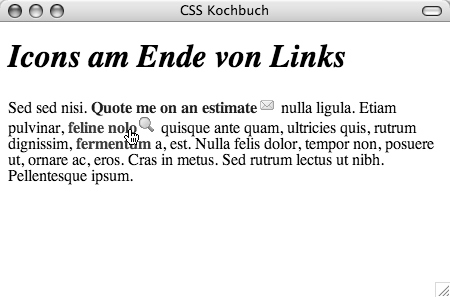
Figure: Icons after links clarify their function.
Solution
Give links two values for the attribute class. The first value, icon, indicates that an icon should follow the link; the second determines its type. Our example uses an email address and a search engine:
<a href="mailto:orders@csscookbook.com" class="icon email">Quote me on an estimate</a>
<a href="http://www.google.com/" class="icon search">feline nolo</a>
To leave room after the link, use a class selector and a pseudo-class with the properties width, height and margin:
a {
 text-decoration: none;
 font-weight: bold;
}
#content a.icon:after {
 display: block;
 width: 17px;
 height: 15px;
 margin: 2px;
}
The second value of the attribute class lets us give link types their own CSS rules and icons.
The class selectors .email and .search together with the pseudo-class :after let the following two CSS rules assign the corresponding icons:
#content a.email:after {
 content: url(email.gif);
}
#content a.search:after {
 content: url(search.gif);
}
Discussion
This approach is easy to adapt and extend. To highlight links to Word documents, for example, use for the attribute class the second value document, as shown here:
<a href="/_assets/report.pdf" class="icon document">feline nolo</a>Now define the corresponding CSS rule for the icon:
#content a.document:after {
 content: url(doc.gif);
}
Attribute selectors let you omit additional markup in the attribute class (see the recipe Attribute selectors):
#content a[href|="mailto"]:after {
 content: url(email.gif);
}
However, attribute selector support is very limited. This solution also uses the property content, unsupported by Internet Explorer for Windows.
See also
Dave Shea’s presentation on using background images to add icons after links and an explanation of why this fails in Internet Explorer.
Copyright of the German edition © 2007 by O’Reilly Verlag GmbH & Co. KG
You may print the online version for your private use.
Otherwise, this chapter from “CSS Kochbuch” is subject to the same conditions as the bound edition: the work, including all its parts, is protected by copyright. All rights reserved, including reproduction, translation, microfilming, and storage and processing in electronic systems.
O’Reilly Verlag GmbH & Co. KG, Balthasarstr. 81, 50670 Köln