

XML technologies / CSS / Advanced websites with CSS / A first overview / Parts of a rule in CSS.
(Excerpt from “CSS − Advanced websites with Cascading Stylesheets” by Rachel Andrew & Dan Shafer)
Every style consists of one or more rules. The next figure shows an example CSS rule and its parts.
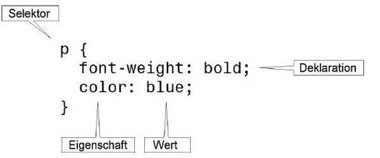
Figure: Parts of a CSS rule.
Every rule has two parts:
a selector, identifying the HTML elements to which the rule applies, and
one or more declarations, consisting of a property and a value, describing the appearance of all matching elements. (Note: many CSS books and articles call these “attributes.” This book uses the W3C terms “declarations,” “properties” and “values,” reserving “attributes” for HTML tag attributes.)
The property tells the browser what is being defined. For example, font-weight specifies tracking. A colon separates the property from its value. If the value bold is assigned to the property font-weight, document text appears bold. Every property-value pair ends with a semicolon; only the last is optional. This book always includes it for consistency. Please do likewise to avoid omissions and make later additions to rules easier.
These CSS examples use syntax shared by all rules, so understanding and remembering it is important.
h1 {
color: red;
}
The selector h1 applies this rule to every heading h1 in the document. The property color controls text color, and we assign the property color the value red. For more about colors and fonts, see Adding some color and Using fonts with CSS.
p {
  font-size: small;
  color: green;
}
The selector p styles every paragraph. We define two properties. First, font-size, sets paragraph font size to small. For details of this and other CSS units, see Measurements. The second property, color, receives the value green. The complete rule makes all paragraphs green with small text.
p {
  font-family: 'New York', Times, serif;
}
The selector p again targets paragraphs, here specifying their font family. This example introduces a list of values for font-family, one of them quoted.
font-family is one of the few properties accepting a list instead of one value. Separate list entries with commas. The example’s list for font-family tells the browser to use New York if installed on the user’s system, otherwise Times. If neither is installed, the browser uses its default serif font. For details, see Using fonts with CSS.
Quote value names containing spaces, such as the font “New York.” Many designers prefer single quotes because they are easier to type. Both are valid CSS.
Copyright © 2006 of the German translation, dpunkt.verlag GmbH
You may print the online version for your private use.
Otherwise, this chapter from “CSS − Anspruchsvolle Websites mit Cascading Stylesheets” is subject to the same conditions as the bound edition: the work, including all its parts, is protected by copyright. All rights reserved, including reproduction, translation, microfilming, and storage and processing in electronic systems.
dpunkt.verlag GmbH, Ringstraße 19, 69115 Heidelberg
back to top