

XML technologies / CSS / Advanced websites with CSS / Putting CSS in perspective / What is CSS actually for? / Animating pseudo-classes and CSS
(Excerpt from “CSS − Advanced websites with Cascading Stylesheets” by Rachel Andrew & Dan Shafer)
CSS also creates interesting effects such as text hovering. A rule changes text appearance when the user moves the mouse over it, making the text seem like a small animation.
In Internet Explorer 6, this works only on linked text. Other browsers, such as Firefox and Internet Explorer 7, also allow other elements to respond to hovering. At press time, Internet Explorer 7 is still beta, so we cannot guarantee its final behavior. Use the pseudo-class a:hover and specify how linked text changes when the mouse passes over it.
a:hover {
   background-color: blue;
   color: white;
   font-size: 22px;
}
The following figure shows what happens when the pointer moves over a link with this rule. The screenshot cannot show the color change, but clearly shows the linked text becoming much larger than the rest.
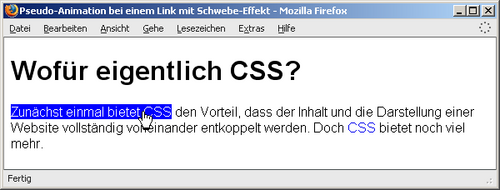
Figure: Pseudo-animation on a hovered link.
This resembles an animated graphical menu button responding to the mouse. Full details are available in Text effects and cascading.
Changing font sizes in :hover rules
Although we advise against table-based layouts, using tables is perfectly fine. They are recommended for tabular data, such as spreadsheets. The tournament schedule shown in The formatted table completes the layout contains tabular data, so a table is the best way to encode it.
Copyright © 2006 of the German translation, dpunkt.verlag GmbH
You may print the online version for your private use.
Otherwise, this chapter from “CSS − Anspruchsvolle Websites mit Cascading Stylesheets” is subject to the same conditions as the bound edition: the work, including all its parts, is protected by copyright. All rights reserved, including reproduction, translation, microfilming, and storage and processing in electronic systems.
dpunkt.verlag GmbH, Ringstraße 19, 69115 Heidelberg