

XML technologies / CSS / CSS Cookbook / Links and navigation / Combining text navigation and rollover effects
(Excerpt from “CSS Kochbuch” by Christopher Schmitt)
Problem
Turn a list of links into an elegant menu (see the following figure).
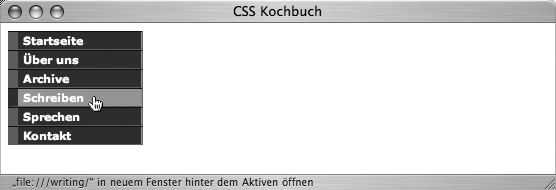
Figure: Links with style.
Solution
Start with an unordered link list wrapped in an element div with an attribute id:
<div id="navsite">
  <p>Navigationsmenü:</p>
  <ul>
    <li><a href="/">Startseite</a></li>
    <li><a href="/about/">Über uns</a></li>
    <li><a href="/archives/">Archive</a></li>
    <li><a href="/writing/">Schreiben</a></li>
    <li><a href="/speaking/">Sprechen</a></li>
    <li><a href="/contact/">Kontakt</a></li>
  </ul>
</div>
Most of the design comes from the property border for the anchor element (a):
#navsite p {
 display: none;
}
#navsite {
 font-family: Verdana, Helvetica, Arial, sans-serif;
 font-size: 0.7em;
 font-weight: bold;
 width: 12em;
 border-right: 1px solid #666;
 padding: 0;
 margin-bottom: 1em;
 background-color: #9cc;
 color: #333;
}
#navsite ul {
 list-style: none;
 margin: 0;
 padding: 0;
}
#navsite ul li {
 margin: 0;
 border-top: 1px solid #003;
}
#navsite ul li a {
 display: block;
 padding: 2px 2px 2px 0.5em;
 border-left: 10px solid #369;
 border-right: 1px solid #69c;
 border-bottom: 1px solid #369;
 background-color: #036;
 color: #fff;
 text-decoration: none;
 width: 100%;
}
html>body #navsite ul li a {
 width: auto;
}
#navsite ul li a:hover {
 border-left: 10px solid #036;
 border-right: 1px solid #69c;
 border-bottom: 1px solid #369;
 background-color: #69f;
 color: #fff;
}
Discussion
Give navigation links their own styles to distinguish them from text, using the ID selector. Besides implementing CSS, the solution works around programming errors (“bugs”) in certain browsers to render correctly.
Inside the element div, a paragraph identifies the links as a navigation menu:
<p>Navigationsmenü:</p>Browsers without CSS show this line. CSS-capable browsers do not need it, so hide it by setting the property display to none:
#navsite p {
 display: none;
}
The property values defined here for the element div reach links through inheritance. Values for width, border-right, padding and margin-bottom keep links from crowding together:
#navsite {
 font-family: Verdana, Helvetica, Arial, sans-serif;
 font-size: 0.7em;
 font-weight: bold;
 width: 12em;
 border-right: 1px solid #666;
 padding: 0;
 margin-bottom: 1em;
}
The following CSS rule prevents list-indentation problems (see Cross-browser indentation) by setting margin and padding to 0. It also removes list markers:
#navsite ul {
 list-style: none;
 margin: 0;
 padding: 0;
}
This rule removes margins from the list and its items and adds a one-pixel top border to each item, separating them visually:
#navsite ul li {
 margin: 0;
 border-top: 1px solid #003;
}
The next rule styles the links. Normally inline, they must become block elements so the whole link area, not just its label such as “Startseite”, is clickable. Set the property display to block.
Define borders, text color, decoration and width as follows:
#navsite ul li a {
 display: block;
 padding: 2px 2px 2px 0.5em;
 border-left: 10px solid #369;
 border-right: 1px solid #69c;
 border-bottom: 1px solid #369;
 background-color: #036;
 color: #fff;
 text-decoration: none;
 width: 100%;
}
The last declaration sets links to 100% width so the entire area is clickable in Internet Explorer too. This causes new problems in Internet Explorer 5 for Macintosh and Netscape Navigator 6+. Reset width with a child selector unsupported by Internet Explorer for Windows (see also Special values for Internet Explorer 5.x for Windows):
html>body #navsite ul li a {
 width: auto;
}
The final CSS rule implements the rollover effect:
#navsite ul li a:hover {
 border-left: 10px solid #036;
 border-right: 1px solid #69c;
 border-bottom: 1px solid #369;
 background-color: #69f;
 color: #fff;
}
An unordered list perfectly structures a link menu, in theory and practice. A link list is a list of unordered things. This gives navigation a solid, logically and semantically correct document structure.
An unordered list also makes menu presentation easier than multiple elements div:
<div id="navsite">
  <p>Navigationsmenü:</p>
  <div><a href="/">Startseite</a></div>
  <div><a href="/about/">Über uns</a></div>
  <div><a href="/archives/">Archive</a></div>
  <div><a href="/writing/">Schreiben</a></div>
  <div><a href="/speaking/">Sprechen</a></div>
  <div><a href="/contact/">Kontakt</a></div>
</div>
See also
“CSS Design: Taming Lists” by Mark Newhouse and the article or tutorial “Semantics, HTML, XHTML, and Structure” by Shirley E. Kaiser.
Copyright of the German edition © 2007 by O’Reilly Verlag GmbH & Co. KG
You may print the online version for your private use.
Otherwise, this chapter from “CSS Kochbuch” is subject to the same conditions as the bound edition: the work, including all its parts, is protected by copyright. All rights reserved, including reproduction, translation, microfilming, and storage and processing in electronic systems.
O’Reilly Verlag GmbH & Co. KG, Balthasarstr. 81, 50670 Köln