

XML technologies / CSS / CSS Cookbook / Links and navigation / Rollover effects without JavaScript
(Excerpt from “CSS Kochbuch” by Christopher Schmitt)
Problem
You want a simple rollover effect without using JavaScript to swap images.
Solution
Use the pseudo-classes :hover and :active:
a:link {
 color: #777;
 text-decoration: none;
}
a:visited {
 color: #333;
 text-decoration: none;
}
a:link:hover, a:visited:hover {
 color: #777;
 background-color: #ccc;
}
a:link:active, a:visited:active {
 color: #ccc;
 background-color: #ccc;
}
Discussion
The pseudo-class :hover imitates the behavior of the commonly used JavaScript event onmouseover. However, rather than executing a JavaScript function when the user’s pointer is over a link, :hover assigns new styles to the link.
Since the selectors have equal specificity, they must be defined in a particular order to prevent the styles from overriding one another. The construct LoVe/HAte avoids this problem.
Although the pseudo-classes :hover and :active can apply to all elements, they are used almost exclusively for links. (Internet Explorer up to version 6 supports :hover only for links, not images, table cells, etc. Current versions of Internet Explorer, Mozilla, Opera and Safari do not have this limitation.)
The solution above ensures that the rollover effect applies only to links. Without :hover and :active, modern browsers can apply the effects to all elements a in the document without violating the specification, as the following code line and figure show:
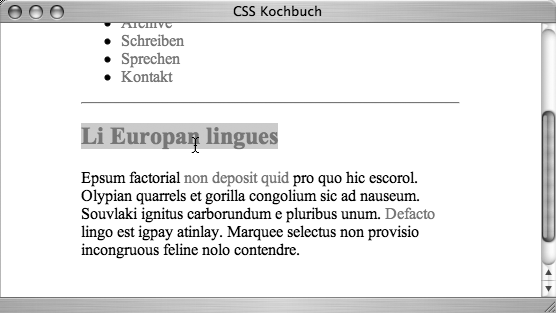
Figure: Unwanted rollover effect on a heading.
<h2><a name="europan">Li Europan lingues</a></h2>See also
The CSS 2.1 specification on the pseudo-classes :active and :hover and an explanation of links and specificity.
Copyright of the German edition © 2007 by O’Reilly Verlag GmbH & Co. KG
You may print the online version for your private use.
Otherwise, this chapter from “CSS Kochbuch” is subject to the same conditions as the bound edition: the work, including all its parts, is protected by copyright. All rights reserved, including reproduction, translation, microfilming, and storage and processing in electronic systems.
O’Reilly Verlag GmbH & Co. KG, Balthasarstr. 81, 50670 Köln