

XML technologies / CSS / Advanced websites with CSS / Behind the scenes / How inheritance in CSS works
(Excerpt from “CSS − Advanced websites with Cascading Stylesheets” by Rachel Andrew & Dan Shafer)
Before stylesheet properties and behavior, understand a key CSS principle: inheritance and how CSS handles it.
Picture a family tree starting with your great-grandfather, then his children including his only son, your grandfather. Next are your mother and her siblings, then you, your siblings and your children. Traits such as eye or hair color come from ancestors: perhaps your mother’s hair and grandfather’s eyes. Others are not inherited; your son might be much taller than anyone else.
Each HTML element likewise has a place in the document’s inheritance tree. Its root is always the element html. (This holds even for older HTML versions where the element html was optional.) The element html always has two children: head and body.
This figure shows a simple HTML inheritance tree.
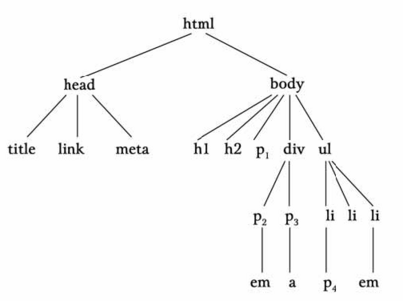
Figure: An HTML inheritance tree.
The document’s head contains the elements title and link, optionally linking an external stylesheet, plus the element meta, providing page information such as encoding.
The element body has five children: h1 and h2, p1 marking a normal paragraph, ul for an indented list, and the block element div. The element div contains two paragraphs p2 and p3, one containing the emphasis element em and the other the anchor a. ul is parent to three list items li, one containing an element em and another a paragraph p4.
Except the root html, every element has a direct parent element. In the figure, the parent of p1 is the element body, while p1 is its direct child, a child of body.
Most elements descend from several ancestors at different levels. Here, p1 descends from body and html. p2 and p3 descend from the elements div, body and html. p4 has the most ancestors: li, ul, body and html. Understanding hierarchy matters for two reasons:
First, selectors depend on document hierarchy. A descendant selector differs from one restricted to the direct parent. For details, see Selectors and CSS rule structure.
Second, elements inherit unspecified properties from parents. Without an explicit property
font-familyfor the elementh1, it uses the font of the tag<body>. If that has nofont-familyeither, text inbodyand the headingh1use the browser default. By contrast, an element’s propertywidthdoes not affect children’s widths becausefont-familyis inherited andwidthis not.
All automatically inherited properties appear in the CSS property reference. Any property can take the special value inherit to use its parent’s value.
Inheritance can be hard to follow in complex HTML, especially tangled tables and inline styles. Investigate it: unexpected inheritance often causes stylesheet problems, and a few adjustments can rescue the page.
Copyright © 2006 of the German translation, dpunkt.verlag GmbH
You may print the online version for your private use.
Otherwise, this chapter from “CSS − Anspruchsvolle Websites mit Cascading Stylesheets” is subject to the same conditions as the bound edition: the work, including all its parts, is protected by copyright. All rights reserved, including reproduction, translation, microfilming, and storage and processing in electronic systems.
dpunkt.verlag GmbH, Ringstraße 19, 69115 Heidelberg
back to top