

XML technologies / CSS / CSS Cookbook / Hacks, workarounds and troubleshooting / Special values for Internet Explorer 5.x for Windows
(Excerpt from “CSS Kochbuch” by Christopher Schmitt)
Problem
You want Internet Explorer 5.x for Windows to use special values for certain properties, such as width, to compensate for Microsoft’s box-model implementation.
Solution
First define the values to be used in Internet Explorer 5.x for Windows. Then use the so-called Star HTML hack to add the correct values for other browsers to the stylesheet:
div#content {
 /* Wert für alle Browser */
 width: 500px;
}
* html div#content {
 /* Wert für alle IE-Browser */
 width: 566px;
 /* Wert nur für IE/Mac */
 w\idth: 500px;
}
Discussion
According to the CSS specification, the property width refers to the width of a box’s content area, explicitly excluding padding, margins and any border. The following code, for example, sets the element’s width to 500 pixels:
div#content {
 width: 500px;
 padding: 33px;
 margin: 50px;
 background-color: #666;
}
In the following figure, the box appears to be 566 pixels wide. The additional 66 pixels come from padding added to the box width.
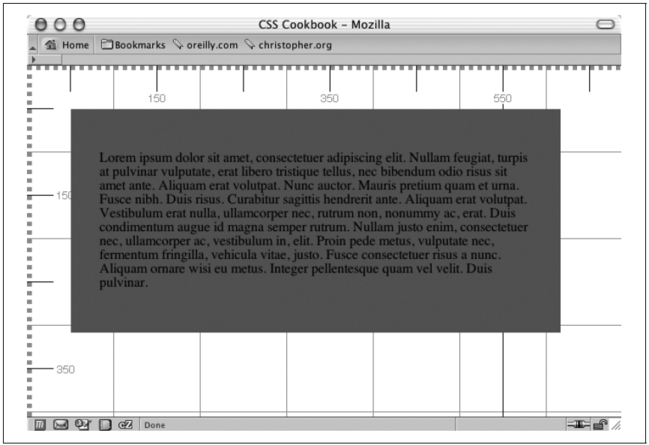
Figure: The correctly implemented box model by Mozilla.
In Internet Explorer 5.x for Windows, the width does not match the specification. Microsoft instead includes borders and padding in the total width. To calculate the actual content width in IE 5.x, subtract borders and padding from the specified total width:
Value of the property
width
– left border – left padding
– right border – right padding
= actual width of Microsoft’s element box
Thus, the width calculated by Internet Explorer 5.x for Windows is only 434 pixels (see the next figure):
500px – 33px – 33px = 434px
The difference from the originally defined content width is therefore 66 pixels.
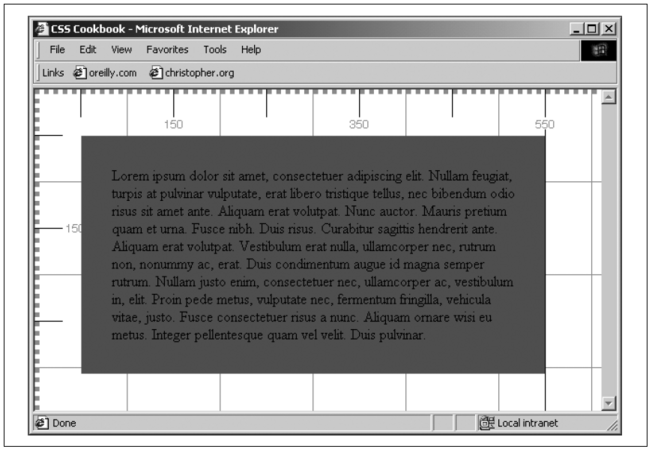
Figure: The box model implemented by IE 5.x for Windows.
The incorrect box-model rendering in Internet Explorer 5.x for Windows, and Internet Explorer 6 for Windows in quirks mode, occurs when padding and borders are defined for an element.
The Star HTML hack
In the Star HTML hack, the first rule defines values for all browsers.
div#content {
 /* Wert für alle Browser */
 width: 500px;
}
...
The second rule sets values for Internet Explorer. The selector used here selects the element div with the attribute id set to content. This element div must in turn descend from the element html, which can descend from any element (*).
div#content {
 /* Wert für alle Browser */
 width: 500px;
}
* html div#content {
 /* Wert für alle IE-Browser */
 width: 566px;
...
In fact, the element html is the root element for all subsequent selectors and therefore cannot descend from any other element. Standards-compliant browsers simply ignore this incorrect syntax. However, due to a bug, Internet Explorer 5.x for Windows accepts it. We can exploit this to define rules specific to that browser, invisible to others. Because of the cascade, the second rule overrides the first in Internet Explorer, changing the element’s width from 500px to 566px.
Finally, we correct the result for Internet Explorer for Macintosh. Although part of the IE family, it renders the box model correctly. We therefore need a way to reset the width previously changed for all IE browsers.
Again we exploit a bug to supply a separate rule to Internet Explorer for Macintosh:
div#content {
 /* Wert für alle Browser */
 width: 500px;
}
* html div#content {
 /* Wert für alle IE-Browser */
 width: 566px;
 /* Wert nur für IE/Mac */
 w\idth: 500px;
}
Normally, the backslash escapes special characters, such as \O’Reilly. Although \i is not a valid CSS special character, Internet Explorer for Windows treats it as one and overlooks the property width. Internet Explorer for Macintosh correctly ignores the backslash. Since we previously restricted this rule to Internet Explorer in general with the Star HTML hack, we can correct the value for IE/Mac.
Another approach: Tantek’s box model hack
Tantek Çelik, formerly Microsoft’s representative in the W3C CSS and HTML working groups, first showed how to use the “box model hack”, also known as the “voice-family hack”, to fix Internet Explorer 5.x for Windows and its incorrect box model. This also works in Internet Explorer 6 for Windows in quirks mode, which uses the same incorrect model.
div#content {
 /* Werte für IE/Win zuerst, danach zweimal die korrekten Werte für andere Browser */
 background-color: red;
 voice-family: "\"}\"";
 voice-family: inherit;
 background-color: green;
}
html>div#content
 background-color: green;
}
The box model is a fundamental concept in CSS web design, so eliminating all inconsistencies caused by this problem should be a top priority.
The “box model hack” exploits a bug to end the rule set early. All declarations following the property voice-family are ignored by IE/Win 5.x. Since other browsers, such as Opera 5, may react badly to this hack, add the following CSS rule to your stylesheet:
html>div#content
 background-color: green;
}
This rule, also known as the “be nice to Opera” rule, uses a child selector to make the property value available again to browsers such as Opera 5. These browsers may have problems with the “box model hack”, but handle child selectors correctly.
See also
The CSS 2.1 specification for information about the property
widthas part of the box model,Box Model Hack for Tantek Çelik’s explanation of the “box model hack” (German translation),
the CSS 2.1 specification for information about the property
voice-familyandan updated version of the “box model hack” and further background information.
Copyright of the German edition © 2007 by O’Reilly Verlag GmbH & Co. KG
You may print the online version for your private use.
Otherwise, this chapter from “CSS Kochbuch” is subject to the same conditions as the bound edition: the work, including all its parts, is protected by copyright. All rights reserved, including reproduction, translation, microfilming, and storage and processing in electronic systems.
O’Reilly Verlag GmbH & Co. KG, Balthasarstr. 81, 50670 Köln