

XML technologies / ePUB / ePub für (In)Designer / Images, boxes and other design elements / Creating drop caps
(Excerpt from “ePub für (In)Designer — Mit InDesign Schritt für Schritt zum E-Book” by Sascha Heck & Yves Apel)
CS5.5:
Good news first: CS5.5 users need do nothing: InDesign automatically exports drop caps correctly. Unfortunately its automatically named CSS class is uninformative, usually char-style-override-1.
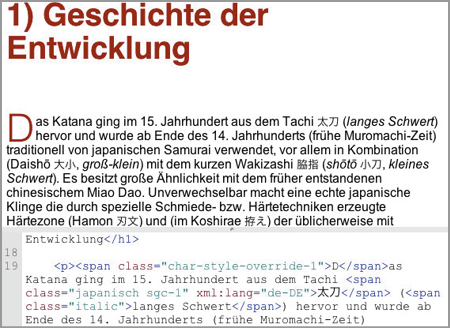
Figure: A minor CS5.5 flaw—the drop-cap class
receives an uninformative name.
CS5.5:
Earlier versions ignore drop-cap settings but export the class to CSS, requiring editing afterward.
Export requires meticulous styles throughout, but that alone is insufficient. Even with a paragraph style and a character style defining the drop cap, InDesign’s Character Styles panel does not show the selected style. InDesign applies it indirectly through the paragraph style, knowing internally that it is needed.
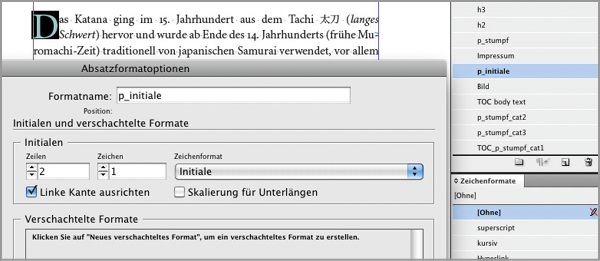
Figure: Creating drop caps through character styles in paragraph styles.
Explicitly select the drop cap in text and click its style in the Character Styles panel. Its class now exports and appears in CSS, like this:
span.initiale {
  font-weight: normal;
  font-style: normal;
  color: #b30000;
  font-family: "Minion Pro";
  font-size: 0.88em;
  line-height: 1.33em;
  text-decoration: none;
  font-variant: normal;
}
Color is already included; other properties do not directly affect appearance. First change font-size, for example to 3 em. This lets e-readers scale text proportionally. Enlarging iBooks text also enlarges the drop cap. Experiment to find the right font-size according to your typographic preferences.
Add the next property manually: float: left; This integrates the drop cap into the paragraph instead of protruding above it.
To position it correctly, experiment with margin-top, margin-left, margin-right and margin-bottom. These em values set spacing above (top), left (left), right (right) and below (bottom). Experiment again to find suitable values. Our example uses:
span.initiale {
  font-weight: normal;
  font-style: normal;
  color: #b30000;
  font-family: "Minion Pro";
  font-size: 2.5em;
  float: left;
  margin-top: 0.05em;
  margin-right: 0.05em;
  line-height: 1em;
  text-decoration: none;
  font-variant: normal;
}
Figure: Drop cap after extending CSS.
Copyright © dpunkt.verlag GmbH 2012
You may print the online version for your private use.
Otherwise, this chapter from “ePub für (In)Designer” is subject to the same terms as the printed edition: the work and all its parts are protected by copyright. All rights reserved, including reproduction, translation, microfilming, and storage and processing in electronic systems.
dpunkt.verlag GmbH, Wieblinger Weg 17, 69123 Heidelberg, fon 06221-14830, fax 06221-148399, hallo(at)dpunkt.de