

XML technologies / ePUB / ePub für (In)Designer / Images, boxes and other design elements / Defining a background color
(Excerpt from “ePub für (In)Designer — Mit InDesign Schritt für Schritt zum E-Book” by Sascha Heck & Yves Apel)
Background colors are uncommon in e-books. Print uses them mainly for special pages; ePub often overlooks them, although they are easy to add afterward. Two methods let you color either one chapter or the whole book.
Setting one chapter’s background
Open its HTML file in an editor. Find <body> and change it to <body style="background-color: #f8ff95">, where #f8ff95 stands for any color code. To find a specific hexadecimal color, see Defining hexadecimal colors.
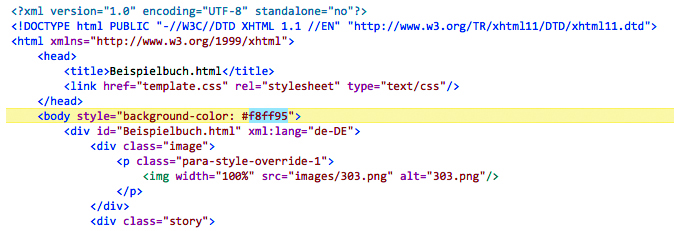
Figure: Specifying a background in HTML.
Changing the whole book’s background
Open the ePub’s template.css file in an editor and add these lines:
body {
  background-color: #f8ff95;
}
The background now has its new color.
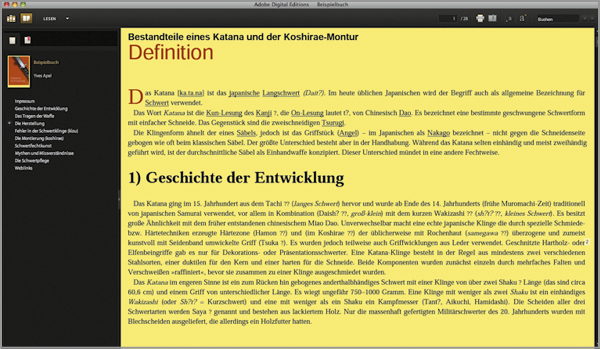
Figure: Yellow background in Adobe Digital Editions.
Again, not every reader supports background colors.
iBooks has normal and sepia modes and, since 1.5, a night mode intended to ease reading in darkness. Night mode overrides background-color settings.
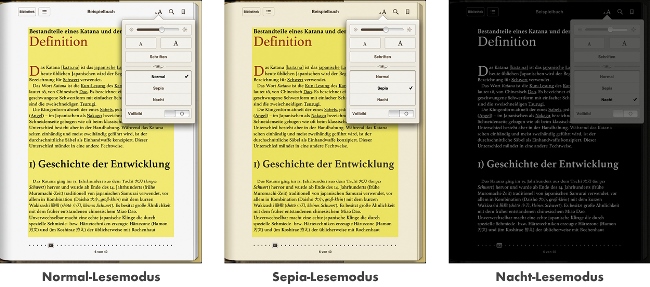
Figure: Normal, sepia and night modes in iBooks.
Copyright © dpunkt.verlag GmbH 2012
You may print the online version for your private use.
Otherwise, this chapter from “ePub für (In)Designer” is subject to the same terms as the printed edition: the work and all its parts are protected by copyright. All rights reserved, including reproduction, translation, microfilming, and storage and processing in electronic systems.
dpunkt.verlag GmbH, Wieblinger Weg 17, 69123 Heidelberg, fon 06221-14830, fax 06221-148399, hallo(at)dpunkt.de