

XML technologies / ePUB / ePub für (In)Designer / Images, boxes and other design elements / Creating drop caps / Images as drop caps
(Excerpt from “ePub für (In)Designer — Mit InDesign Schritt für Schritt zum E-Book” by Sascha Heck & Yves Apel)
For more unusual drop caps, use an image. Reader display varies greatly, while text-only drop caps are more consistent. Anchor the image in text and wrap it afterward; see Wrapping text around images and boxes.
The procedure is identical in CS5 and CS5.5: copy the image, insert a paragraph before the target paragraph, paste it there and create a new paragraph style, for example named Kassetteninitiale.
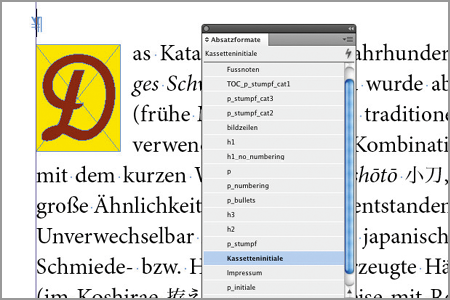
Figure: The drop cap and yellow box are outlined, grouped, then
inserted into a new paragraph above.
Assign Kassetteninitiale to the paragraph, then position the image through Anchored Object Options (menu Object → Anchored Object → Options). This does not affect ePub export, only your InDesign overview.
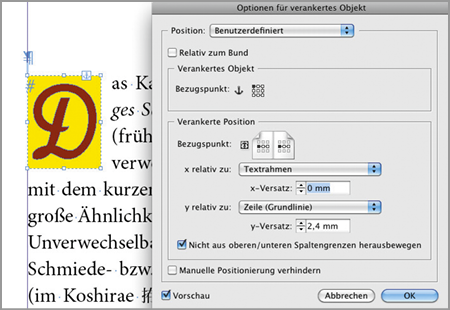
Figure: Position the drop cap through Anchored Object Options.
Opening exported ePub shows a paragraph containing the initial and the following text in another paragraph. Manually change the CSS code to integrate it. The image was exported into Images.
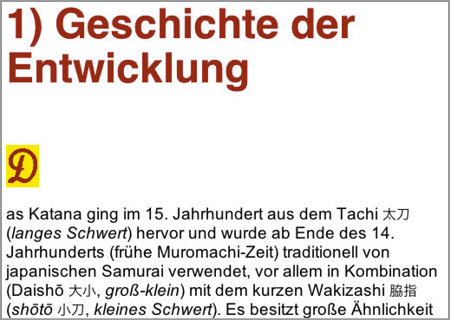
Figure: Drop cap not yet integrated in the editor.
Find the previously defined CSS class kassetteninitiale and add float: left; to integrate the image. Use margin-right, margin-left, margin-top and margin-bottom for spacing, or the shorthand margin: 0.2em 0.5em 0em 0em; clockwise: top, right, bottom, left. Use em to preserve proportional spacing when scaling. As this is an image, remove unnecessary font properties such as fontstyle or fontweight to keep code clean.
p.kassetteninitiale {
  font-weight: normal;
  font-style: normal;
  text-decoration: none;
  font-variant: normal;
  line-height: 0;
  text-align: left;
  color: #000000;
  text-indent: 0px;
  margin-right: 0.5em;
  margin-top: 0.2em;
  margin-bottom: 0em;
  float:left;
}
Figure: Result in Sigil—image drop cap.
Copyright © dpunkt.verlag GmbH 2012
You may print the online version for your private use.
Otherwise, this chapter from “ePub für (In)Designer” is subject to the same terms as the printed edition: the work and all its parts are protected by copyright. All rights reserved, including reproduction, translation, microfilming, and storage and processing in electronic systems.
dpunkt.verlag GmbH, Wieblinger Weg 17, 69123 Heidelberg, fon 06221-14830, fax 06221-148399, hallo(at)dpunkt.de
back to top