

XML technologies / CSS / CSS Cookbook / Page elements / Using a lightbox
(Excerpt from “CSS Kochbuch” by Christopher Schmitt)
Problem
Overlay the current page with an image in a lightbox (see the figure) without opening a browser popup.
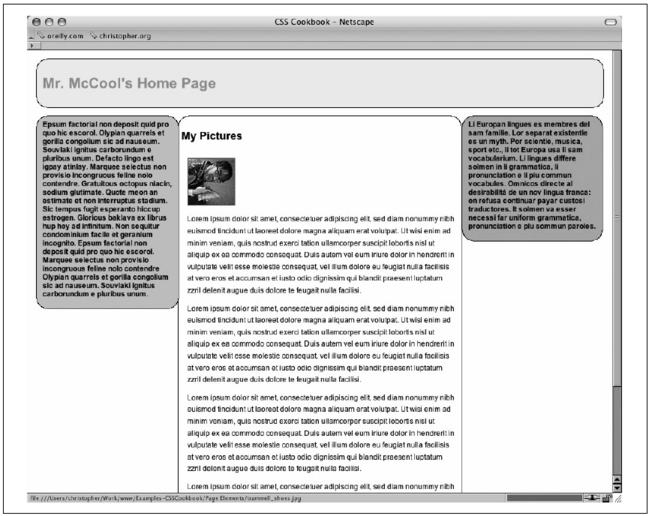
Figure: Default page display.
Solution
Use a special JavaScript.
Besides the JavaScript libraries Prototype and Script.aculo.us, the code includes a dedicated image-overlay script:
<title>Mr. McCool's Homepage</title>
<!-- Struktur für den Lightbox-Effekt -->
<script type="text/javascript" src="prototype.js"></script>
<script type="text/javascript" src="scriptaculous.js?load=effects"></script>
<!-- Skript für die Lightbox einbinden -->
<script type="text/javascript" src="lightbox.js"></script>
Include the stylesheet controlling the overlay’s appearance:
<title>Mr. McCool's Homepage</title>
<script type="text/javascript" src="prototype.js"></script>
<script type="text/javascript" src="scriptaculous.js?load=effects"></script>
<script type="text/javascript" src="lightbox.js"></script>
<link rel="stylesheet" href="lightbox.css" type="text/css" media="screen" />
Link to the overlay image in the page. Give the tag a an extra attribute rel with the value lightbox. Usually the link wraps a thumbnail, as below:
<a href="trammell_shoes.jpg" rel="lightbox" title="Trammell shows off his happy shoes."><img src="trammell_shoes_tn.jpg" alt="Mark Trammel is happy with his shoes." /></a>Clicking the link activates the lightbox (see the next figure).
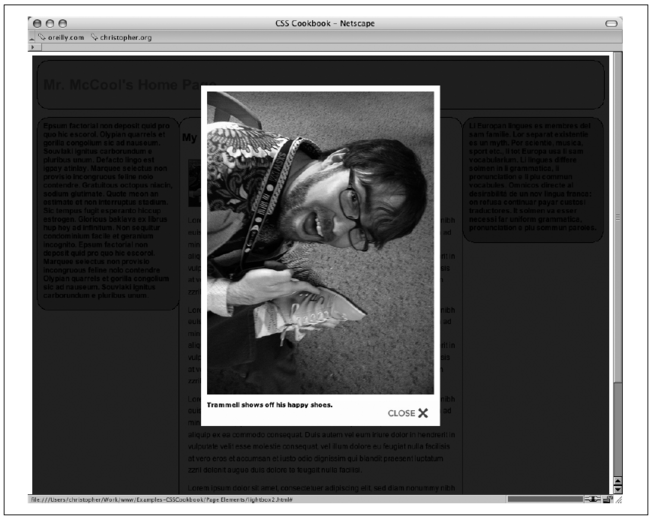
Figure: The lightbox overlays the normal page.
Discussion
The lightbox uses two JavaScript foundations: the Prototype framework and the Script.aculo.us library.
Prototype is an object-oriented library for quickly building JavaScript web applications. More information is available online.
Script.aculo.us is a set of JavaScript libraries. With Prototype, they support dynamic Ajax (Asynchronous JavaScript and XML) interactions.
Using these foundations, Lokesh Dhakar created a way to display images without leaving the thumbnail page.
Setting up the files
Ensure JavaScript and CSS files are correctly linked. If they occupy different directories—here JavaScript in js, CSS in css, both inside _assets —the included code must reflect this.
<script type="text/javascript" src="/_assets/js/prototype.js"></script>
<script type="text/javascript" src="/_assets/js/scriptaculous.js?load=effects"></script>
<script type="text/javascript" src="/_assets/js/lightbox.js"></script>
<link rel="stylesheet" href="/_assets/css/lightbox.css" type="text/css" media="screen" />
Also adjust image paths near the start of the lightbox JavaScript file. Here the images are in img inside _assets:
var fileLoadingImage = "/_assets/img/loading.gif";
var fileBottomNavCloseImage = "/_assets/img/closelabel.gif";
The lightbox stylesheet uses the image property background three times. Ensure these image paths are correct too:
#prevLink, #nextLink {
 width: 49%;
 height: 100%;
 /* Trick IE into showing hover */
 background: transparent url(/_assets/img/blank.gif) no-repeat;
 display: block;
}
#prevLink:hover, #prevLink:visited:hover {
 background: url(/_assets/img/prevlabel.gif) left 15% no-repeat;
}
#nextLink:hover, #nextLink:visited:hover {
 background: url(/_assets/img/nextlabel.gif) right 15% no-repeat;
}
Slideshows
The lightbox also supports slideshows rather than single images, as shown below.
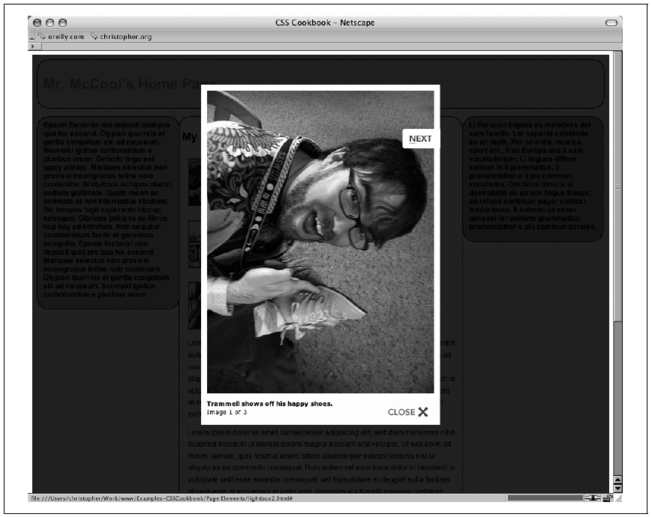
Figure: The lightbox can display a slideshow.
Extend the attribute rel so that the value lightbox is followed by a gallery name in square brackets. These images were taken in Austin, Texas, so our gallery is named austin:
<ul>
  <li><a href="trammell_shoes.jpg" rel="lightbox[austin]" title="Trammell shows off his happy shoes."><img src="trammell_shoes_tn.jpg" alt="Mark Trammell is happy with his shoes." /></a></li>
  <li><a href="molly_andy.jpg" rel="lightbox[austin]" title="Molly and Andy pose for a shot."><img src="molly_andy_tn.jpg" alt="Molly and Andy pose for a shot." /></a></li>
  <li><a href="msjen.jpg" rel="lightbox[austin]" title="Ms. Jen at breakfast."><img src="msjen_tn.jpg" alt="Ms. Jen at breakfast." /></a></li>
</ul>
All images in one slideshow must share a gallery name.
Known browser issues
The lightbox effect requires Prototype support. At the time of writing, Prototype worked in these browsers:
Microsoft Internet Explorer for Windows 6+
Mozilla Firefox 1.0+
Mozilla 1.7+
Apple Safari 1.2+
Unsupported browsers do not exclude users: they simply follow the link in the attribute href.
<a href="trammell_shoes.jpg" rel="lightbox" title="Trammell shows off his happy shoes."><img src="trammell_shoes_tn.jpg" alt="Mark Trammel is happy with his shoes." /></a>This example displays the image named trammel_shoes.jpg in the lightbox.
Copyright of the German edition © 2007 by O’Reilly Verlag GmbH & Co. KG
You may print the online version for your private use.
Otherwise, this chapter from “CSS Kochbuch” is subject to the same conditions as the bound edition: the work, including all its parts, is protected by copyright. All rights reserved, including reproduction, translation, microfilming, and storage and processing in electronic systems.
O’Reilly Verlag GmbH & Co. KG, Balthasarstr. 81, 50670 Köln