

XML technologies / CSS / CSS Cookbook / Page elements / Borders
(Excerpt from “CSS Kochbuch” by Christopher Schmitt)
Problem
A web page should have a visible border, as shown in the following figure.
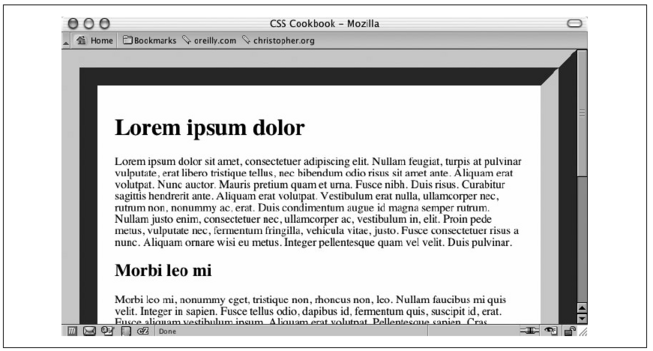
Figure: A web page with a border.
Solution
Use the property border for the element body:
body {
 margin: 0;
 padding: 1.5em;
 border: 50px #666 ridge;
}
Discussion
The property border is a shorthand property that defines the width, color and style of an element’s border in one step instead of three. To use the individual properties instead, replace the line border: 50px #666 ridge; with the following three lines:
border-width: 50px;
border-color: #666;
border-style: ridge;
Naturally, you can define another border style, such as dotted, dashed or solid (see the following figure).
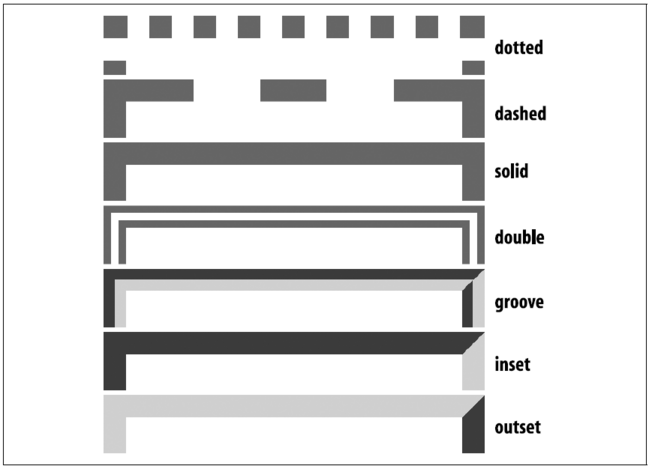
Figure: Border styles available in CSS.
As you can see, shadows in the border style groove are reversed compared with the value ridge used in the solution.
Warning: There are minor difficulties in Internet Explorer 5 for Macintosh and Internet Explorer for Windows: the border style dotted appears as rather angular circles, whereas in Netscape 6+, Firefox, Mozilla and Safari it resembles a row of blocks.
Images can also use border styles other than the default solid border. Try the values groove or double, as shown in the next figure:
img.left {
 float: left;
 margin-right: 7px;
 margin-bottom: 3px;
 border: 4px double #666;
}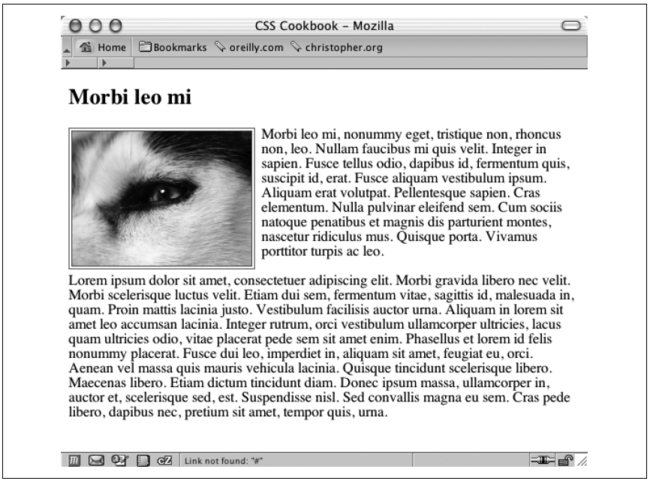
Figure: An image with a double border.
See also
The recipe Bordered pull quotes for defining custom border styles for pull quotes.
Copyright of the German edition © 2007 by O’Reilly Verlag GmbH & Co. KG
You may print the online version for your private use.
Otherwise, this chapter from “CSS Kochbuch” is subject to the same conditions as the bound edition: the work, including all its parts, is protected by copyright. All rights reserved, including reproduction, translation, microfilming, and storage and processing in electronic systems.
O’Reilly Verlag GmbH & Co. KG, Balthasarstr. 81, 50670 Köln