

XML technologies / CSS / CSS Cookbook / Page elements / Removing page margins
(Excerpt from “CSS Kochbuch” by Christopher Schmitt)
Problem
Remove the white space between the page edges and the browser window’s border, as shown in the next figure.
Solution
Set the properties margin and padding to zero for the elements html and body:
html, body {
 margin: 0;
 padding: 0;
 position: absolute;
 top: 0;
 left: 0;
}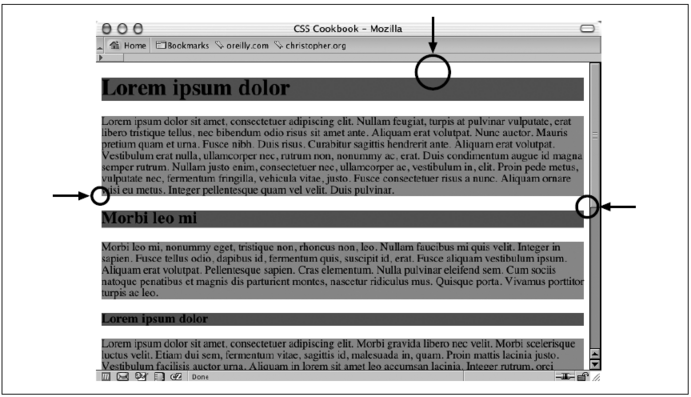
Figure: Page margins appearing as white space along the page edges.
Setting the properties padding and margin (padding and margin) for the element body to 0 produces a full-bleed effect. White space around the web page is removed; units do not matter in this case.
Depending on the page’s content, you may need to adjust more properties besides margin and padding to remove the margins completely. Defaults for particular elements, defined in the browser’s stylesheet, can have unexpected side effects when you change page margins. For example, if the first child of body is an element h1, unwanted white space may appear above the heading (see the following figure). The headings and paragraphs have gray backgrounds in the figure to make the effect easier to see.
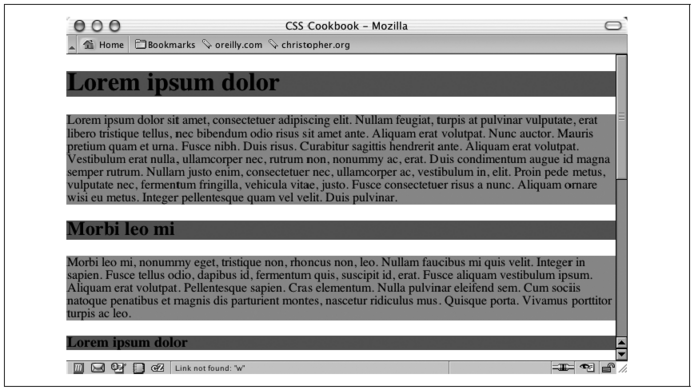
Figure: Unwanted white space above the heading at the top of the browser window.
To retain the full-bleed effect in this situation, set padding and margins for the affected elements (here h1, h2 and h3), as well as the element body, to 0. If this is not possible, for example because bottom padding or margin needs a different value, you can instead set margin-top and padding-top to 0 to remove the white space above the elements:
html, body {
 margin: 0;
 padding: 0;
 position: absolute;
 top: 0;
 left: 0;}
h1, h2, h3 {
 margin-top: 0;
 padding-top: 0;
 background-color: #666;
}
p {
 background-color: #999;
}
As the next figure shows, these instructions also achieve the desired effect: the gray background is now flush with the browser viewport.
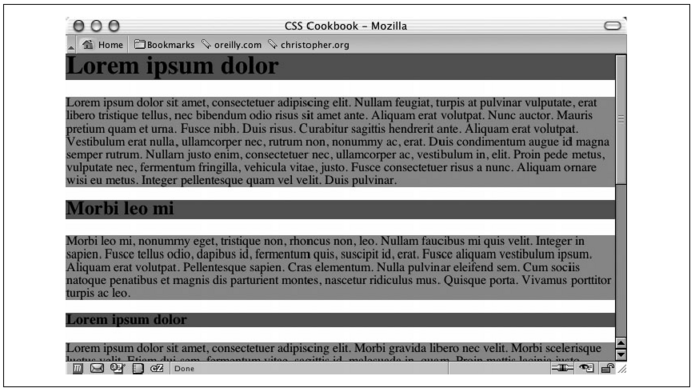
Figure: White space above the heading has been removed.
See also
The recipe Single-column layouts for creating single-column layouts by giving the properties margin and padding values other than 0.
Copyright of the German edition © 2007 by O’Reilly Verlag GmbH & Co. KG
You may print the online version for your private use.
Otherwise, this chapter from “CSS Kochbuch” is subject to the same conditions as the bound edition: the work, including all its parts, is protected by copyright. All rights reserved, including reproduction, translation, microfilming, and storage and processing in electronic systems.
O’Reilly Verlag GmbH & Co. KG, Balthasarstr. 81, 50670 Köln