

XML technologies / CSS / CSS Cookbook / Page elements / Colored scrollbars
(Excerpt from “CSS Kochbuch” by Christopher Schmitt)
Problem
You want to customize the colors of browser window scrollbars.
Solution
Use scrollbar color properties in browsers that support them:
body,html {
 scrollbar-face-color: #99ccff;
 scrollbar-shadow-color: #ccccff;
 scrollbar-highlight-color: #ccccff;
 scrollbar-3dlight-color: #99ccff;
 scrollbar-darkshadow-color: #ccccff;
 scrollbar-track-color: #ccccff;
 scrollbar-arrow-color: #000033;
}
Warning: Browser vendors are not expected to support these properties because they are not part of the W3C CSS recommendation. This solution works only in KDE Konqueror and Internet Explorer 5.5+ for Windows. Other browsers simply ignore the rules.
Discussion
A scrollbar may seem simple, but its many components form a controllable three-dimensional object. The following figure shows its properties. A completely new color scheme requires seven separate properties to be adjusted.
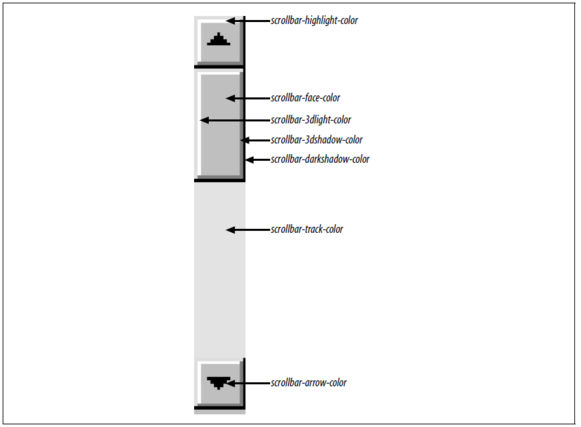
Figure: Proprietary Internet Explorer for Windows CSS properties affecting scrollbars.
Besides browser windows, customize scrollbars on elements textarea in web forms, on framesets, iframes and anything else that can have a scrollbar:
.highlight {
 scrollbar-face-color: #99ccff;
 scrollbar-shadow-color: #ccccff;
 scrollbar-highlight-color: #ccccff;
 scrollbar-3dlight-color: #99ccff;
 scrollbar-darkshadow-color: #ccccff;
 scrollbar-track-color: #ccccff;
 scrollbar-arrow-color: #000033;
}

<form>
  <textarea class="highlight"></textarea>
</form>
When a page lacks a valid declaration of DOCTYPE, Internet Explorer for Windows enters quirks mode (for nonstandard behavior) and recognizes scrollbar properties in declarations using body as a selector. With a valid document type declaration, Internet Explorer for Windows uses standards mode and also recognizes the selector html. To handle document type changes, group the selectors body and html with identical CSS rules, as shown here:
html .highlight, body .highlight {
 scrollbar-face-color: #99ccff;
 scrollbar-shadow-color: #ccccff;
 scrollbar-highlight-color: #ccccff;
 scrollbar-3dlight-color: #99ccff;
 scrollbar-darkshadow-color: #ccccff;
 scrollbar-track-color: #ccccff;
 scrollbar-arrow-color: #000033;
}
Copyright of the German edition © 2007 by O’Reilly Verlag GmbH & Co. KG
You may print the online version for your private use.
Otherwise, this chapter from “CSS Kochbuch” is subject to the same conditions as the bound edition: the work, including all its parts, is protected by copyright. All rights reserved, including reproduction, translation, microfilming, and storage and processing in electronic systems.
O’Reilly Verlag GmbH & Co. KG, Balthasarstr. 81, 50670 Köln