XML technologies / XSL-FO / Reference / Antenna House Formatter XSL Extensions / Properties / overprint
(Excerpt from “XSL-FO ― The Reference” by Manuel Montero Pineda & Steffen Herkert, 2016, dpunkt.verlag)
A | B | C | D | E | F | G | H | I | J | K | L | M | N | O | P | Q | R | S | T | U | V | W | X | Y | Z
Category Printing Control
Specifies the overprint. V6.3MR2[no-LT]
Value: | auto | <overprint># |
Initial: | auto |
Applies to: | all formatting objects |
Inherited: | yes |
Percentages: | N/A |
<overprint> | = | <opcolor> [[stroke || paint || [full | nonzero]] | none]? |
<opcolor> | = | <color> | k100 | separation | all |
Values have the following meanings.
auto | The setting of the overprint in the Option Setting File is adopted. If you specify overprint="k100" in the Option Setting File, even if nothing is specified in FO, black overprinting will be done on all pages. |
<color> | Specifies a color you want to apply the overprint. A color with alpha value cannot be specified. |
k100 | Applies the overprint to rgb-icc(#CMYK,0,0,0,1). |
separation | Applies the overprint to the separation color shown rgb-icc (#Separation). The registration color is not included. |
all | Applies the overprint to all colors except for a color with alpha value. |
stroke | Applies the overprint for the line stroke. |
paint | Applies the overprint for the paint. |
full | Specifies the operation in case the color ingredient is 0 when applying the overprint. When full is specified, the color ingredient is set to 0, when nonzero is specified, the color ingredient is not changed. (It is considered as no color). This setting is effective only with CMYK. |
nonzero | Specifies the operation in case the color ingredient is 0 when applying the overprint. When full is specified, the color ingredient is set to 0, when nonzero is specified, the color ingredient is not changed. (It is considered as no color). This setting is effective only with CMYK. |
none | The overprint is not applied. |
If you specify only the color as follows;
axf:overprint="<color>"
it is considered as follows;
axf:overprint="<color> stroke paint nonzero"
In addition, when neither stroke nor paint is specified, it is considered that stroke and paint are specified. Please specify none to remove them from the overprint.
axf:overprint="k100, rgb-icc(#CMYK,0,0,0,1) stroke full, all paint"
As specified above, when a certain color can be interpreted as multiple settings, the settings will be investigated in the following order and the first matched setting will be adopted.
<color>
k100
separation
all
The effect of the overprint varies by the actual printing environment, in relation between the background color and the foreground color with overprint specified. The effect of the typical overprint by the color space is shown below. When rgb-conversion="cmyk" is specified in the Option Setting File, RGB serves as CMYK.
Foreground (overprint is specified) | |||||
CMYK | Separation | RGB | Grayscale | ||
Background | CMYK | Yes | Yes | No | No |
Separation | Yes | Yes | Yes | Yes | |
RGB | Yes | Yes | No | No | |
Grayscale | No | Yes | No | No | |
See also 4.5.6 Overprint Control in "PDF Reference" for more details.
CAUTION: | The overprint is effective only with the PDF output. It is invalid when printing to paper directly. Also it is not applied to shading and the form field. |
CAUTION: | The setting does not affect on the embedded PDF. Please create PDF by specifying the overprint before embedding it. |
This property is not available with AH Formatter V6.3 Lite.
XSL-FO sample:
<fo:root xml:lang="ja" xmlns:fo="http://www.w3.org/1999/XSL/Format" xmlns:cpfo="http://www.compart.net/xmlns/cpfo" xmlns:svg="http://www.w3.org/2000/svg" xmlns:axf="http://www.antennahouse.com/names/XSL/Extensions">
<axf:document-info name="document-title" value="オーバープリントの設定例"/>
<axf:document-info name="author" value="Antenna House, Inc."/>
<fo:layout-master-set>
<fo:simple-page-master page-height="297mm" page-width="210mm" margin-top="10mm" margin-left="20mm" margin-right="20mm" margin-bottom="10mm" master-name="PageMaster1">
<fo:region-after extent="7mm"/>
<fo:region-body margin-top="0mm" margin-left="0mm" margin-right="0mm" margin-bottom="10mm"/>
</fo:simple-page-master>
</fo:layout-master-set>
<fo:page-sequence master-reference="PageMaster1">
<fo:static-content flow-name="xsl-region-after">
<fo:block font-size="0.8em" text-align="right" color="green">
<fo:basic-link external-destination="http://www.antenna.co.jp/AHF/">
Antenna House, Inc.
</fo:basic-link>
</fo:block>
</fo:static-content>
<fo:flow flow-name="xsl-region-body" font-family="serif" font-size="1em" line-height="1.6" axf:hyphenate-hyphenated-word="false" hyphenate="true">
<fo:block span="all" font-family="sans-serif" font-size="2em" font-weight="bold" line-height="2" space-before="1em" space-after="1em" space-before.conditionality="retain" space-after.conditionality="retain" background-color="#EEEEEE">
<fo:block start-indent="1em" end-indent="1em">
オーバープリントの設定例
</fo:block>
</fo:block>
<fo:block span="all" space-before="1em" space-after="1em" space-after.conditionality="retain" text-indent="0em" border="1pt solid #9999FF" start-indent="0.5em" end-indent="0.5em" padding="0.5em" text-align="justify">
<fo:block>
axf:overprint の設定によりオーバープリントを指定できます。オーバープリントは文字や図形などオブジェクトの色が重なって配置された場合に上下のオブジェクトの色を重ねて印刷する状態のことです。axf:overprint で設定できる値は、"<color>":オーバープリントを適用するカラーを指定、"k100":rgb-icc(#CMYK,0,0,0,1) に適用、"separation":rgb-icc(#Separation) で示されるセパレーションカラーに適用、"all":すべてのカラーに適用、"stroke":線の描画に対して適用、"paint":塗りの描画に対して適用などがあります。詳しい機能、制限などはオンラインマニュアルの「
<fo:inline text-decoration="underline" color="blue">
<fo:basic-link external-destination="http://www.antenna.co.jp/AHF/help/v63/ahf-ext.html#axf.overprint">
axf:overprint
</fo:basic-link>
</fo:inline>
」をご覧ください。
</fo:block>
</fo:block>
<fo:block space-before="1em" font-family="sans-serif" font-size="1.2em" font-weight="bold" text-indent="0em" line-height="2" keep-with-next.within-column="always">
axf:overprint が指定されているサンプル
</fo:block>
<fo:block>
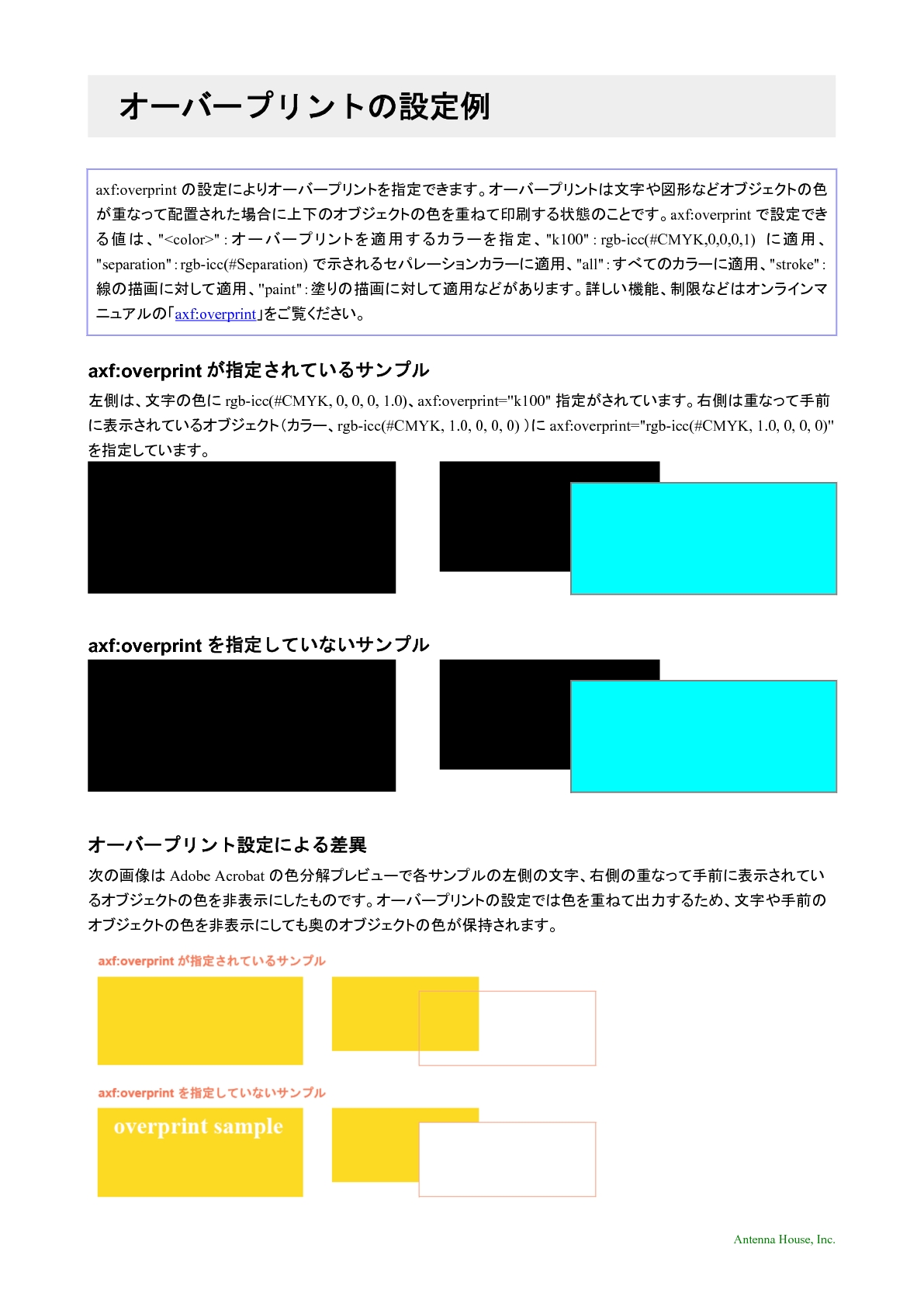
左側は、文字の色に rgb-icc(#CMYK, 0, 0, 0, 1.0)、axf:overprint="k100" 指定がされています。右側は重なって手前に表示されているオブジェクト(カラー、rgb-icc(#CMYK, 1.0, 0, 0, 0) )に axf:overprint="rgb-icc(#CMYK, 1.0, 0, 0, 0)" を指定しています。
</fo:block>
<fo:block font-size="1.5em" space-after="7em" text-indent="1em">
<fo:block-container absolute-position="absolute" top="25mm" left="0mm" width="70mm" height="30mm" background-color="rgb-icc(#Separation, 'PANTONE Process Yellow C')">
<fo:block font-size="1.5em" font-weight="bold" color="rgb-icc(#CMYK, 0, 0, 0, 1.0)" axf:overprint="k100">
overprint sample
</fo:block>
</fo:block-container>
<fo:block-container absolute-position="absolute" top="25mm" left="80mm" width="50mm" height="25mm" background-color="rgb-icc(#Separation, 'PANTONE Process Yellow C')"/>
<fo:block-container absolute-position="absolute" top="30mm" left="110mm" width="60mm" height="25mm" background-color="rgb-icc(#CMYK, 1.0, 0, 0, 0)" axf:overprint="rgb-icc(#CMYK, 1.0, 0, 0, 0)" border="thin solid gray"/>
</fo:block>
<fo:block space-before="1em" font-family="sans-serif" font-size="1.2em" font-weight="bold" text-indent="0em" line-height="2" keep-with-next.within-column="always">
axf:overprint を指定していないサンプル
</fo:block>
<fo:block font-size="1.5em" space-after="7em" text-indent="1em">
<fo:block-container absolute-position="absolute" top="70mm" left="0mm" width="70mm" height="30mm" background-color="rgb-icc(#Separation, 'PANTONE Process Yellow C')">
<fo:block font-size="1.5em" font-weight="bold" color="rgb-icc(#CMYK, 0, 0, 0, 1.0)">
overprint sample
</fo:block>
</fo:block-container>
<fo:block-container absolute-position="absolute" top="70mm" left="80mm" width="50mm" height="25mm" background-color="rgb-icc(#Separation, 'PANTONE Process Yellow C')"/>
<fo:block-container absolute-position="absolute" top="75mm" left="110mm" width="60mm" height="25mm" background-color="rgb-icc(#CMYK, 1.0, 0, 0, 0)" border="thin solid gray"/>
</fo:block>
<fo:block space-before="1em" font-family="sans-serif" font-size="1.2em" font-weight="bold" text-indent="0em" line-height="2" keep-with-next.within-column="always">
オーバープリント設定による差異
</fo:block>
<fo:block>
次の画像は Adobe Acrobat の色分解プレビューで各サンプルの左側の文字、右側の重なって手前に表示されているオブジェクトの色を非表示にしたものです。オーバープリントの設定では色を重ねて出力するため、文字や手前のオブジェクトの色を非表示にしても奥のオブジェクトの色が保持されます。
</fo:block>
<fo:block>
<fo:external-graphic src="img/overprint-1.png" content-width="130mm" content-height="60mm"/>
</fo:block>
</fo:flow>
</fo:page-sequence>
</fo:root>Output: