Tecnologías XML / XSL-FO / Referencia / Extensiones XSL de Antenna House Formatter / Propiedades / overprint
(Extracto de «XSL-FO ― La Referencia» de Manuel Montero Pineda & Steffen Herkert, 2016, dpunkt.verlag)
A | B | C | D | E | F | G | H | I | J | K | L | M | N | O | P | Q | R | S | T | U | V | W | X | Y | Z
Categoría Control de impresión
Define la sobreimpresión. V6.3MR2[no-LT]
Valor: | auto | <overprint># |
Valor inicial: | auto |
Se aplica a: | todos los objetos de formato |
Heredado: | yes |
Porcentajes: | N/A |
<overprint> | = | <opcolor> [[stroke || paint || [full | nonzero]] | none]? |
<opcolor> | = | <color> | k100 | separation | all |
Los valores tienen estos significados.
auto | Se adopta el ajuste overprint del archivo de opciones. Con overprint="k100" en ese archivo, el negro se sobreimprime en todas las páginas aunque no se indique en FO. |
<color> | Indica un color para sobreimprimir. No se permiten colores con alfa. |
k100 | Aplica sobreimpresión a rgb-icc(#CMYK,0,0,0,1). |
separation | Aplica sobreimpresión al color de separación rgb-icc (#Separation), sin incluir el color de registro. |
all | Sobreimprime todos los colores salvo los que tienen alfa. |
stroke | Sobreimprime el trazo de la línea. |
paint | Sobreimprime el relleno. |
full | Define el comportamiento de un componente cero. Con full se fija en 0; con nonzero no cambia y se considera ausente. Solo actúa con CMYK. |
nonzero | Define el comportamiento de un componente cero. Con full se fija en 0; con nonzero no cambia y se considera ausente. Solo actúa con CMYK. |
none | Sin sobreimpresión. |
Si solo se indica el color así,
axf:overprint="<color>"
equivale a:
axf:overprint="<color> stroke paint nonzero"
Si no se indica stroke ni paint, se consideran presentes ambos. Utilice none para retirarlos de la sobreimpresión.
axf:overprint="k100, rgb-icc(#CMYK,0,0,0,1) stroke full, all paint"
Si un color corresponde a varios ajustes, se examinan en este orden y se adopta el primero aplicable.
<color>
k100
separation
all
El efecto depende del entorno de impresión y de la relación entre el fondo y el color de primer plano sobreimpreso. La tabla indica efectos típicos por espacio de color. Con rgb-conversion="cmyk" en el archivo de opciones, RGB se trata como CMYK.
Primer plano con sobreimpresión | |||||
CMYK | Separación | RGB | Escala de grises | ||
Fondo | CMYK | Sí | Sí | No | No |
Separación | Sí | Sí | Sí | Sí | |
RGB | Sí | Sí | No | No | |
Escala de grises | No | Sí | No | No | |
Véase también 4.5.6 Overprint Control en «PDF Reference» para más detalles.
ATENCIÓN: | La sobreimpresión solo actúa en salida PDF, no al imprimir directamente en papel. No se aplica a sombreados ni campos de formulario. |
ATENCIÓN: | El ajuste no modifica PDF integrados. Defina la sobreimpresión al crearlos, antes de integrarlos. |
Esta propiedad no está disponible con AH Formatter V6.3 Lite.
Ejemplo XSL-FO:
<fo:root xml:lang="ja" xmlns:fo="http://www.w3.org/1999/XSL/Format" xmlns:cpfo="http://www.compart.net/xmlns/cpfo" xmlns:svg="http://www.w3.org/2000/svg" xmlns:axf="http://www.antennahouse.com/names/XSL/Extensions">
<axf:document-info name="document-title" value="オーバープリントの設定例"/>
<axf:document-info name="author" value="Antenna House, Inc."/>
<fo:layout-master-set>
<fo:simple-page-master page-height="297mm" page-width="210mm" margin-top="10mm" margin-left="20mm" margin-right="20mm" margin-bottom="10mm" master-name="PageMaster1">
<fo:region-after extent="7mm"/>
<fo:region-body margin-top="0mm" margin-left="0mm" margin-right="0mm" margin-bottom="10mm"/>
</fo:simple-page-master>
</fo:layout-master-set>
<fo:page-sequence master-reference="PageMaster1">
<fo:static-content flow-name="xsl-region-after">
<fo:block font-size="0.8em" text-align="right" color="green">
<fo:basic-link external-destination="http://www.antenna.co.jp/AHF/">
Antenna House, Inc.
</fo:basic-link>
</fo:block>
</fo:static-content>
<fo:flow flow-name="xsl-region-body" font-family="serif" font-size="1em" line-height="1.6" axf:hyphenate-hyphenated-word="false" hyphenate="true">
<fo:block span="all" font-family="sans-serif" font-size="2em" font-weight="bold" line-height="2" space-before="1em" space-after="1em" space-before.conditionality="retain" space-after.conditionality="retain" background-color="#EEEEEE">
<fo:block start-indent="1em" end-indent="1em">
オーバープリントの設定例
</fo:block>
</fo:block>
<fo:block span="all" space-before="1em" space-after="1em" space-after.conditionality="retain" text-indent="0em" border="1pt solid #9999FF" start-indent="0.5em" end-indent="0.5em" padding="0.5em" text-align="justify">
<fo:block>
axf:overprint の設定によりオーバープリントを指定できます。オーバープリントは文字や図形などオブジェクトの色が重なって配置された場合に上下のオブジェクトの色を重ねて印刷する状態のことです。axf:overprint で設定できる値は、"<color>":オーバープリントを適用するカラーを指定、"k100":rgb-icc(#CMYK,0,0,0,1) に適用、"separation":rgb-icc(#Separation) で示されるセパレーションカラーに適用、"all":すべてのカラーに適用、"stroke":線の描画に対して適用、"paint":塗りの描画に対して適用などがあります。詳しい機能、制限などはオンラインマニュアルの「
<fo:inline text-decoration="underline" color="blue">
<fo:basic-link external-destination="http://www.antenna.co.jp/AHF/help/v63/ahf-ext.html#axf.overprint">
axf:overprint
</fo:basic-link>
</fo:inline>
」をご覧ください。
</fo:block>
</fo:block>
<fo:block space-before="1em" font-family="sans-serif" font-size="1.2em" font-weight="bold" text-indent="0em" line-height="2" keep-with-next.within-column="always">
axf:overprint が指定されているサンプル
</fo:block>
<fo:block>
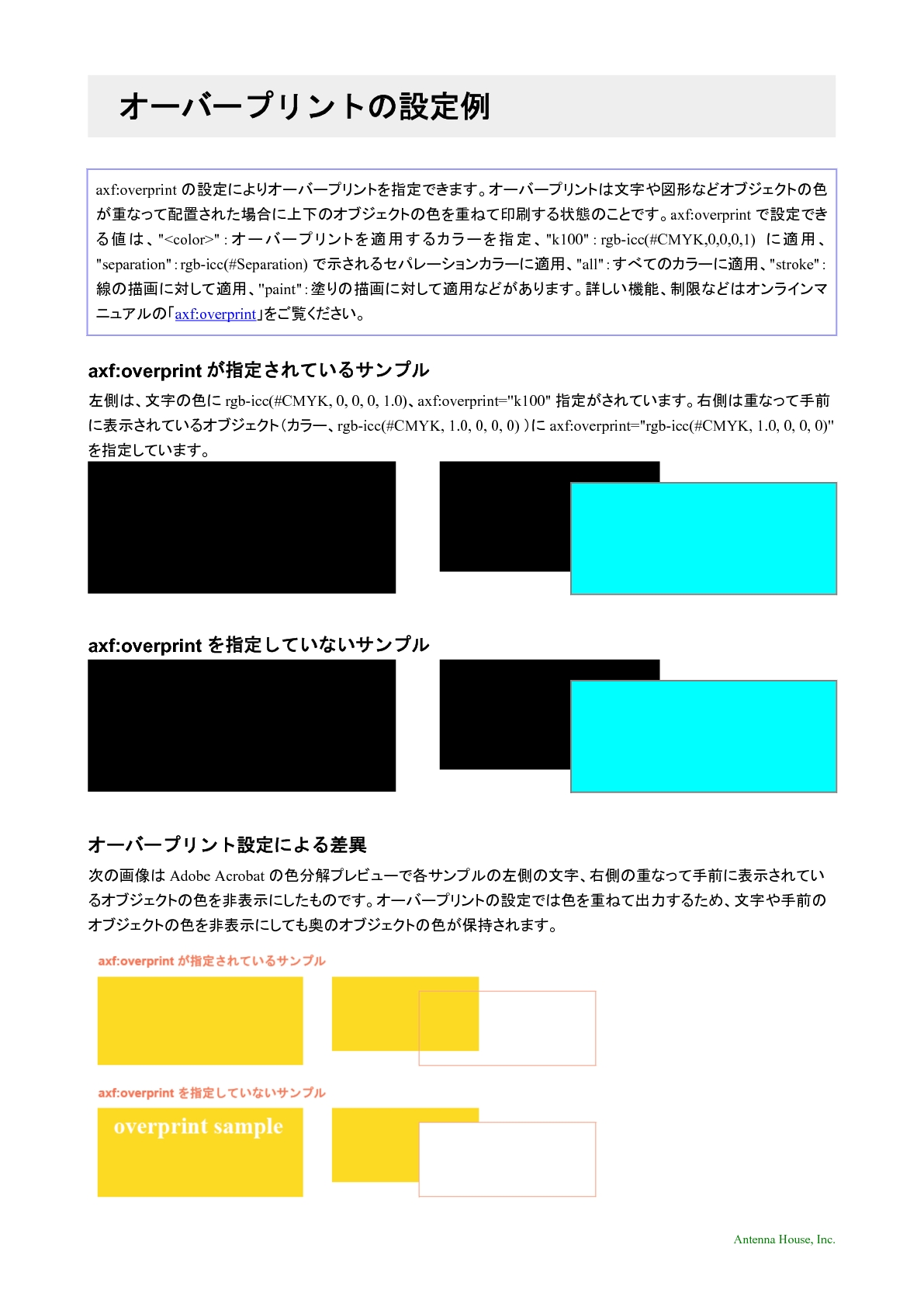
左側は、文字の色に rgb-icc(#CMYK, 0, 0, 0, 1.0)、axf:overprint="k100" 指定がされています。右側は重なって手前に表示されているオブジェクト(カラー、rgb-icc(#CMYK, 1.0, 0, 0, 0) )に axf:overprint="rgb-icc(#CMYK, 1.0, 0, 0, 0)" を指定しています。
</fo:block>
<fo:block font-size="1.5em" space-after="7em" text-indent="1em">
<fo:block-container absolute-position="absolute" top="25mm" left="0mm" width="70mm" height="30mm" background-color="rgb-icc(#Separation, 'PANTONE Process Yellow C')">
<fo:block font-size="1.5em" font-weight="bold" color="rgb-icc(#CMYK, 0, 0, 0, 1.0)" axf:overprint="k100">
overprint sample
</fo:block>
</fo:block-container>
<fo:block-container absolute-position="absolute" top="25mm" left="80mm" width="50mm" height="25mm" background-color="rgb-icc(#Separation, 'PANTONE Process Yellow C')"/>
<fo:block-container absolute-position="absolute" top="30mm" left="110mm" width="60mm" height="25mm" background-color="rgb-icc(#CMYK, 1.0, 0, 0, 0)" axf:overprint="rgb-icc(#CMYK, 1.0, 0, 0, 0)" border="thin solid gray"/>
</fo:block>
<fo:block space-before="1em" font-family="sans-serif" font-size="1.2em" font-weight="bold" text-indent="0em" line-height="2" keep-with-next.within-column="always">
axf:overprint を指定していないサンプル
</fo:block>
<fo:block font-size="1.5em" space-after="7em" text-indent="1em">
<fo:block-container absolute-position="absolute" top="70mm" left="0mm" width="70mm" height="30mm" background-color="rgb-icc(#Separation, 'PANTONE Process Yellow C')">
<fo:block font-size="1.5em" font-weight="bold" color="rgb-icc(#CMYK, 0, 0, 0, 1.0)">
overprint sample
</fo:block>
</fo:block-container>
<fo:block-container absolute-position="absolute" top="70mm" left="80mm" width="50mm" height="25mm" background-color="rgb-icc(#Separation, 'PANTONE Process Yellow C')"/>
<fo:block-container absolute-position="absolute" top="75mm" left="110mm" width="60mm" height="25mm" background-color="rgb-icc(#CMYK, 1.0, 0, 0, 0)" border="thin solid gray"/>
</fo:block>
<fo:block space-before="1em" font-family="sans-serif" font-size="1.2em" font-weight="bold" text-indent="0em" line-height="2" keep-with-next.within-column="always">
オーバープリント設定による差異
</fo:block>
<fo:block>
次の画像は Adobe Acrobat の色分解プレビューで各サンプルの左側の文字、右側の重なって手前に表示されているオブジェクトの色を非表示にしたものです。オーバープリントの設定では色を重ねて出力するため、文字や手前のオブジェクトの色を非表示にしても奥のオブジェクトの色が保持されます。
</fo:block>
<fo:block>
<fo:external-graphic src="img/overprint-1.png" content-width="130mm" content-height="60mm"/>
</fo:block>
</fo:flow>
</fo:page-sequence>
</fo:root>Salida: