

XML technologies / CSS / CSS Cookbook / Images / Defining multiple background images for a CSS style selector.
(Excerpt from “CSS Kochbuch” by Christopher Schmitt)
Problem
You want to assign more than one background image to a CSS selector.
Solution
At the time this book was written, Safari for Macintosh had implemented the CSS 3 specification for assigning multiple background images to a CSS selector.
In CSS 3, the shorthand property background should accept multiple background image values separated by commas (see the following figure):
h2 {
 padding-top: 72px;  /* Genügend große Innenabstände für die Bilder */
 text-align: center;
 background: url(plane.gif) center no-repeat,
             url(mail.gif) top center no-repeat,
             url(printer.gif) 40% 24px no-repeat,
             url(gift.gif) 60% 24px no-repeat;
}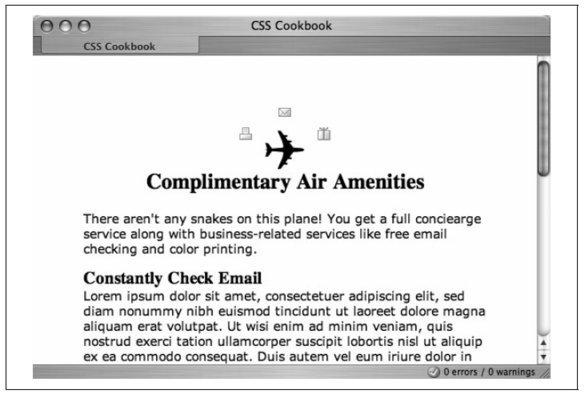
Figure: Multiple icons are defined as the heading’s background images.
Discussion
As with most shorthand properties, code for multiple background images can be split into individual CSS declarations:
h2 {
 padding-top: 72px;  /* Genügend große Innenabstände für die Bilder */
 text-align: center;
 background: url(plane.gif), url(mail.gif), url(printer.gif), url(gift.gif);
 background-position: center, top center, 40% 24px, 60% 24px;
 background-repeat: no-repeat, no-repeat, no-repeat, no-repeat;
}
Since none of the background images in the CSS rule should be tiled, defining the value no-repeat once is enough. It is shared by all the background images:
h2 {
 padding-top: 72px;  /* Genügend große Innenabstände für die Bilder */
 text-align: center;
 background: url(plane.gif), url(mail.gif), url(printer.gif), url(gift.gif);
 background-position: center, top center, 40% 24px, 60% 24px;
 background-repeat: no-repeat;
}
If all background images should receive the same value, this notation can be used for every property relating to CSS backgrounds.
Until other browsers support the CSS 3 specification, the only option is to use separate elements, each with its own background image. For more information on these techniques, see the recipes Rounded corners (Sliding Doors technique) and Rounded corners (Mountaintop technique) for creating rounded corners with additional markup.
See also
The CSS 3 specification on layering images.
Copyright of the German edition © 2007 by O’Reilly Verlag GmbH & Co. KG
You may print the online version for your private use.
Otherwise, this chapter from “CSS Kochbuch” is subject to the same conditions as the bound edition: the work, including all its parts, is protected by copyright. All rights reserved, including reproduction, translation, microfilming, and storage and processing in electronic systems.
O’Reilly Verlag GmbH & Co. KG, Balthasarstr. 81, 50670 Köln