

XML technologies / CSS / CSS Cookbook / Images / Fixing the background image in place
(Excerpt from “CSS Kochbuch” by Christopher Schmitt)
Problem
Keep the background image visible even when the page content scrolls.
Solution
Use the property background-attachment with the value fixed as shown here:
body {
 background-image: url(bkgd.jpg);
 background-repeat: no-repeat;
 background-attachment: fixed;
}
Discussion
This technique fixes the background image at a particular position. Even when visitors scroll the page, the image remains visible where you placed it in the browser window. Another possible value for background-attachment is the default, scroll. Even without explicitly specifying it, the image moves with the rest of the content.
Suppose you want to post a photo from a recent trip on your website, with the image on the left and text on the right. Even as the reader scrolls down to read more about the trip, the photo stays in place, as shown in the following figure. Here is the required code:
body {
 background-image: url(bkgd2.jpg);
 background-repeat: no-repeat;
 background-attachment: fixed;
 background-position: -125px 75px;
 margin: 75px 75px 0 375px;
}
h1, h2, h3 {
 padding-top: 0;
 margin-top: 0;
 text-transform: uppercase;
}
p {
 text-align: justify;
}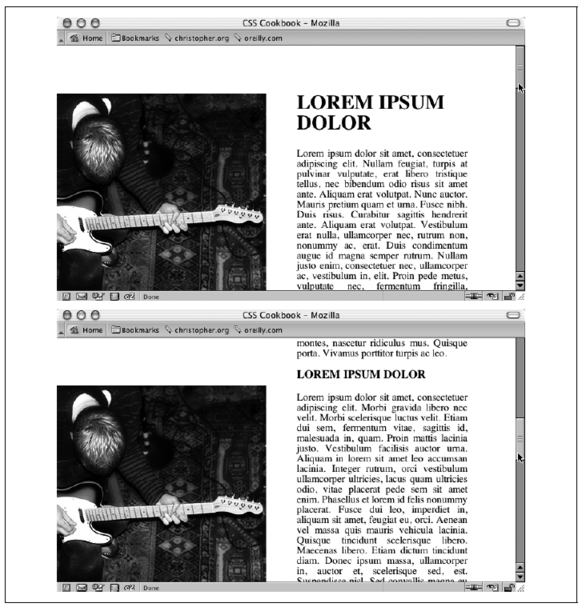
Figure: The photo stays in place when the user scrolls.
Things become more interesting when you fix background images for block elements other than body. Try this with headings for a film or concert review, for example. The following CSS rule can give readers an interesting browsing experience:
h1, h2, h3 {
 font-size: 200%;
 background-image: url(bkgd2.jpg);
 background-repeat: no-repeat;
 background-attachment: fixed;
 background-position: center;
 padding: 1.5em;
 text-align: center;
 color: white;
}
The padding and light color of the heading elements leave insufficient space to see the image through them while reading the headings. As the user scrolls through the review, the rest of the image becomes visible (see the next figure).
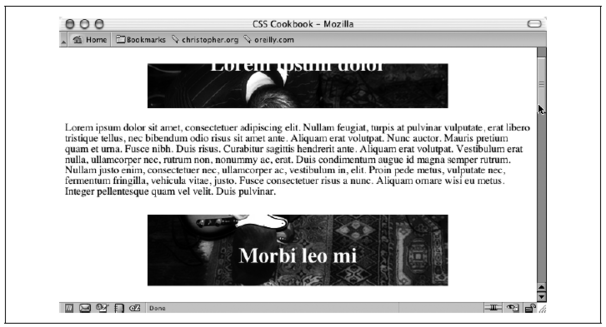
Figure: The photo shows through headings but not through the body element.
At the time this book went to press, fixed background images for block-level elements other than body, such as the headings used here, were supported only by Mozilla, Netscape 6+, Internet Explorer 7 and Safari. Internet Explorer 5.x and 6 for Windows repeat the background image in each heading.
See also
The recipe Positioning background images on positioning background images,
the recipe Fixing background images in Internet Explorer 6 for Windows for a hack that works around Internet Explorer for Windows’s lack of support for the value
background-fixed, andthe CSS 2.1 specification for the property
background-attachment.
Copyright of the German edition © 2007 by O’Reilly Verlag GmbH & Co. KG
You may print the online version for your private use.
Otherwise, this chapter from “CSS Kochbuch” is subject to the same conditions as the bound edition: the work, including all its parts, is protected by copyright. All rights reserved, including reproduction, translation, microfilming, and storage and processing in electronic systems.
O’Reilly Verlag GmbH & Co. KG, Balthasarstr. 81, 50670 Köln