

XML technologies / SVG / Filters, transformations and gradients / Using and combining filters and lighting effectively / Filters and masks / The feImage element
(Excerpt from “Das Einsteigerseminar SVG — Webgrafiken mit XML” by Helma Spona)
Many filter elements require more than one input image. Creating it from the filtered object is not always possible or appropriate, for example with the filter <feBlend>. The filter element <feImage> can reference any SVG element and supply it to other filter elements using the result attribute. Its single attribute, xlink:href, references an external file such as GIF or JPG, or a named element inside the SVG file. The following example illustrates this.
Note:
The graphic integrated into <feImage> is scaled to the size of the element receiving the filter.
The first filter uses an external GIF previously used for fill patterns. The <feBlend> element blends it with the rectangle. The second filter uses an SVG drawing element. Define that element in the <defs> section so it remains otherwise invisible.
Note:
Any other object can also be referenced. But if it is scaled or positioned with the transform attribute and the filtered element also uses a transform attribute, unwanted results may follow because the image referenced by <feImage> is transformed twice. This occurs in the example, so the object is defined without the transform attribute inside the <defs> tag and named with the id attribute.
The second filter applies to the red button; the first to the rectangle with text.
<defs>
  <g id="Bttn" >
    <desc>Der Button</desc>
    <circle cx="25" cy="25" r="25" style="stroke-width:1; stroke-opacity:0.8;stroke:rgb(222,0,0);fill-opacity:1;opacity:1;fill:url(#runderVerlauf)"/>
    <ellipse cx="25" cy="15" rx="20" ry="12" style="stroke-width:1;stroke:none;fill-opacity:1;opacity:1;fill:url(#linearerVerlauf)"/>
  </g>
  <filter id="externesBild" >
    <feImage xlink:href="kaefer.gif" result="kaefer"/>
    <feBlend in2="SourceGraphic" in="kaefer" mode="darken"/>
  </filter>
  <filter id="SVGObjekt" filterUnits="userSpaceOnUse" width="150" heigth="150">
    <feGaussianBlur in="SourceAlpha" stdDeviation="12 6" result="Schatten"/>
    <feImage xlink:href="#Bttn" result="Button"/>
    <feComposite in="Button" in2="Schatten" />
  </filter>
  <desc>Es folgen die Farbverläufe</desc>
  ...
</defs>
<g transform="translate(0,0)">
  <g transform="translate(20,20), scale(0.7)" style="filter:url(#SVGObjekt)">
    <desc>Der Button</desc>
    <circle cx="25" cy="25" r="25" style="stroke-width:1;stroke-opacity:0.8;stroke:rgb(222,0,0);fill-opacity:1;opacity:1;fill:url(#runderVerlauf)"/>
    <ellipse cx="25" cy="15" rx="20" ry="12" style="stroke-width:1;stroke:none;fill-opacity:1;opacity:1;fill:url(#linearerVerlauf)"/>
  </g>
  <g transform="translate(120,20)" style="filter:url(#externesBild)">
    <desc>Der Text mit Rechteck</desc>
    <rect x="0" y="0" width="150" height="75" style="fill:red;stroke:black;stroke-width:1;"/>
    <text id="iText" x="20" y="55" style="fill-opacity:1;font-family:Arial Black;font-size:46;stroke:black;fill:yellow">SVG</text>
  </g>
</g>
Different methods specify the referenced element in the xlink:href attribute. For an external graphic, supply its filename, for example with xlink:href="kaefer.gif". To use an element inside an SVG graphic, specify its name defined by the id attribute, prefixed by #.
Note:
In SVG, # means much the same as in HTML, where it introduces an anchor’s name. References to SVG elements inside the file serve a similar purpose to HTML anchors.
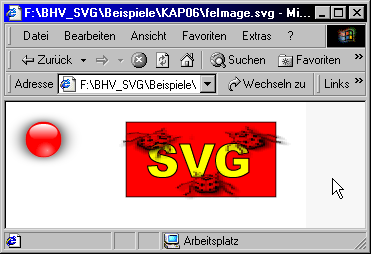
Figure: Result of the feImage filters.
Note:
Batik 1.0 apparently does not support the <feImage> element. Filters containing it are not applied and produce the placeholder for unsupported elements. In most cases, however, <feComposite> produces the same result and also works in Batik.
Note:
Unlike the SVG specification of November 20, 2000, the final SVG 1.0 specification will no longer support the <feImage> filter’s transform attribute. Avoid the transform attribute even though current SVG viewers implement it.
Copyright © verlag moderne industrie GmbH 2001
You may print the online version for your private use.
Otherwise, this chapter from “Das Einsteigerseminar SVG — Webgrafiken mit XML” is subject to the same conditions as the bound edition. The work, including all its parts, is protected by copyright. All rights reserved, including reproduction, translation, microfilming, and storage and processing in electronic systems.
verlag moderne industrie GmbH, Justus-von-Liebig-Straße 1, D-86899 Landsberg/Lech, fon ++49 (0) 81 91 / 125 – 0, leserservice(at)mi-verlag.de
back to top