

XML technologies / SVG / Filters, transformations and gradients / Using and combining filters and lighting effectively / Filters and masks / The feComponentTransfer filter element
(Excerpt from “Das Einsteigerseminar SVG — Webgrafiken mit XML” by Helma Spona)
The filter element <feComponentTransfer> changes individual color components or the alpha channel. Insert further child elements inside it. The element <feComponentTransfer> has no attributes of its own, but each child has many additional attributes and can also use the universal attributes. Its child elements are:
<feFuncR>changes the graphic’s red component.<feFuncG>changes the graphic’s green component.<feFuncB>changes the graphic’s blue component.<feFuncA>changes the graphic’s alpha channel.
All these elements have the following attributes:
typedetermines how the component is changed. Possible values areidentity,table,discrete,linearandgamma. They determine how color values are calculated.
Table: Color calculation for the different type values.
Value of | Color calculation formula | Description |
|---|---|---|
| C' = C | No change occurs because the new color C' equals the original color C. |
| k/N <= C < (k+1)/N => C' = vk + (C - k/N)*N * (vk+1 - vk) | With the value |
| k/N <= C < (k+1)/N => C' = vk | Here too, supply table values named |
| C' = | With the value |
| C' = | For type |
tableValuesspecifies the values used whentableordiscreteis the value oftype. List the values separated by spaces or commas. If omitted, an empty list is used, resulting in no change.slopespecifies, withtype="linear", the slope of the linear color calculation function. If omitted, the value1is used. The color is calculated with the formula:C' = slope * C + intercept.interceptspecifies the value of the variableinterceptin the linear formula. If omitted when usingtype="linear", the value0is used. It must lie between 0 and 1.amplitudespecifies the valueamplitudein the gamma function. If omitted, the default1is used.exponentspecifies the exponent in the gamma function. Here too,1is the default when omitted.offsetspecifies the valueoffsetin the gamma function.
<filter id="identity">
  <feComponentTransfer in="SourceGraphic">
    <feFuncR type="identity" />
    <feFuncG type="identity" />
    <feFuncB type="identity" />
    <feFuncA type="identity" />
  </feComponentTransfer>
</filter>
<filter id="table">
  <feComponentTransfer in="SourceGraphic">
    <feFuncR type="table" tableValues="0.3 -5 6" />
    <feFuncG type="table" tableValues="-0.3 5 -2" />
    <feFuncB type="table" tableValues="1 2.3" />
    <feFuncA type="identity" />
  </feComponentTransfer>
</filter>
<filter id="discrete">
  <feComponentTransfer in="SourceGraphic" >
    <feFuncR type="discrete" tableValues="0.3 -5 6"/>
    <feFuncG type="discrete" tableValues="0.3 -5 6"/>
    <feFuncB type="discrete" tableValues="0.3 -5 6"/>
    <feFuncA type="identity"/>
  </feComponentTransfer>
</filter>
<filter id="linear">
  <feComponentTransfer in="SourceGraphic" >
    <feFuncR type="linear" slope="-0.7" intercept="0.2"/>
    <feFuncG type="linear" slope="2" intercept="0.8"/>
    <feFuncB type="linear" slope="1.5" intercept="0.2"/>
    <feFuncA type="identity" />
  </feComponentTransfer>
</filter>
<filter id="gamma">
  <feComponentTransfer in="SourceGraphic" >
    <feFuncR type="gamma" amplitude="1" exponent="1.5" offset="-0.5"/>
    <feFuncG type="gamma" amplitude="3" exponent="2.5" offset="1" />
    <feFuncB type="gamma" amplitude="1" exponent="0.5" offset="0"/>
    <feFuncA type="identity"/>
  </feComponentTransfer>
</filter>
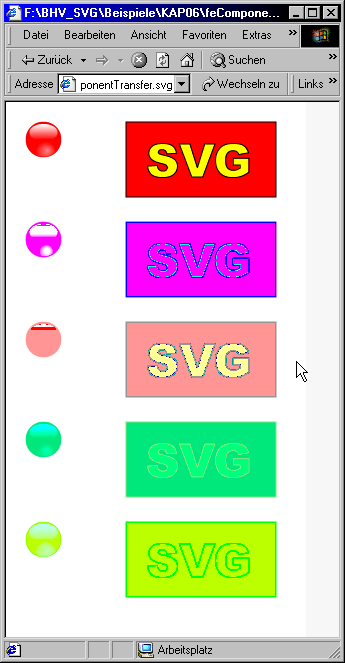
Figure: Result of the feComponentTransfer filter element.
Note:
Different methods can be chosen for the child elements’ type attribute.
Copyright © verlag moderne industrie GmbH 2001
You may print the online version for your private use.
Otherwise, this chapter from “Das Einsteigerseminar SVG — Webgrafiken mit XML” is subject to the same conditions as the bound edition. The work, including all its parts, is protected by copyright. All rights reserved, including reproduction, translation, microfilming, and storage and processing in electronic systems.
verlag moderne industrie GmbH, Justus-von-Liebig-Straße 1, D-86899 Landsberg/Lech, fon ++49 (0) 81 91 / 125 – 0, leserservice(at)mi-verlag.de
back to top