

XML technologies / SVG / Filters, transformations and gradients / Using and combining filters and lighting effectively / Filters and masks / The feColorMatrix effect
(Excerpt from “Das Einsteigerseminar SVG — Webgrafiken mit XML” by Helma Spona)
The filter element <feColorMatrix> changes an object’s colors using a matrix applied to every pixel. Besides the universal attributes it has these attributes:
typespecifies the adjustment type. Possible values arematrix,saturate,hueRotateandluminanceToAlpha. The typematrixuses a 5 x 4 matrix. Other settings use only part of this matrix to change particular color values.valuessupplies the matrix values; their form and number depend on the parametertype.
With type="matrix" supply for values 4 x 5 values separated by commas or spaces, corresponding to this matrix:
R' | a00 | a01 | a02 | a03 | a04 | R(ot) | ||||
G' | a10 | a11 | a12 | a13 | a14 | G(rün) | ||||
B' | = | a20 | a21 | a22 | a23 | a24 | * | B(lau) | ||
A' | a30 | a31 | a32 | a33 | a34 | A(lpha) | ||||
1 | 0 | 0 | 0 | 0 | 1 | 1 |
Supply the values as follows: values="a00 a01 a02 a03 a04 a10 a11 a12 ... a34". An example follows.
With operation type saturate supply one number between 0 and 1; percentages are forbidden. With type hueRotate supply one integer greater than 0. At 0 no change occurs. For type luminanceToAlpha omit the attribute because no values are needed.
Omitting the attribute values uses defaults depending on the attribute type. All defaults leave the image unchanged.
Note:
These settings generally make no sense for an alpha channel using the attribute in with the values SourceAlpha or BackgroundAlpha.
<filter id="matrix">
  <feColorMatrix in="SourceGraphic" type="matrix" values="1 1 1 0 0 0.5 0.5 0.5 0 0 1 1 1 0 0 1 1 1 0 0"/>
</filter>
<filter id="saturate">
  <feColorMatrix in="SourceGraphic" type="saturate" values="0.5"/>
</filter>
<filter id="hueRotate">
  <feColorMatrix in="SourceGraphic" type="hueRotate" values="178"/>
</filter>
<filter id="luminanceToAlpha">
  <feColorMatrix in="SourceGraphic" type="luminanceToAlpha"/>
</filter>
Applying the preceding settings successively to the example produces this output:
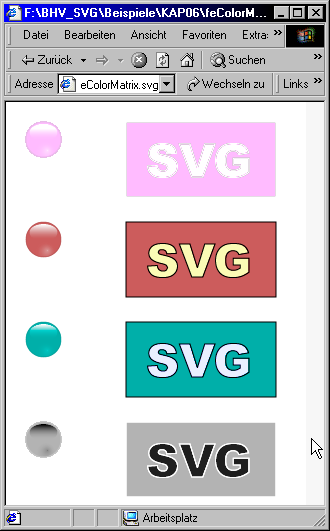
Figure: Effects of the different type and values settings.
To calculate matrix values for type="matrix", understanding the matrix helps. This refresher explains it for readers whose mathematics is rusty. As above, new colors are calculated using this matrix:
R' | a00 | a01 | a02 | a03 | a04 | R(ot) | ||||
G' | a10 | a11 | a12 | a13 | a14 | G(rün) | ||||
B' | = | a20 | a21 | a22 | a23 | a24 | * | B(lau) | ||
A' | a30 | a31 | a32 | a33 | a34 | A(lpha) | ||||
1 | 0 | 0 | 0 | 0 | 1 | 1 |
This shorthand says that the values R' through A' are calculated by multiplying the values R through A by a00 through a34. Results stand left of the equals sign; multiplication is indicated by * in the penultimate column. The figure shows the calculation pattern for the color R. Imagine writing current color values from R through A beneath the columns: R beneath the first and 1 beneath the last. Calculate R with this formula, for example:
R' = a00 * R + a01 * G + a02 * B + a03 * A + a04 * 1
The new green component is calculated as follows:
G' = a10 * R + a11 * G + a12 * B + a13 * A + a14 * 1
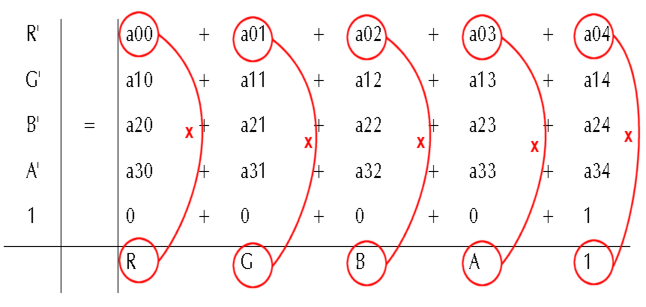
Figure: Calculating new color values.
The values a00 through a34 weight the individual color components. The final row (1) pads the matrix into a square 5x5 matrix, allowing inversion to recover original colors. For a 1:1 transformation, set all values except the diagonal entries a00, a11, a22 and a33 to 0 and set diagonal entries to 1.
R' | 1 | 0 | 0 | 0 | 0 | R(ot) | ||||
G' | 0 | 1 | 0 | 0 | 0 | G(rün) | ||||
B' | = | 0 | 0 | 1 | 0 | 0 | * | B(lau) | ||
A' | 0 | 0 | 0 | 1 | 0 | A(lpha) | ||||
1 | 0 | 0 | 0 | 0 | 1 | 1 |
This transformation leaves the graphic unchanged. Setting everything except the last column to 0 produces white or gray, depending on that column’s values.
Copyright © verlag moderne industrie GmbH 2001
You may print the online version for your private use.
Otherwise, this chapter from “Das Einsteigerseminar SVG — Webgrafiken mit XML” is subject to the same conditions as the bound edition. The work, including all its parts, is protected by copyright. All rights reserved, including reproduction, translation, microfilming, and storage and processing in electronic systems.
verlag moderne industrie GmbH, Justus-von-Liebig-Straße 1, D-86899 Landsberg/Lech, fon ++49 (0) 81 91 / 125 – 0, leserservice(at)mi-verlag.de
back to top