

XML technologies / SVG / Filters, transformations and gradients / Using and combining filters and lighting effectively / Filters and masks / The feComposite filter element
(Excerpt from “Das Einsteigerseminar SVG — Webgrafiken mit XML” by Helma Spona)
The element <feComposite> combines filter results, “adding” individual pixels from two images according to the chosen method. These attributes are available in addition to the universal attributes:
operatordetermines how pixels are combined. Available values areover,in,out,atop,xorandarithmetic. Witharithmetic, the result is calculated with the formulaErgebnis = k1*i1*i2 + k2*i1 + k3*i2 + k4. The valuesk1,k2,k3andk4are additional attributes you can set. The valuei1denotes the first image’s pixel, andi2the corresponding pixel in the second image.k1,k2,k3andk4are values required for calculation when selectingarithmeticfor the attributeoperator. Attributes omitted default to0.in2specifies the second image, with the same options as the universal attributein.
Using this element requires at least one additional element. Its result and the original image or its alpha channel can then be merged with the filter element <feComposite>. The following example shows the different operators’ results, applied here to the parent groups.
...
  <defs>
    <filter id="arithmetic">
      <feGaussianBlur in="SourceAlpha" stdDeviation="4" result="Schatten"/>
      <feComposite in="SourceGraphic" in2="Schatten" operator="in"/>
    </filter>
    <filter id="out">
      <feGaussianBlur in="SourceAlpha" stdDeviation="4" result="Schatten"/>
      <feOffset dx="+3" dy="+3" in="Schatten" result="Schatten"/>
      <feComposite in="SourceGraphic" in2="Schatten" operator="out"/>
    </filter>
    <filter id="atop">
      <feGaussianBlur in="SourceAlpha" stdDeviation="4" result="Schatten"/>
      <feOffset dx="+3" dy="+3" in="Schatten" result="Schatten"/>
      <feComposite in="SourceGraphic" in2="Schatten" operator="atop" />
    </filter>
    <filter id="xor">
      <feGaussianBlur in="SourceAlpha" stdDeviation="4" result="Schatten"/>
      <feOffset dx="+3" dy="+3" in="Schatten" result="Schatten"/>
      <feComposite in="SourceGraphic" in2="Schatten" operator="xor" />
    </filter>
    <desc>Es folgen die Farbverläufe</desc>
    ...
  </defs>
  <g transform="translate(0,0)" style="filter:url(#arithmetic)">
    <g transform="translate(20,20), scale(0.7)" >
      <desc>Der Button</desc>
      <circle cx="25" cy="25" r="25" style="stroke-width:1;stroke-opacity:0.8;stroke:rgb(222,0,0);fill-opacity:1;opacity:1;fill:url(#runderVerlauf)"/>
      <ellipse cx="25" cy="15" rx="20" ry="12" style="stroke-width:1;stroke:none;fill-opacity:1;opacity:1;fill:url(#linearerVerlauf)"/>
    </g>
    <g transform="translate(120,20)">
      <desc>Der Text mit Rechteck</desc>
      <rect x="0" y="0" width="150" height="75" style="fill:red;stroke:black;stroke-width:1"/>
      <text id="iText" x="20" y="55" style="fill-opacity:1;font-family:'Arial Black';font-size:46;stroke:black;fill:yellow">SVG</text>
    </g>
  </g>
...
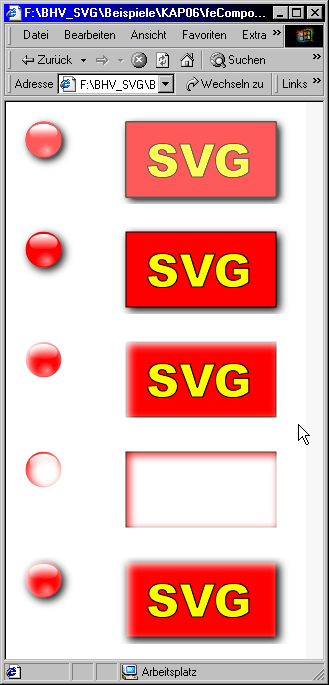
Figure: Filter results with arithmetic, over, in, out, atop and xor.
Copyright © verlag moderne industrie GmbH 2001
You may print the online version for your private use.
Otherwise, this chapter from “Das Einsteigerseminar SVG — Webgrafiken mit XML” is subject to the same conditions as the bound edition. The work, including all its parts, is protected by copyright. All rights reserved, including reproduction, translation, microfilming, and storage and processing in electronic systems.
verlag moderne industrie GmbH, Justus-von-Liebig-Straße 1, D-86899 Landsberg/Lech, fon ++49 (0) 81 91 / 125 – 0, leserservice(at)mi-verlag.de
back to top