

XML technologies / SVG / Creating simple SVG graphics / SVG tag syntax / The rect tag
(Excerpt from “Das Einsteigerseminar SVG — Webgrafiken mit XML” by Helma Spona)
The <rect> tag defines a rectangle. Besides the previously explained attributes id, width, height, x and y, it has the attributes rx and ry.
Note:
rx and ry abbreviate radius x and radius y. These will appear again when discussing curves and circles.
Both attributes matter only for rounded rectangle corners. They specify the radii of an imaginary ellipse determining how rounded the corners are. These attributes are optional: omitting them or setting them to 0 leaves the corners square.
The following figure shows two rectangles created with <rect>. In one, the attributes rx and ry are set to 8 to round the corners. In the other, both have the value 0.
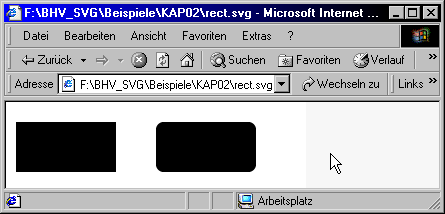
Figure: Rectangle with square and rounded corners.
<?xml version="1.0" standalone="no"?>
...
<svg width="300" height="300">
  <rect x="10" y="20" width="100" height="50" rx="0" ry="0"/>
  <rect x="150" y="20" width="100" height="50" rx="8" ry="8"/>
</svg>
Note:
There is no separate tag for squares. To create one, use the <rect> tag and set the attributes width and height to the same value.
Copyright © verlag moderne industrie GmbH 2001
You may print the online version for your private use.
Otherwise, this chapter from “Das Einsteigerseminar SVG — Webgrafiken mit XML” is subject to the same conditions as the bound edition. The work, including all its parts, is protected by copyright. All rights reserved, including reproduction, translation, microfilming, and storage and processing in electronic systems.
verlag moderne industrie GmbH, Justus-von-Liebig-Straße 1, D-86899 Landsberg/Lech, fon ++49 (0) 81 91 / 125 – 0, leserservice(at)mi-verlag.de
back to top