

XML technologies / SVG / Filters, transformations and gradients / Using and combining filters and lighting effectively / Filters and masks / The feGaussianBlur element
(Excerpt from “Das Einsteigerseminar SVG — Webgrafiken mit XML” by Helma Spona)
The filter element <feGaussianBlur> creates shadows and has already been used several times. The attribute stdDeviation needs further explanation: it controls how strongly the object is blurred and how soft its edge becomes. Pass one or two numeric values. A single value controls the blur on both axes. With two values, the first controls the x axis and the second the y axis.
The attribute in also strongly affects the shadow’s appearance. With SourceAlpha, a shadow is created from the alpha channel; with SourceGraphic, it is created from the entire object. Usually this filter must be combined with others: it creates only the shadow itself, not the original element with a shadow.
The next example first creates three shadows with the values in="SourceGraphic" and different values for the attribute stdDeviation. The first element uses the value 3 for both axes; the second uses 6 for the x axis and 0 for the y axis; the third reverses those settings.
<filter id="einfach">
  <feGaussianBlur stdDeviation="3"/>
</filter>
<filter id="schatten2">
  <feGaussianBlur in="SourceGraphic" stdDeviation="6 0"/>
</filter>
<filter id="schatten3">
  <feGaussianBlur in="SourceGraphic" stdDeviation="0 6"/>
</filter>
<filter id="schatten4">
  <feGaussianBlur in="SourceAlpha" stdDeviation="6"/>
</filter>
The last filter again uses equal values on both axes, but sets the attribute in to SourceAlpha.
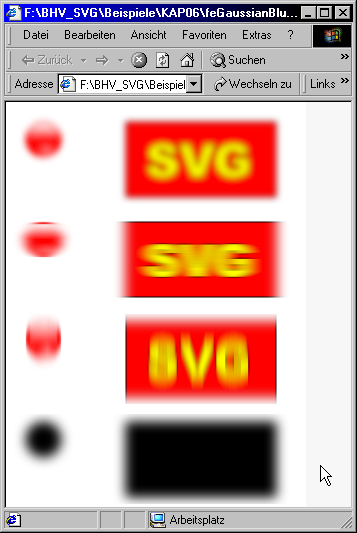
Figure: Results of the defined feGaussianBlur filters.
Copyright © verlag moderne industrie GmbH 2001
You may print the online version for your private use.
Otherwise, this chapter from “Das Einsteigerseminar SVG — Webgrafiken mit XML” is subject to the same conditions as the bound edition. The work, including all its parts, is protected by copyright. All rights reserved, including reproduction, translation, microfilming, and storage and processing in electronic systems.
verlag moderne industrie GmbH, Justus-von-Liebig-Straße 1, D-86899 Landsberg/Lech, fon ++49 (0) 81 91 / 125 – 0, leserservice(at)mi-verlag.de
back to top