

XML technologies / SVG / Creating simple SVG graphics / SVG tag syntax / The ellipse tag
(Excerpt from “Das Einsteigerseminar SVG — Webgrafiken mit XML” by Helma Spona)
The tag <ellipse> creates an ellipse rather than a circle, but can also create circles. For example, WebDraw uses the <ellipse> tag by default when drawing a circle. Besides the universal attributes id and style, the tag has the attributes cx, cy, rx and ry.
The attributes cx and cy specify the center, as for a circle. Since an ellipse can be taller than it is wide, it needs two different radius values, provided by the attributes rx and ry. The following figure illustrates the attributes’ meaning.
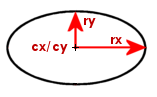
Figure: Meaning of the attributes defining the ellipse’s shape.
Note:
You can only create horizontal or vertical ellipses this way, not tilted ones. However, SVG provides the attribute transform to rotate elements.
Copyright © verlag moderne industrie GmbH 2001
You may print the online version for your private use.
Otherwise, this chapter from “Das Einsteigerseminar SVG — Webgrafiken mit XML” is subject to the same conditions as the bound edition. The work, including all its parts, is protected by copyright. All rights reserved, including reproduction, translation, microfilming, and storage and processing in electronic systems.
verlag moderne industrie GmbH, Justus-von-Liebig-Straße 1, D-86899 Landsberg/Lech, fon ++49 (0) 81 91 / 125 – 0, leserservice(at)mi-verlag.de
back to top