

XML technologies / SVG / Filters, transformations and gradients / Using and combining filters and lighting effectively / Filters and masks / The feBlend filter
(Excerpt from “Das Einsteigerseminar SVG — Webgrafiken mit XML” by Helma Spona)
The <feBlend> filter blends two objects in several ways. Its attributes are listed below, alongside the universal attributes.
modesets the blending method. Available values arenormal,multiply,screen,darkenandlighten. The default isnormal, used when omitted.in2specifies the second object. The first is set through the universal attributein.
Two formulas calculate the result: one for pixel opacity, one for color. The opacity qr always uses this formula:
qr = 1-(1-qa)*(1-qb)
Here, qa is the first image pixel’s opacity, and qb the second’s. Depending on the attribute mode, different formulas calculate color, as shown in the table:
Table: Settings of feBlend’s mode parameter.
Setting of | Formula |
|---|---|
| cr = (1-qa)*cb+ca |
| cr = (1-qa)*cb+(1-qb)*ca+ca*cb |
| cr = cb+ca-ca*cb |
| cr = Min((1-qa)*cb+ca, (1-qb)*ca+cb) |
| cr = Max((1-qa)*cb+ca, (1-qb)*ca+cb) |
Here, cr is the resulting color; ca is the first image pixel’s color, and cb the second’s color. The previous explanation applies to qb and qa.
Note:
This effect is useful only for objects with transparency. Fully opaque objects look no different from ordinary overlapping elements.
First add transparency to make the effect visible, for example setting the text’s property fill-opacity to 0.5. You also need two objects to blend. Shift the text a few pixels with the filter element <feOffset>.
<defs>
  <filter id="Blend">
    <feOffset dx="-3" dy="-3" in="SourceGraphic" result="rText"/>
    <feBlend mode="darken" in="SourceGraphic" in2="rText" />
  </filter>
  ...
</defs>
...
<g transform="translate(120,20)">
  <desc>Der Text mit Rechteck</desc>
  <rect x="0" y="0" width="150" height="75" style="fill:red;stroke:black;stroke-width:1"/>
  <text id="iText" x="20" y="55" style="filter:url(#Blend);fill-opacity:0.5; font-family:'Arial Black';font-size:46;stroke:black;fill:yellow">SVG</text>
</g>
The following figure shows three settings of the mode attribute: on the left mode="normal", in the middle mode="darken", and on the right mode="lighten".
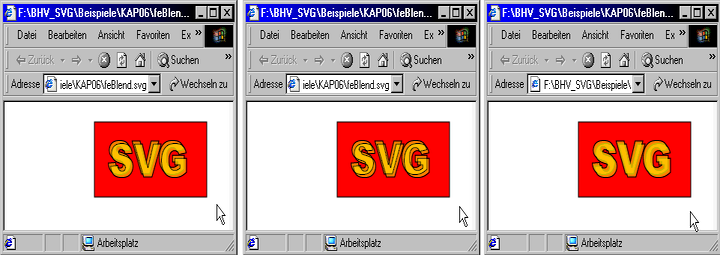
Figure: Three variants of the feBlend effect.
Copyright © verlag moderne industrie GmbH 2001
You may print the online version for your private use.
Otherwise, this chapter from “Das Einsteigerseminar SVG — Webgrafiken mit XML” is subject to the same conditions as the bound edition. The work, including all its parts, is protected by copyright. All rights reserved, including reproduction, translation, microfilming, and storage and processing in electronic systems.
verlag moderne industrie GmbH, Justus-von-Liebig-Straße 1, D-86899 Landsberg/Lech, fon ++49 (0) 81 91 / 125 – 0, leserservice(at)mi-verlag.de
back to top