

XML technologies / CSS / CSS Cookbook / Links and navigation / Contextual menus
(Excerpt from “CSS Kochbuch” by Christopher Schmitt)
Problem
A navigation menu created with the recipe Combining text-based navigation menus and rollover effects (see the following figure) should be modified to highlight the current page.
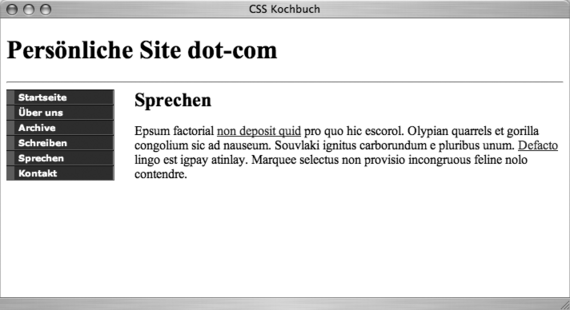
Figure: Navigation list without highlighting the current page.
Solution
Give the element body an attribute id:
<body id="pagespk">Also give the anchor elements their own attributes id:
<div id="navsite">
  <h5>Navigationsmenü:</h5>
  <ul>
    <li><a href="/" id="linkhom">Startseite</a></li>
    <li><a href="/about/" id="linkabt">Über uns</a></li>
    <li><a href="/archives/" id="linkarh">Archive</a></li>
    <li><a href="/writing/" id="linkwri">Schreiben</a></li>
    <li><a href="/speaking/" id="linkspk">Sprechen</a></li>
    <li><a href="/contact/" id="linkcnt">Kontakt</a></li>
  </ul>
</div>
To finish the menu, combine two ID selectors into a selector for descendant elements (see the next figure):
#pagespk a#linkspk {
 border-left: 10px solid #f33;
 border-right: 1px solid #f66;
 border-bottom: 1px solid #f33;
 background-color: #fcc;
 color: #333;
}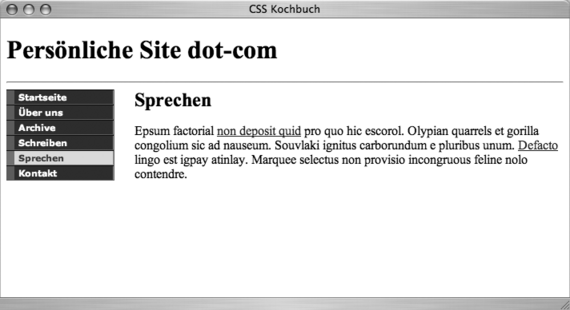
Figure: The current page’s link differs from the others.
Discussion
On a small website, highlight the current page by removing its link from the HTML:
<div id="navsite">
  <h5>Navigationsmenü:</h5>
  <ul>
    <li><a href="/"Startseite</a></li>
    <li><a href="/about/">Über uns</a></li>
    <li><a href="/archives/">Archive</a></li>
    <li><a href="/writing/">Schreiben</a></li>
    <li>Sprechen</li>
    <li><a href="/contact/">Kontakt</a></li>
  </ul>
</div>
On larger sites, possibly with submenus, manually removing link tags on every page increases production and maintenance time. With appropriate markup, links can instead be loaded through a Server Side Include. Adjust the CSS rules for navigation links as needed.
Combine CSS rules to address every link in the menu at once. Join the individual descendant selectors with commas and at least one space each:
#pagehom a#linkhom:link,
#pageabt a#linkabt:link,
#pagearh a#linkarh:link,
#pagewri a#linkwri:link,
#pagespk a#linkspk:link,
#pagecnt a#linkcnt:link {
 border-left: 10px solid #f33;
 border-right: 1px solid #f66;
 border-bottom: 1px solid #f33;
 background-color: #fcc;
 color: #333;
}
In each document, ensure that the element body has the correct attribute id. For example, the home page’s element body has the form <body id="pagehom">.
See also
The CSS 2.1 specification on descendant selectors.
Copyright of the German edition © 2007 by O’Reilly Verlag GmbH & Co. KG
You may print the online version for your private use.
Otherwise, this chapter from “CSS Kochbuch” is subject to the same conditions as the bound edition: the work, including all its parts, is protected by copyright. All rights reserved, including reproduction, translation, microfilming, and storage and processing in electronic systems.
O’Reilly Verlag GmbH & Co. KG, Balthasarstr. 81, 50670 Köln