

XML technologies / ePUB / ePub für (In)Designer / Book features / Adding metadata
(Excerpt from “ePub für (In)Designer — Mit InDesign Schritt für Schritt zum E-Book” by Sascha Heck & Yves Apel)
Metadata describes other data: photographs may record camera, aperture, lens and time. E-books need discoverable information too—description, summary, authors and content keywords—so buyers can find them.
In a bookstore, readers choose a department, then notice titles and covers. E-book buyers first search keywords. Plan metadata carefully: an undiscoverable book cannot sell. Metadata also lets search engines index ePub.
With an InDesign book file, enter metadata in its first document, usually the cover. Choose File → File Info. The dialog offers several fields, not all exported. Fill in Document Title, Author, Description, Keywords and Copyright Status. Only the first tab, Description, matters here. Others such as IPTC and Camera Data do not. The entry Document Title is especially important: most e-readers use it as a running title, for example iBooks, or beside the cover to identify the book.
During ePub export, add publisher and unique identifier, such as ISBN. Leaving Unique Identifier blank makes InDesign generate a number. In CS5.5, InDesign also generates Publication date from the export date. CS5 does not; add it to avoid validation problems and possible Apple Store rejection; see Validating the ePub file.
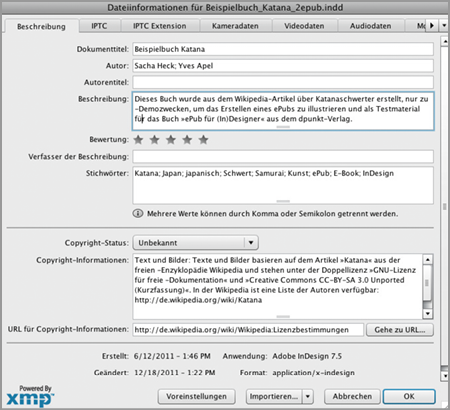
Figure: InDesign File → File Info.
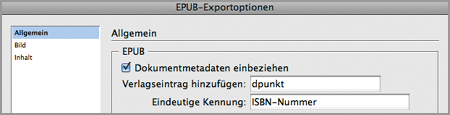
Figure: Enable Include Document Metadata during export
and optionally add publisher
and an identifier such as ISBN.
InDesign supports only some metadata. After export, add or edit more, discussed under Editing metadata.
Copyright © dpunkt.verlag GmbH 2012
You may print the online version for your private use.
Otherwise, this chapter from “ePub für (In)Designer” is subject to the same terms as the printed edition: the work and all its parts are protected by copyright. All rights reserved, including reproduction, translation, microfilming, and storage and processing in electronic systems.
dpunkt.verlag GmbH, Wieblinger Weg 17, 69123 Heidelberg, fon 06221-14830, fax 06221-148399, hallo(at)dpunkt.de
back to top