

XML technologies / ePUB / ePub für (In)Designer / Finishing tasks / Editing metadata
(Excerpt from “ePub für (In)Designer — Mit InDesign Schritt für Schritt zum E-Book” by Sascha Heck & Yves Apel)
Before ePub export, InDesign accepts the essential metadata every e-book should have. Many additional entries are possible.
With Sigil, open the ePub and access metadata through Tools → Meta Editor.
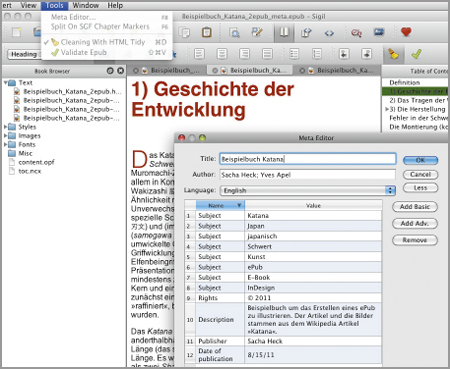
Figure: Sigil—Tools → Meta Editor.
The InDesign entries appear here. The buttons Add Basic and em>Add Adv. add many more. If the ePub came from InDesign CS5, also add Date of publication.
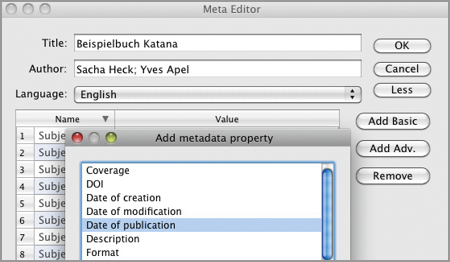
Figure: ePubs from CS5 need Date of publication added afterward.
Calibre also offers metadata editing. Add the ePub to its library, select it and click the large top button Edit Metadata to open the editing window.
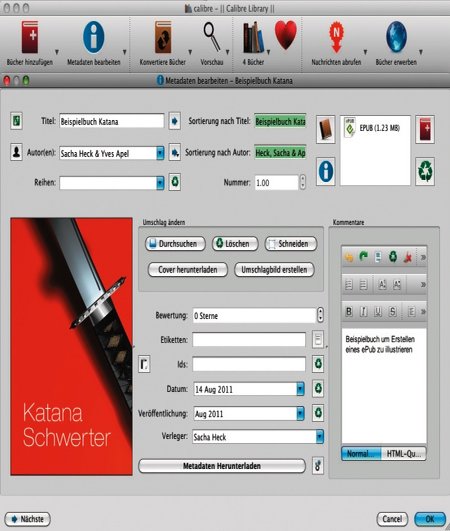
Figure: Editing metadata in Calibre.
Calibre also changes several books together. Select two or more and click Edit Metadata.
Editing content.opf
Another option is editing the content.opf file, which stores the metadata entered above. New Sigil versions edit the content.opf file directly, as do oXygen Author and BBEdit. The content.opf file contains metadata, manifest and reading order. Opening it in Sigil first shows metadata.
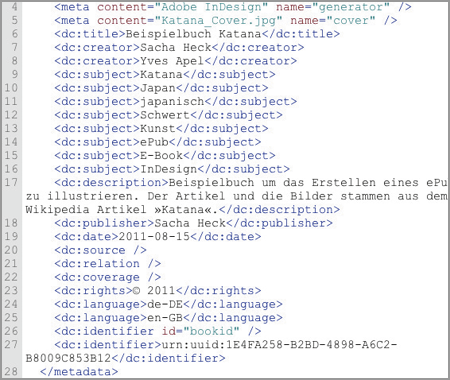
Figure: content.opf in Sigil.
These are your metadata, partly from InDesign, as the XML file’s first line shows. Editing requires precise syntax. The dc: tag prefix means “Dublin Core”. Dublin Core Metadata Initiative supplies descriptive terms to make online documents and objects discoverable. For more, visit the Dublin Core website. Most users, however, need only the metadata described above.
<metadata>
   <meta content="Adobe InDesign"name="generator"/>
   <meta content="Katana_Cover.jpg"name="cover"/>
   <dc:title>Beispielbuch Katana</dc:title>
   <dc:creator>Sacha Heck</dc:creator>
   <dc:creator>Yves Apel</dc:creator>
   <dc:subject>Katana</dc:subject>
   <dc:subject>Japan</dc:subject>
   <dc:subject>japanisch</dc:subject>
   <dc:subject>Schwert</dc:subject>
   <dc:subject>Kunst</dc:subject>
   <dc:subject>ePub</dc:subject>
   <dc:subject>E-Book</dc:subject>
   <dc:subject>InDesign</dc:subject>
   <dc:description>Beispielbuch, um das Erstellen eines ePub zu illustrieren. Der Artikel und die Bilder stammen aus dem Wikipedia Artikel »Katana«.</dc:description>
   <dc:publisher>Sacha Heck</dc:publisher>
   <dc:date>2011-08-15</dc:date>
   <dc:source />
   <dc:relation />
   <dc:coverage />
   <dc:rights>© 2011</dc:rights>
   <dc:language>de-DE</dc:language>
   <dc:language>en-GB</dc:language>
   <dc:identifier id="bookid"/>
   <dc:identifier>urn:uuid:1E4FA258-B2BD-4898-A6C2-B8009C853B12</dc:identifier>
</metadata>
Copyright © dpunkt.verlag GmbH 2012
You may print the online version for your private use.
Otherwise, this chapter from “ePub für (In)Designer” is subject to the same terms as the printed edition: the work and all its parts are protected by copyright. All rights reserved, including reproduction, translation, microfilming, and storage and processing in electronic systems.
dpunkt.verlag GmbH, Wieblinger Weg 17, 69123 Heidelberg, fon 06221-14830, fax 06221-148399, hallo(at)dpunkt.de