

XML technologies / CSS / CSS Cookbook / Links and navigation / Dynamic style definitions
(Excerpt from “CSS Kochbuch” by Christopher Schmitt)
Problem
An element’s style definitions should change when the user clicks a link.
Solution
First add ordinary links to the document markup. For this solution, links to anchors within the same document (fragment identifiers) were defined in an image map:
<img src="target_header.jpg" alt="Header" border="0" usemap="#Map" />
<map name="Map" id="Map">
  <area shape="circle" coords="115,136,72" href="#mark" />
  <area shape="circle" coords="244,145,55" href="#jessica" />
  <area shape="circle" coords="340,88,58" href="#trueman" />
  <area shape="circle" coords="480,287,79" href="#katrina" />
</map>
<div class="bios">
  <dl id="katrina">
    <dt>Katrina</dt>
    <dd>...</dd>
  </dl>
  <dl id="jessica">
    <dt>Jessica</dt>
    <dd>...</dd>
  </dl>
  <dl id="trueman">
    <dt>Trueman</dt>
    <dd>...</dd>
  <dl id="mark">
    <dt>Mark</dt>
    <dd>...</dd>
  </dl>
</div>
Then create the CSS rules for the web page’s default styles (see the next figure):
.bios dt {
 font-weight: bold;
}
.bios dd {
 margin: 0;
 padding: 0;
}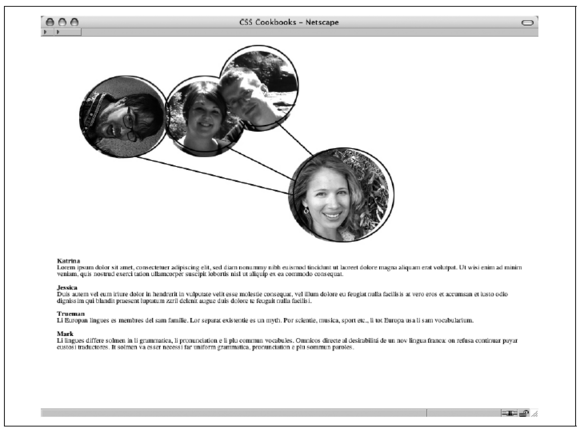
Figure: The web page’s default appearance.
Then use the pseudo-class :target to define the elements’ appearance when the user clicks one of the links (see the next figure):
.bios dl:target {
 background-color: #999999;
 border: 1px solid black;
 padding: 1em;
 font-weight: bold;
 line-height: 1.5;
}
.bios dl:target dt {
 font-style: italic;
 color: white;
 font-size: 1.5em;
 background-color: #cccccc;
 margin-right: 20px;
}
.bios dl:target dd {
 margin-right: 20px;
 background-color: #cccccc;
 padding: 0 1em 1em 1em;
}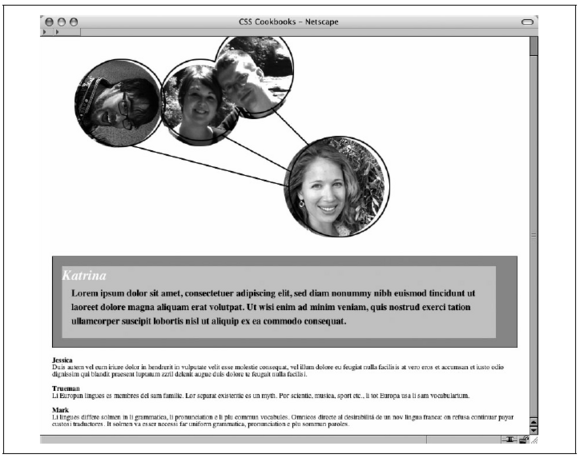
Figure: The style definitions for the part of the page about Katrina have changed.
To restore the element to its original state when the user clicks another link, use the negation pseudo-class :not (see the following figure):
.bios dl:not(:target) {
 border: none;
 padding: 0;
 font-size: .8em;
}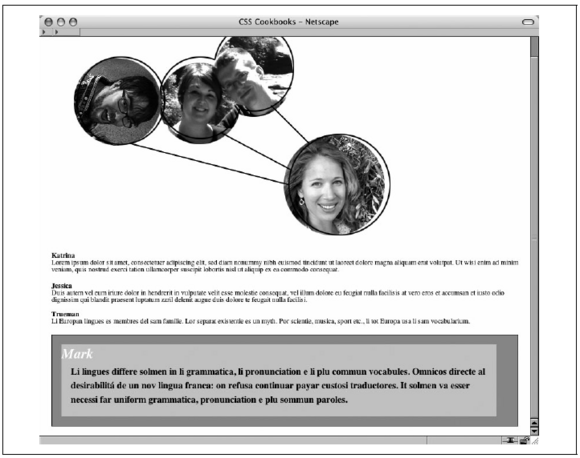
Figure: Clicking another link restores the default styles of the part of the page about Katrina.
Discussion
The pseudo-classes :target and :not are part of the CSS 3 specification and are therefore still unfamiliar to many web designers and browsers. These selectors can, however, make developers’ work much easier.
CSS-based expanding navigation menus without JavaScript
Using these selectors, the JavaScript-based solution in the recipe Expanding navigation menus can be replaced with a few additional CSS rules. To do so, add an anchor link to your markup:
<h5><a href="#menulink">Interessante Links</a></h5>
<ul id="menulink">
  <li><a href="http://www.ora.com/">O'Reilly</a></li>
  <li><a href="http://www.slashdot.org/">Slashdot</a></li>
  <li><a href="http://www.apple.com/">Apple</a></li>
  <li><a href="http://www.microsoft.com/">Microsoft</a></li>
  <li><a href="http://www.mozilla.org/">Mozilla</a></li>
</ul>
Now add the appropriate CSS rules:
/* Standarddarstellung */
ul#menulink {
 display: none;
}

/* nach dem Anklicken */
ul:target {
 display: block;
}

/* zurück zum Ausgangszustand */
ul:not(:target) {
 display: none;
}
The pseudo-class (and thus expanding navigation menus based entirely on CSS) is currently supported by Firefox, Mozilla, Safari and Internet Explorer 7 for Windows.
See also
The CSS 3 specification for the pseudo-class :target.
Copyright of the German edition © 2007 by O’Reilly Verlag GmbH & Co. KG
You may print the online version for your private use.
Otherwise, this chapter from “CSS Kochbuch” is subject to the same conditions as the bound edition: the work, including all its parts, is protected by copyright. All rights reserved, including reproduction, translation, microfilming, and storage and processing in electronic systems.
O’Reilly Verlag GmbH & Co. KG, Balthasarstr. 81, 50670 Köln