

XML technologies / SVG / Filters, transformations and gradients / Using and combining filters and lighting effectively / Universal attributes for filter elements
(Excerpt from “Das Einsteigerseminar SVG — Webgrafiken mit XML” by Helma Spona)
As with many SVG elements, elements within a <filter> tag have attributes available generally or almost throughout. These are called universal attributes and apply to almost all <fe...> tags.
Note:
Any exceptions to the following explanations are discussed for the respective filter element below.
The universal attributes for filter elements are:
x,y,widthandheighttogether define a subregion for the filter element. They always refer to the filter region’s coordinate system, defined withx,y,widthandheightin the<filter>tag. If omitted, their values arex="0%",y="0%",width="100%"andheight="100%".resultnames the stored filter result. This name must be unique among all elements in the<filter>tag and is needed for further processing. If omitted, the filter element’s result passes automatically to the next element unless that element uses theinattribute.inspecifies the filter element’s input. This may be one of the valuesSourceGraphic,SourceAlpha,BackgroundImage,BackgroundAlpha,FillPaint,StrokePaintor the value of aresultattribute of a preceding filter element. WithSourceGraphicthe object to which the filter applies is used. WithSourceAlphathe object’s shape filled with black is used, its alpha mask. WithBackgroundImagethe background image is the input; withBackgroundAlphaits alpha mask is used. The valueFillPaintcreates the shadow using the object’s fill, whileStrokePaintuses its outline’s fill. However, the shadow shows the rectangular area occupied by the object, not its outline. If omitted, the default depends on the filter element’s position within the<filter>tag. For the first filter element, the original graphic,SourceGraphic, is used. Otherwise the preceding filter element’s result is used.
The following example illustrates this. First apply the shadow from the previous example to the alpha channel of the button and text, using this code:
<filter id="AlphaSchatten" >
  <feGaussianBlur in="SourceAlpha" stdDeviation="3"/>
</filter>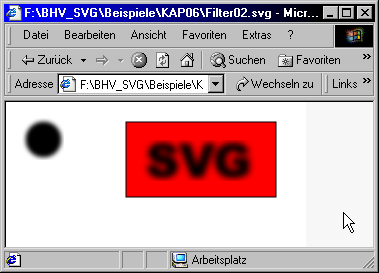
Figure: Result of the SourceAlpha value for the in parameter.
If instead the filter assigned to the text uses the value fillPaint for the attribute in, the following listing produces this result:
<filter id="StrokeSchatten">
  <feGaussianBlur in="FillPaint" stdDeviation="3"/>
</filter>
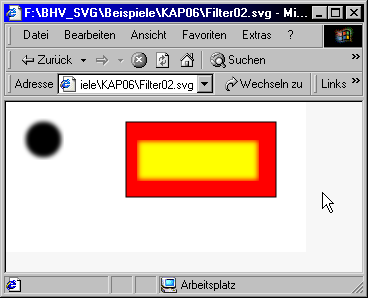
Figure: SourceAlpha is used as input on the left, FillPaint on the right.
Copyright © verlag moderne industrie GmbH 2001
You may print the online version for your private use.
Otherwise, this chapter from “Das Einsteigerseminar SVG — Webgrafiken mit XML” is subject to the same conditions as the bound edition. The work, including all its parts, is protected by copyright. All rights reserved, including reproduction, translation, microfilming, and storage and processing in electronic systems.
verlag moderne industrie GmbH, Justus-von-Liebig-Straße 1, D-86899 Landsberg/Lech, fon ++49 (0) 81 91 / 125 – 0, leserservice(at)mi-verlag.de
back to top