

XML technologies / CSS / CSS Cookbook / Page layouts / Single-column layouts
(Excerpt from “CSS Kochbuch” by Christopher Schmitt)
Problem
You want to create a layout with one main column, as shown in the following figure.
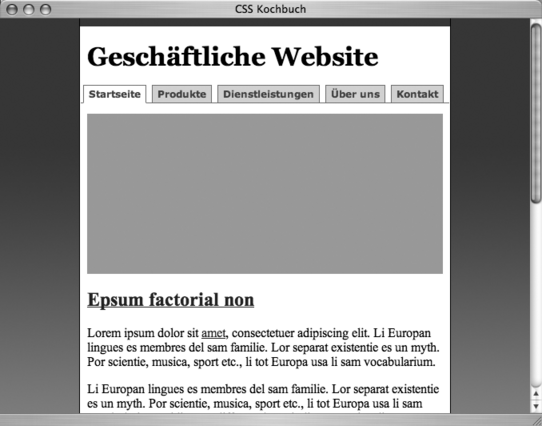
Figure: A single-column page layout.
Solution
Give the left and right margins of the element body percentage values:
body {
 margin-left: 15%;
 margin-right: 15%;
}
Discussion
Percentage left and right margins on the document body keep the column width flexible, allowing content to span the width of the user’s browser window.
For a fixed-width column, define the property width for the element body with an absolute length, such as pixels:
body {
 width: 600px;
}
This places the column on the window’s left side. To center it, enclose all content in an element div with a unique attribute id, for example frame:
<div id="frame">
 [...]
</div>
In the CSS rule, assign the left padding of the element body a value of 50%:
body {
 width: 600px;
 padding-left: 50%;
}
Use an ID selector to assign the column a negative value equal to half its width. Make sure the column has the same width as the element body.
#frame {
 /* Spaltenbreite festlegen */
 width: 600px;
 margin-left: -300px;
}
You may think the same result can be achieved by setting both left and right margins to auto:
#frame {
 width: 600px;
 margin-left: auto;
 margin-right: auto;
}
Unfortunately, this otherwise good, straightforward approach fails in Internet Explorer for Windows. This solution therefore uses a workaround compatible with most common browsers.
See also
The recipe Centering elements on a web page for centering elements in a web document, and the recipe Horizontal navigation menus for creating a horizontal tabbed navigation menu.
Copyright of the German edition © 2007 by O’Reilly Verlag GmbH & Co. KG
You may print the online version for your private use.
Otherwise, this chapter from “CSS Kochbuch” is subject to the same conditions as the bound edition: the work, including all its parts, is protected by copyright. All rights reserved, including reproduction, translation, microfilming, and storage and processing in electronic systems.
O’Reilly Verlag GmbH & Co. KG, Balthasarstr. 81, 50670 Köln