

XML technologies / CSS / Advanced websites with CSS / Text effects and cascading / Decorative text
(Excerpt from “CSS − Advanced websites with Cascading Stylesheets” by Rachel Andrew & Dan Shafer)
The property text-decoration offers four decorative values:
underlinefor underlined textoverlinefor overlined textblinkfor blinking textline-throughfor struck-through text
There is also the default value none, producing normal undecorated text.
We will skip blinking text. When Netscape introduced the nonstandard HTML tag <blink>, most designers and users rejected it. Blinking text now means poor, amateurish design, and many current browsers do not support the CSS value.
Underlining, though still supported by many browsers, is also a poor design choice. Users recognize links by their default underlines, so underlining other text causes confusion.
Overlines can help create a boundary matching text width. Unlike a border, they do not include a box’s padding. The next figure compares overline and border, followed by their HTML.
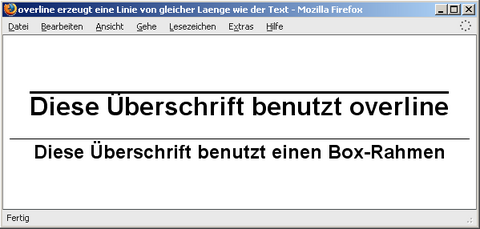
Figure: overline draws a line matching text length.
<!DOCTYPE html PUBLIC "-//W3C//DTD XHTML 1.0 Strict//EN" "http://www.w3.org/TR/xhtml11/DTD/xhtml1-strict.dtd">
<html xmlns="http://www.w3.org/1999/xhtml">
<head>
  <title>overline erzeugt eine Linie von gleicher Laenge wie der Text</title>
  <meta http-equiv="Content-Type" content="text/html; charset=iso-8859-1" />
  <style type="text/css">
    body {
      background-color: #FFFFFF;
      font-family: helvetica, arial, sans-serif;
    }
    h1 {
      margin-top: 70px;
      text-align: center;
      text-decoration: overline;
    }
    h2 {
      text-align: center;
      border-top: 1px solid black;
    }
  </style>
</head>
<body>
  <h1>Diese Überschrift benutzt overline</h1>
  <h2>Diese Überschrift benutzt einen Box-Rahmen</h2>
</body>
</html>
The first heading uses the property text-decoration with the value overline. Only text is overlined. The second heading’s border spans the page because it marks the top of the box for the block element h1.
A line between text elements could also use the HTML tag <hr>. Though its width and alignment are controllable, prefer overline: the line always matches its text length, whatever the page width or font size.
The fourth value of text-decoration is line-through, producing struck-through text. HTML also offers the semantic tag <del>, useful for editing HTML. For purely visual strikethrough, use CSS instead. The next figure and HTML demonstrate line-through.
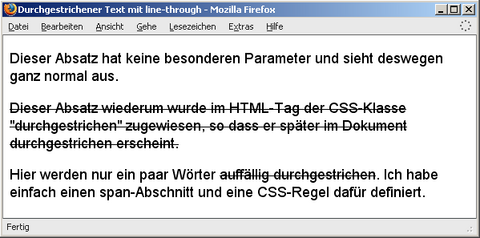
Figure: Struck-through text with line-through.
<!DOCTYPE html PUBLIC "-//W3C//DTD XHTML 1.0 Strict//EN" "http://www.w3.org/TR/xhtml11/DTD/xhtml1-strict.dtd">
<html xmlns="http://www.w3.org/1999/xhtml">
<head>
  <title>Durchgestrichener Text mit line-through</title>
  <meta http-equiv="Content-Type" content="text/html; charset=iso-8859-1" />
  <style type="text/css">
    body {
      background-color: #FFFFFF;
      font-family: helvetica, arial, sans-serif;
      font-size: 1.1em;
    }
    .durchgestrichen {
      text-decoration: line-through;
    }
  </style>
</head>
<body>
  <p>Dieser Absatz hat keine besonderen Parameter und sieht deswegen ganz normal aus.</p>
  <p class="durchgestrichen">Dieser Absatz wiederum wurde im HTML-Tag der CSS-Klasse "durchgestrichen" zugewiesen, so dass er später im Dokument durchgestrichen erscheint.</p>
  <p>Hier werden nur ein paar Wörter <span class="durchgestrichen">auffällig durchgestrichen</span>. Ich habe einfach einen span-Abschnitt und eine CSS-Regel dafür definiert.</p>
</body>
</html>
The del element
This HTML element indicates deleted text during editing and exists in the specification for that purpose. Browsers render it struck through.
Mark up deleted text with del to preserve semantics. For other reasons, use an element div or span with a CSS rule.
The element del goes hand in hand with the element ins, which marks inserted text.
Finally, consider the value none of the property text-decoration. It is rarely needed, since text has no decoration by default. Sometimes it helps remove link underlines or prevent inheritance of text decorations by child elements.
Copyright © 2006 of the German translation, dpunkt.verlag GmbH
You may print the online version for your private use.
Otherwise, this chapter from “CSS − Anspruchsvolle Websites mit Cascading Stylesheets” is subject to the same conditions as the bound edition: the work, including all its parts, is protected by copyright. All rights reserved, including reproduction, translation, microfilming, and storage and processing in electronic systems.
dpunkt.verlag GmbH, Ringstraße 19, 69115 Heidelberg
back to top