

XML technologies / CSS / Advanced websites with CSS / Text effects and cascading / Horizontal and vertical spacing / The properties letter-spacing and word-spacing
(Excerpt from “CSS − Advanced websites with Cascading Stylesheets” by Rachel Andrew & Dan Shafer)
The property letter-spacing defines character spacing, also called the font’s tracking. CSS accepts relative and absolute values, with a default of normal. The next figure clearly demonstrates the effect of letter-spacing.
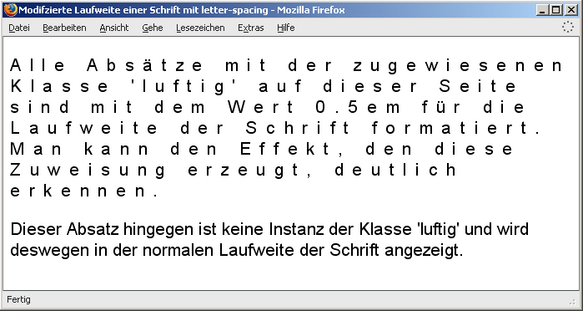
Figure: Modified tracking with letter-spacing.
This HTML produces the page shown:
<!DOCTYPE html PUBLIC "-//W3C//DTD XHTML 1.0 Strict//EN" "http://www.w3.org/TR/xhtml11/DTD/xhtml1-strict.dtd">
<html xmlns="http://www.w3.org/1999/xhtml">
<head>
  <title>Modifzierte Laufweite einer Schrift mit letter-spacing</title>
  <meta http-equiv="Content-Type" content="text/html; charset=iso-8859-1" />
  <style type="text/css">
    body {
      background-color: #FFFFFF;
      font-family: helvetica, arial, sans-serif;
    }
    p {
      font-size: 16pt;
    }
    .luftig {
      letter-spacing: 0.5em;
    }
  </style>
</head>
<body>
  <p class="luftig">Alle Absätze mit der zugewiesenen Klasse 'luftig' auf dieser Seite sind mit dem Wert 0.5em für die Laufweite der Schrift formatiert. Man kann den Effekt, den diese Zuweisung erzeugt, deutlich erkennen.</p>
  <p>Dieser Absatz hingegen ist keine Instanz der Klasse 'luftig' und wird deswegen in der normalen Laufweite der Schrift angezeigt.</p>
</body>
</html>
The property letter-spacing increases both letter and word spacing. Browsers treat words as letter groups separated by spaces, so tracking affects these gaps too.
The property letter-spacing also accepts negative values to tighten tracking. This helps with headings whose letters, particularly in font families sans-serif and monospace, are spaced too far apart by default. The next figure compares two headings. The first has no explicit letter-spacing. Gaps around “i”, “l” and “t” are especially large. The second uses a negative value for letter-spacing to make the text more compact.
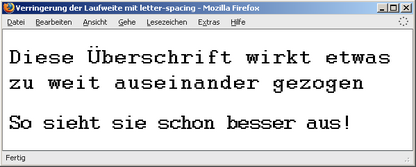
Figure: Tightening tracking with letter-spacing.
Here is the HTML. Note the class zusammengerueckt assigned to the second heading h1.
<!DOCTYPE html PUBLIC "-//W3C//DTD XHTML 1.0 Strict//EN" "http://www.w3.org/TR/xhtml11/DTD/xhtml1-strict.dtd">
<html xmlns="http://www.w3.org/1999/xhtml">
<head>
  <title>Verringerung der Laufweite mit letter-spacing</title>
  <meta http-equiv="Content-Type" content="text/html; charset=iso-8859-1" />
  <style type="text/css">
    body {
      background-color: #FFFFFF;
      font-family: helvetica, arial, sans-serif;
    }
    h1 {
      font-family: Courier, "Courier New", monospace;
    }
    .zusammengerueckt {
      letter-spacing: -0.08em;
    }
  </style>
</head>
<body>
  <h1>Diese Überschrift wirkt etwas zu weit auseinander gezogen</h1>
  <h1 class="zusammengerueckt">So sieht sie schon besser aus!</h1>
</body>
</html>
Only a slight reduction achieves the desired effect. To develop a feel for tracking, experiment with letter-spacing across fonts and sizes. This powerful property can easily enhance a design and create interesting graphic effects.
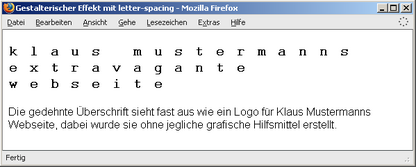
Figure: Graphic effect with letter-spacing.
This heading’s graphic effect comes solely from changing tracking, without an image editor.
Here is the page’s source:
<!DOCTYPE html PUBLIC "-//W3C//DTD XHTML 1.0 Strict//EN" "http://www.w3.org/TR/xhtml11/DTD/xhtml1-strict.dtd">
<html xmlns="http://www.w3.org/1999/xhtml">
<head>
  <title>Gestalterischer Effekt mit letter-spacing</title>
  <meta http-equiv="Content-Type" content="text/html; charset=iso-8859-1" />
  <style type="text/css">
    body {
      background-color: #FFFFFF;
      font-family: helvetica, arial, sans-serif;
    }
    .seitentitel {
      font-family: Courier, 'Courier New', monospace;
      font-size: 18pt;
      letter-spacing: 0.7em;
      text-transform: lowercase;
    }
  </style>
</head>
<body>
  <h2 class="seitentitel">Klaus Mustermanns extravagante Webseite</h2>
  <p>Die gedehnte Überschrift sieht fast aus wie ein Logo für Klaus Mustermanns Webseite, dabei wurde sie ohne jegliche grafische Hilfsmittel erstellt.</p>
</body>
</html>
The property word-spacing adjusts only word spacing, but is not recommended for two reasons:
First, not all major browsers support it. Internet Explorer before version 6 for Windows or 5 for Macintosh does not support word-spacing, nor does Netscape Navigator before version 6. IE 5 for Macintosh renders it incorrectly and can overlap words. Only the newest Internet Explorer for Windows, Netscape Navigator, Opera and Mozilla versions handle word-spacing correctly, despite its presence in the W3C specification since CSS1.
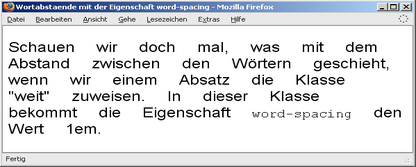
Figure: Word spacing with word-spacing.
Second, combining word-spacing with text-align: justify can cause unpredictable layout effects in any browser. Never use them together.
The figure above shows word-spacing with the value 1em in a longer sentence. Its HTML follows:
<!DOCTYPE html PUBLIC "-//W3C//DTD XHTML 1.0 Strict//EN" "http://www.w3.org/TR/xhtml11/DTD/xhtml1-strict.dtd">
<html xmlns="http://www.w3.org/1999/xhtml">
<head>
  <title>Wortabstaende mit der Eigenschaft word-spacing</title>
  <meta http-equiv="Content-Type" content="text/html; charset=iso-8859-1" />
  <style type="text/css">
    body {
      background-color: #FFFFFF;
      font-family: helvetica, arial, sans-serif;
    }
    .weit {
      word-spacing: 1em;
      font-size: 1.5em;
    }
  </style>
</head>
<body>
  <p class="weit">Schauen wir doch mal, was mit dem Abstand zwischen den Wörtern geschieht, wenn wir einem Absatz die Klasse "weit" zuweisen. In dieser Klasse bekommt die Eigenschaft <code>word-spacing</code> den Wert 1em.</p>
</body>
</html>
Copyright © 2006 of the German translation, dpunkt.verlag GmbH
You may print the online version for your private use.
Otherwise, this chapter from “CSS − Anspruchsvolle Websites mit Cascading Stylesheets” is subject to the same conditions as the bound edition: the work, including all its parts, is protected by copyright. All rights reserved, including reproduction, translation, microfilming, and storage and processing in electronic systems.
dpunkt.verlag GmbH, Ringstraße 19, 69115 Heidelberg
back to top