

XML technologies / CSS / Advanced websites with CSS / Text effects and cascading / Styling hyperlinks
(Excerpt from “CSS − Advanced websites with Cascading Stylesheets” by Rachel Andrew & Dan Shafer)
Hyperlinks are interactive text used for navigation within and between pages. With JavaScript, they can also open dialogs or secondary windows and perform many other tasks.
There are two basic approaches to styling links. CSS can give them a static appearance like ordinary text, ignoring their four states. Alternatively, use those states: CSS provides four pseudo-classes for anchor states, each with its own style (see the table). (Note: CSS also permits :hover and :active on elements other than links. Another pseudo-class, :focus, is unsupported by Internet Explorer for Windows and therefore rarely used.)
Links default to blue underlined text, inheriting font family and size from surrounding text. Different fonts, sizes or colors can distinguish them, particularly in long link lists.
Table: Four anchor pseudo-classes.
Pseudo-class | Link state |
|---|---|
| Not yet clicked |
| Already clicked |
| Pointer over the link |
| While being clicked |
All familiar CSS text properties apply to links. Here we assign a link to the class hyperlink, with a special font and color combination:
<a class="hyperlink" href="irgendwo">Hier klicken</a>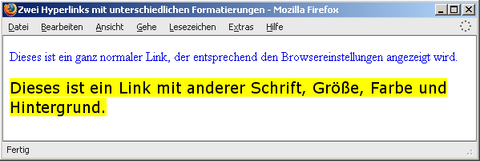
Figure: Two differently styled links.
The upper link is ordinary blue text in the default font, with underlining disabled in the browser. The lower link belongs to class hyperlink, defining font family, size, background and text colors.
Pseudo-classes define a different style for each link state, as in this typical example:
a:link {
  color: darkgreen;
  background-color: transparent;
}
a:visited {
  color: lightgreen;
  background-color: transparent;
}
a:hover {
  color: green;
  background-color: black;
}
a:active {
  color: black;
  background-color: green;
}
Keep this order when styling states. Later rules can override earlier ones. If you define a:hover before a:link and a:visited, the values of a:hover will not apply. A hovered link is also either visited or unvisited, so :hover is overridden by the later rules for :link or :visited. The mnemonic “love-hate” helps remember the order: :link, :visited, :hover and finally :active.
Two pseudo-classes can be combined. This rule defines a special color for the state :hover of visited links:
a:visited:hover {
  color: blue;
  background-color: transparent;
}
This rule removes underlining in all four states:
a {
  text-decoration: none;
}
Do not remove underlines unless links remain obvious, or they become hard to distinguish from text. This does not apply to clearly styled CSS navigation links replacing images.
Copyright © 2006 of the German translation, dpunkt.verlag GmbH
You may print the online version for your private use.
Otherwise, this chapter from “CSS − Anspruchsvolle Websites mit Cascading Stylesheets” is subject to the same conditions as the bound edition: the work, including all its parts, is protected by copyright. All rights reserved, including reproduction, translation, microfilming, and storage and processing in electronic systems.
dpunkt.verlag GmbH, Ringstraße 19, 69115 Heidelberg
back to top