

XML technologies / CSS / Advanced websites with CSS / Text effects and cascading / The element span explained
(Excerpt from “CSS − Advanced websites with Cascading Stylesheets” by Rachel Andrew & Dan Shafer)
Sometimes it is important to emphasize the significance of particular text within a paragraph or heading through its design. Simply changing the font, color or font size in the middle of a paragraph is enough. Obviously, you cannot define a new paragraph for this without ruining your layout.
In such cases, simply enclose the desired text in tags <span> and apply an ordinary style rule to it. span is thus similar to the element div, which is also used to mark up individual areas on a page. Unlike the block element div, however, span is an inline element and can therefore be used directly within running text.
The element span is extremely useful for assigning special font properties or other unusual text formatting. The next figure shows an example in which the designer wanted to emphasize a sentence within a paragraph and chose a background color and a different font.
<!DOCTYPE html PUBLIC "-//W3C//DTD XHTML 1.0 Strict//EN" http://www.w3.org/TR/xhtml1/DTD/xhtml1-strict.dtd">
<html xmlns="http://www.w3.org/1999/xhtml">
<head>
<title>Demonstration des <span> Elements</title>
<meta http-equiv="Content-Type" content="text/html; charset=iso-8859-1" />
<style type="text/css">
.change {
background-color: yellow;
color: maroon;
font-weight: bold;
}
</style>
</head>
<body>
<p>Das ist ganz normaler Fließtext, aber genau an dieser Stelle hat die Designerin beschlossen, das Aussehen des Textes zu ändern. <span class="change">Sie benutzt dazu das <code>span</code>-Element und eine Stilregel, die diesen Satz hervorhebt.</span></p>
</body>
</html>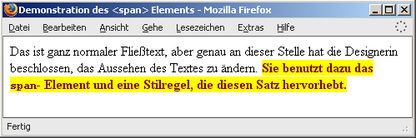
Figure: Emphasizing a sentence within running text with span.
We will encounter the tag <span> several more times in this chapter. It is ideal for marking up selected parts of running text and formatting them with CSS properties. However, if your HTML already contains another tag to which you could assign a style rule to achieve the desired effect, use that existing tag instead of adding an extra element span.
In the example above, we used the tag <code> to indicate that the word span is a code fragment. The browser normally displays text between these tags in a monospace font. CSS lets us change this default as we wish. To display text in bold or italics, we could have used an element strong or em and assigned it a CSS rule.
Copyright © 2006 of the German translation, dpunkt.verlag GmbH
You may print the online version for your private use.
Otherwise, this chapter from “CSS − Anspruchsvolle Websites mit Cascading Stylesheets” is subject to the same conditions as the bound edition: the work, including all its parts, is protected by copyright. All rights reserved, including reproduction, translation, microfilming, and storage and processing in electronic systems.
dpunkt.verlag GmbH, Ringstraße 19, 69115 Heidelberg
back to top